3.3.3 Info Tool
As models grow, the management of design elements becomes
critical. For this task MetaEdit+ contains an Info Tool that can be opened on
any element in the repository. The Info Tool provides information about the
usage of the current design element in different projects, graphs, or
representations of graphs.
An Info Tool can be opened in many ways. In a browser or
Graph Manager the Info Tool can be opened from the element’s pop-up menu.
In Property dialogs the Info Tool for the object can be opened from the
Info... button (
Figure 3-32,
bottom right). In an editor, the Info Tool for the Graph can be opened from the
Graph | Graph Info... menu item. An Info Tool can also be opened from
another Info Tool from one of its list’s pop-up menus. If an Info Tool is
opened from a dialog, it will itself be a dialog, and thus other windows cannot
be accessed while it is open. If it is opened from a normal window, it will
itself be a normal window, allowing you to switch between it and other
windows.
Two types of Info Tools are available depending whether
the design element is a graph or not. Graphs have their own Info Tool that shows
more information specific to graphs, as illustrated in
Figure 3-38.
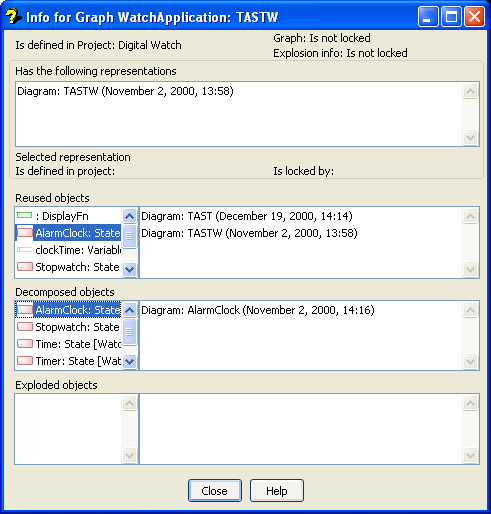
Figure 3-38. Info Tool for graphs.
The Info Tool for graphs
provides the following information:
 | The
project that the graph belongs to. In the example figure the graph called
‘TASTW’ belongs to the ‘Digital Watch’
project. |
| Locking
information. In the example figure the graph ‘TASTW’ is currently
not locked by
anyone. |
| The
representations that the graph has. In the example figure the graph
‘TASTW’ has only one diagram representation, made on November 2nd
2000. |
| The
elements of this graph that are also represented (re-used) in other graphs.
According to the example figure ‘AlarmClock’ is also used in graph
‘TAST’. |
| The
objects in this graph which have decompositions, and the existing
representations of those decomposition graphs. In the figure, the graph
‘TASTW’ includes five decomposed objects. Because
‘AlarmClock’ is selected, the Info Tool also shows the
representations of the target graph for the decomposition: a diagram called
‘AlarmClock’. |
| The
objects which have explosions in this graph, and the existing representations of
those explosion graphs. In the figure, the graph ‘TASTW’ does not
include any exploded objects. |
Each element in an
Info Tool has its own pop-up menu for further inspections of the properties of
that element or for opening another Info Tool on that element.
Design elements other than graphs (such as objects,
relationships, and roles) have their own Info Tool, illustrated in
Figure 3-39 below.
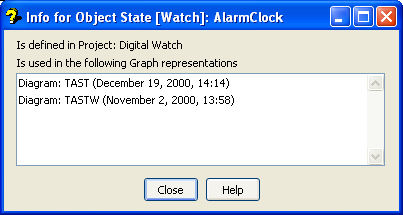
Figure 3-39. Info Tool for objects etc.
This Info Tool
shows:
| The
project that the element belongs to. In the figure the state called
‘AlarmClock’ belongs to the ‘Digital Watch’
project. |
| The
graph representations where the element is used. In the figure
‘AlarmClock’ is used in the diagram representations of two
graphs. |


