2.1.7 Subgraphs tab
The Subgraphs tab contains lists where the possible
subgraphs of types in this graph type can be defined. The top half of the tab
defines decompositions, whereas the bottom half defines explosions.
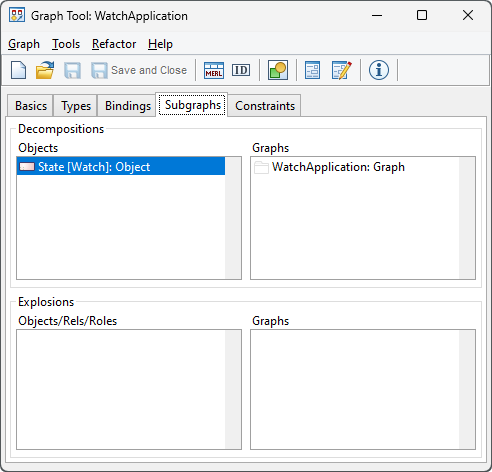
Figure 2–6. Subgraphs tab.
Decompositions
The Decompositions group is at the top of the tab. The
left-hand list shows all the object types of the modeling language for which a
decomposition has been defined. You can add object types to that list from its
pop-up menu. When one of the types is selected, the right hand list shows the
graph types to which that type can decompose. New decompositions can be added
and old ones deleted for the selected type by selecting the appropriate item
from the right hand list’s pop-up menu. The Add... menu item
presents a list of all available graph types, from which one or several can be
selected. Note that selecting a Graph type also allows instances of subtypes of
that Graph type to be targets of decomposition links. In some exceptional
circumstances it may be desirable to specify the supertype of all graph types,
Graph: you can do this by selecting Add... with shift held down, and
Graph will then be included in the list of types to select from. There are also
menu commands for editing the type selected on the left or its symbol.
All decomposition
structures are
defined in Graph Tool and they are always dependent both on the object type and
graph type. On the instance level, however, things work a little differently: a
given instance State always decomposes to the same graph, wherever it is. Thus
the type level defines where it is legal to
create new decomposition
structures: existing decomposition links are part of the object, and can be
followed anywhere.
A typical decomposition structure can be found from
WatchApplication diagrams, in which a State can decompose into a new
WatchApplication model. Note that on the instance level only one decomposition
is allowed for an object, and applied in all graphs containing that object. On
the type level, each object type in a graph type can have several possible graph
types that it could legally decompose to.
Explosions
The Explosions group works in the same way as the
decompositions definition, but the source of the explosion can be an object,
relationship or role type. Explosion forms another way to connect elements of a
graph to other graphs. The difference from decomposition is that explosion
creates a simpler link between an element and a graph whereas decomposition is
more often used for a stronger containment. Unlike decomposition, explosion
allows users to make links from a design element to several graphs, and
different links for the same element used in different graphs, whereas an object
can have only one decomposition, which is the same wherever that object is
used.
Basically, the explosion structure allows a user to select
one instance from a graph and link that to a new graph. An instance can have
many explosions in a single graph, and a different set of explosions in each
graph where it is used. Similarly, the same graph can be used as the target of
multiple instances in multiple graphs. Explosion is often used between graphs of
different types. A typical example of explosion can be found from UML, in which
a class in a Class Diagram can be exploded into a State Transition Diagram to
describe the behavior of the
object.


