2.1.6 Bindings tab
To specify how the relationships, roles, ports and objects are
connected to each other select the
Bindings tab
in
the Graph Tool. A window opens showing how the components of the Graph type are
bound together. The tool interface is similar to the Types tab, but it shows the
bindings of the modeling language, each binding
showing a
possible way of connecting certai
n object types with
role types and relationship types, possibly via ports.
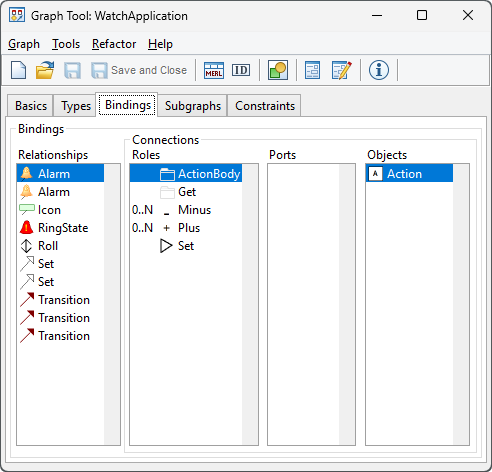
Figure 2–4. Specifying bindings.
A binding consists
of a relationship
type and a number of connections
(usually two for a binary relationship). Each connection consists of a role type
and a list of object types that may participate in the relationship in that
role. The binding is defined by first adding a relationship type to the
relationships list, selecting that relationship and adding role types for it,
then selecting each of the role types and adding the object types that can take
part in this relationship in that role.
If the use of ports
is required they
can be placed between the role and object. There are two kinds of ports, static
and dynamic, and MetaEdit+ will prompt for the kind of port when you are adding
one. There are semantic differences between static and dynamic ports that
determine which one to choose for a specific purpose and how to use
them:
 | Static
ports are used when all instances of a given Object type have the same ports:
they are part of the Object type’s symbol, not the Object instance. Static
ports are instances of subtypes of the real Port metatype. Choosing a port
instance requires that specific instance to be in the symbol of the object type;
choosing a port type requires any instance of that type. In either case, when
creating an instance binding in an editor, the user must attach the role to a
matching port in the
object. |
| Dynamic
ports are used when each instance of a given Object type can have different
ports: they are fetched by a specified path from the Object instance. Dynamic
ports are instances of Object types, not Port types. The host Object’s
symbol has a template symbol element that defines how the Object instances are
fetched as dynamic ports, how they are distributed visually and how they provide
the connectable areas for roles to connect
to. |
If no bindings are defined, the default
behavior is that no relationships can be created, as there is no way of knowing
which role types should be associated with which relationship types. Thus we
must define bindings that allow all the relationship-role-object type
combinations we want, without allowing any combinations that should be illegal.
Note that it is possible to define multiple bindings for each relationship type,
and similarly role types and object types may participate in as many bindings as
you wish, including being in multiple connections within the same binding. Types
may also participate in several different graph types, with different bindings
in each.
The members of a binding are selected from the available
types currently in that graph type, defined in the Types tab (Section
2.1.5), plus their supertypes. In some
exceptional circumstances it may be desirable to specify the supertype of all
object types, Object: you can do this by selecting
Add... with shift held
down, and Object will then be included in the list of types to select from.
When creating a relationship in a Diagram Editor, the user
can supply type information by choosing a specific type in the type toolbar.
Normally, the type from the type toolbar (i.e. that defined in the Types tab)
will be specified exactly in a binding in the Bindings tab, but it is also
possible that the binding contains a type that inherits from the chosen type, or
vice versa. As the selection in the Diagram Editor and the binding in the Graph
type will both supply their own relationship type information, the more specific
of the two will determine the type of the relationship instance that is created.
Note that roles are always created to be instances of the exact type specified
in the bindings.
In the Bindings tab the four lists are chained together,
so that a binding is selected by selecting its relationship type in the
relationship list. This then changes the contents of the other lists to show the
connections in that binding: the role types and object types in them. We can
then select a role type, and that will show us the object types that can
participate in that role in that binding, along with their
ports.
Connection order
The order of the role types
is important
for each relationship type, because a user preference allows MetaEdit+’s
tools to assume when drawing relationships that the object for the first role is
always selected first, that for the second role is selected second etc. Hence
you should try to select as the first role type in each binding the type which
is most likely to be at the ‘starting’ end of the relationship. You
can change the order of role types by dragging them within the list. Holding
down Shift while dragging will create a new copy of the selected
connection.
You can also choose Move... from the pop-up menu
related to the role types:
| 1) | Select
first the role type to be moved.
|
| 2) | Choose
Move... from the menu.
|
| 3) | Choose
the right place for the role type from the list that
opens. |
Connection cardinalities
The role list shows cardinalities for each connection in a
binding. The cardinality
is a range with minimum and
maximum values and it defines how many times this connection with its role type
and object types can appear in a single binding. An example of cardinality is
the Child role in the Family relationship in Family Tree diagrams: as there can
be zero to many children in a family, the cardinality for this role should be
0..N.
Cardinalities are set in the Cardinality
Dialog
, which is shown in
Figure 2–5 below.
To set cardinalities:
| 1) | Select
the role type for which to add a cardinality
constraint. |
| 2) | Choose
Cardinality... from the pop-up menu.
|
| 3) | Enter
minimum and maximum cardinality values and press
OK. |
The values can be from 0 to
infinite, which is entered and shown as an N. If no cardinality is defined, the
default is one for minimum and one for maximum, i.e. an obligatory role that can
occur only once. If the upper limit is infinite set the maximum to N. You can of
course also add the same role twice in the same binding; in general using
cardinalities is a better way.
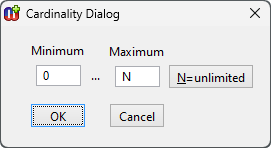
Figure 2–5. Cardinality Dialog.


