1.1.2 Properties and non-properties
The concepts of GOPPRR can be divided into two categories:
properties and non-properties.
Figure
1–2 illustrates the division. Graph, Object, Port, Role and
Relationship can all have properties. In MetaEdit+ these properties are created,
edited and viewed through property dialogs. The property
dialogs
work similarly in all tools of MetaEdit+: to test
a property dialog open it by selecting
Properties... from any
non-property pop-up menu.
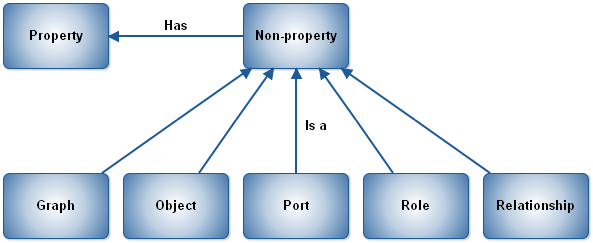
Figure 1–2. Properties and non-properties.
Data type
The property has two additional characteristics: it has a data
type
and its values can be shared to other similar
properties. Data types of the properties include (see Section
2.6.3 for more details):
 | String
(e.g. name of a
state) |
| Text
(e.g. documentation
field) |
| Number
(e.g. thread of execution of
message) |
| Boolean
(e.g. primary
key?) |
| Creation
Timestamp (the time the property was created – essentially the
creation time of the non-property the property belongs
to) |
| Collection
of items (e.g. attributes of a
class) |
| Non-property
(e.g. an attribute in an attribute list of a class may itself be an
object). |
Property types of data type String
can further specify which widget is used in property dialogs for inputting their
values. The widget type is one of the following (see Section
2.6.4 for more details):
| Input
Field: a normal one-line text entry field (the
default). |
| External
Element: a one-line text entry field, whose values are intended to refer to
external resources like file names or URLs. These external files can be opened
with the Execute command from the widget’s pop-up
menu. |
| Editable
List: a pull-down list of values: the user can also type a value which is
not in the list. Such new values are added to the list for this property type in
this
project. |
| Overridable
List: a pull-down list of values: the user can also type a value which is
not in the
list. |
| Fixed
List: a pull-down list of values: only values in the list are allowed.
|
| SOAP
Fixed List: a pull-down list of values that has been fetched from an
external source via a SOAP
call. |
| Radio
Button Set: a list of values that will appear as a set of radio
buttons. |
| UUID
Base64: a Universally Unique Identifier with an initial value of a
near-guaranteed globally unique sequence of Base64 characters.
|
| UUID
Hex: a Universally Unique Identifier with an initial value of a
near-guaranteed globally unique hexadecimal value in RFC 4122 canonical
representation. |
For the list and radio button
widgets, the list of possible values is specified in the property
type.
For collection data types, the property type must also
specify the type of the contents, which can be either a simple string or a
non-property type. Similarly property types with non-property data type must
specify which non-property they may contain. In this way complex property types
can be built up. An example of a complex property can be found from object type
Class in object-oriented modeling languages because it has a collection
of attributes and methods as properties and each attribute or method itself is
an object, and as such can have one or more properties. In principle these new
properties could be again complex ones and therefore they could have their own
properties and so on. MetaEdit+ does not limit the number of complex properties
or their depth in any way: you can even have cyclic
structures.


