3.3 The Code Generator
The basic idea of the code generator within a DSM environment
is simple: it crawls through the models, extracts information from them and
translates it as the code for the target platform. With the models capturing all
static and dynamic logical aspects and a framework providing the required
low-level support, the code generator can produce completely functional and
executable output code.
The MetaEdit+ generator used to produce the code also
provides a flexible tool to automate integration of the DSM environment with
other tools. An example of this kind of integration within the watch example is
the auto-build mechanism that enables us to automatically compile the generated
code, load it into the IDE and execute it. This automation results in major
savings of both the effort and time during the testing.
In the watch example, the auto-build proceeds with the
following steps:
| 1) |
The scripts and project files for compiling and executing the code are
generated. As the mechanism of automated compilation and execution varies
between the platforms, the number and content of generated script files depend
on the target
platform. |
| 2) |
The code for framework components is generated. All framework code has
been included into the watch models and generated from there as needed. This way
we ensure that all required components are available at the time of compilation
and have the control over the inclusion of platform specific
components. |
| 3) |
The code for logical watches and watch applications is generated. The
state machines are implemented by creating a data structure that defines each
state transition and display function. For each action the code generator
creates a set of commands that are executed when the action is
invoked. |
| 4) |
The generated code is compiled and executed as a test environment on the
target platform. Basically this step requires only the execution of the scripts
created during the first step. |
How then
has the code generator been implemented? As we have seen before, the code
generators in MetaEdit+ are defined with a dedicated MERL generator definition
language. Each generator is associated with a certain graph type, and thus can
operate on models made according to that specific graph type. These generators
can be arranged in a hierarchical fashion with generators calling
sub-generators.
For a better understanding of the generator architecture
and how the actual code is generated, let us walk through the code generation of
WatchApplication state machines. We will use Java as an example language this
time, but everything explained here applies equally well to C# – except
for the syntactical differences between Java and C#, of course.
The generator hierarchy for the Java of a watch’s
behavior is shown in
Figure 3-3. This
generator modularization remains the same for both Java and C#, and there are
even a few subgenerators that are employed by both of them (like
‘_TransitionData’ or ‘_Decompositions’). Where a
language-specific subgenerator is needed, the C# version is named with a prefix
of ‘_Cs’: ‘_Cs_variables’, ‘_Cs_Actions’,
etc. Java generators mostly have no prefix, but a few begin with
‘_Java’.
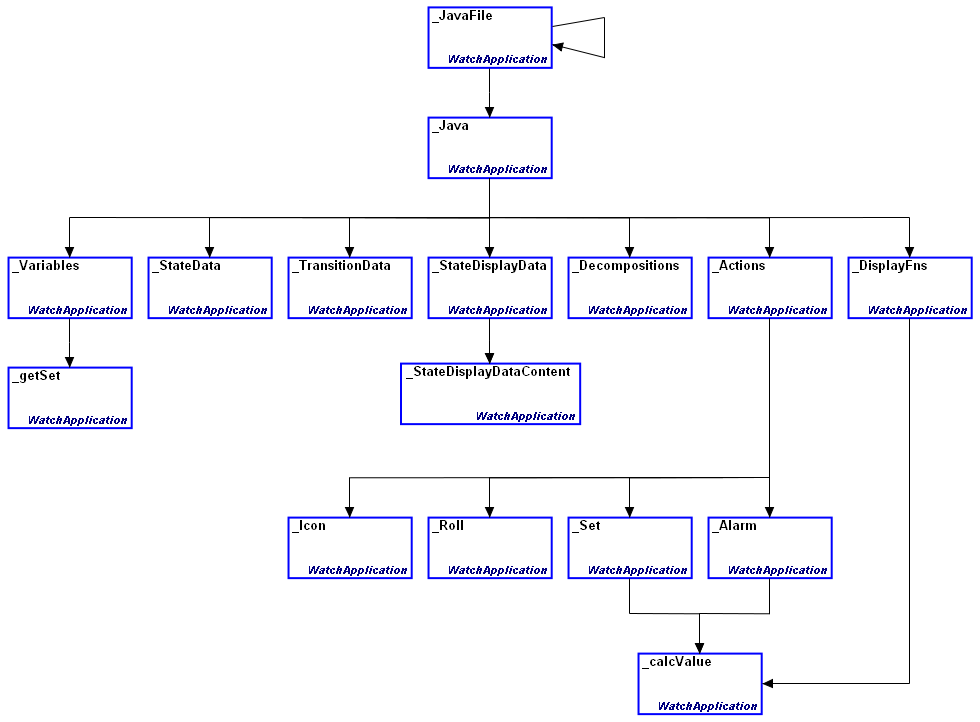
Figure 3-3. The watch code generator architecture, part 1
In
order to see which part of the generator is responsible for what, let us explore
the Java code in Listing 1 (generated by running the ‘Java state
machine’ generator for ‘Stopwatch’) line by line:
01 package com.metacase.watch.generated;
02
03 import com.metacase.watch.framework.*;
04
05 public class Stopwatch extends AbstractWatchApplication {
06   static final int a22_3324 = 1;
07   static final int a22_3621 = 2;
08   static final int a22_4857 = 3;
09   static final int d22_4302 = 4;
10   static final int d22_5403 = 5;
11
12   public METime startTime = new METime();
13   public METime stopTime = new METime();
14
15   public METime getstartTime() {
16     return startTime;
17   }
18   public void setstartTime(METime t1) {
19     startTime = t1;
20   }
21   public METime getstopTime() {
22     return stopTime;
23   }
24   public void setstopTime(METime t1) {
25     stopTime = t1;
26   }
27
28   public Stopwatch(Master master) {
29     super(master, "22_1039");
30     addStateOop("Start [Watch]", "22_4743");
31     addStateOop("Running", "22_2650");
32     addStateOop("Stopped", "22_5338");
33     addStateOop("Stop [Watch]", "22_4800");
34
35     addTransition ("Stopped", "Down", a22_3324, "Stopped");
36     addTransition ("Running", "Up", a22_4857, "Stopped");
37     addTransition ("Stopped", "Up", a22_3621, "Running");
38     addTransition ("Stopped", "Mode", 0, "Stop [Watch]");
39     addTransition ("Running", "Mode", 0, "Stop [Watch]");
40     addTransition ("Start [Watch]", "", 0, "Stopped");
41
42     addStateDisplay("Running", -1, METime.SECOND, d22_5403);
43     addStateDisplay("Stopped", -1, METime.SECOND, d22_4302);
44   };
45
46   public Object perform(int methodId)
47   {
48     switch (methodId) {
49       case a22_3324:
50         setstopTime(getstartTime().meMinus(getstartTime()));
51         return null;
52       case a22_3621:
53         setstartTime(getsysTime().meMinus(getstopTime()));
54         iconOn("stopwatch");
55         return null;
56       case a22_4857:
57         setstopTime(getsysTime().meMinus(getstartTime()));
58         iconOff("stopwatch");
59         return null;
60       case d22_4302:
61         return getstopTime();
62       case d22_5403:
63         return getsysTime().meMinus(getstartTime());
64     }
65     return null;
66   }
67 }
Listing 1. The generated code for the Stopwatch application
In
the beginning, the top-level ‘_Java’ generator takes care of the
usual headers and imports (lines 1-3), and derives a new concrete watch
application class from the AbstractWatchApplication class (line 5). From here
on, the responsibility for the generated code is distributed among the
‘_Variables’, ‘_StateData’,
‘_TransitionData’, ‘_Decompositions’,
‘_StateDisplayData’, ‘_Actions’ and
‘_DisplayFns’ sub-generators.
The ‘_Variables’ and ‘_getSet’
sub-generators are responsible for declaring the identifiers for actions and
display functions to be used later within the switch-case structure (lines
6–10). They also define the variables used (lines 12–13) and the
implementations of their accessing methods (lines 15–26). A short return
back to the ‘_Java’ sub-generator produces the lines 28-29, followed
by the state (lines 30–33) and state transition definitions (lines
35–40) generated by the ‘_StateData’ and
‘_TransitionData’ sub-generators. The
‘_StateDisplayData’ and ‘_StateDisplayDataContent’
sub-generators then provide the display function definitions (lines 42–43)
while the basic method definition and opening of the switch statement in the
slines 44–48 again come from the ‘_Java’
sub-generator.
The generation of the code for the actions triggered
during the state transitions (lines 49–59) is a good example of how to
creatively integrate the code generator and the modeling language. On the
modeling language level, each action is modeled with a relationship type of its
own. When the code for them is generated, the ‘_Actions’
sub-generator first provides the master structure for each action definition and
then executes the sub-generator bearing the same name as the current action
relationship (either ‘_Icon’, ‘_Roll’,
‘_Alarm’ or ‘_Set’). This implementation not only
reduces the generator complexity but also provides a flexible way to extend the
watch modeling language later if new kinds of actions are needed.
Finally, the ‘_DisplayFns’ and
‘_calcValue’ sub-generators produce the calculations required by the
display functions (lines 60–63). The ‘_calcValue’ –
which is also used by the ‘_Alarm’ and ‘_Set’
sub-generators – provides the basic template for all arithmetic operations
within the code generator. The final lines 64-67 are again provided by the
‘_Action’ subgenerator.
The generation of a logical watch proceeds in the same
way. As there are typically no actions related to the state transitions within a
logical watch, they are left out of the generated code as well. Moreover, in
order to support the references to the lower-level state machines (i.e. to the
watch applications the logical watch is composed of), the definitions of these
decomposition structures must be generated. This is taken care of by the
‘_Decompositions’ sub-generator. To enable the invocation of these
lower-level state machines a recursive structure was implemented in the
‘_JavaFile’ sub-generator. During the generation, when a reference
to a lower-level state machine is encountered, the ‘_JavaFile’
sub-generator will dive to that level and call itself from there.
‘_JavaFile’ will also take care of outputting each state machine
implementation into a file of its own.
As we can see, there is no magic within the code
generator, just a carefully designed modularization of the solution and
integration with the modeling language and domain framework. In general, the
rule is to try to keep generation as simple as possible: if anything appears
difficult, consider raising it up into the modeling language, or pushing it down
into the domain framework code.
Although they are the core of the generator, the
subgenerators responsible for the generation of the WatchApplication state
machine implementation are not enough on their own. A complete and executable
application still requires a good chunk of additional code like UI definitions
and make or project files depending on the target platform and language. Hence
we have established another hierarchy of generators (shown in
Figure 3-4) on top of the WatchApplication
generation to provide these additional bits and pieces (again, C# versions of
subgenerators add the ‘_Cs’ prefix or replace _’Java’
with it in their names).
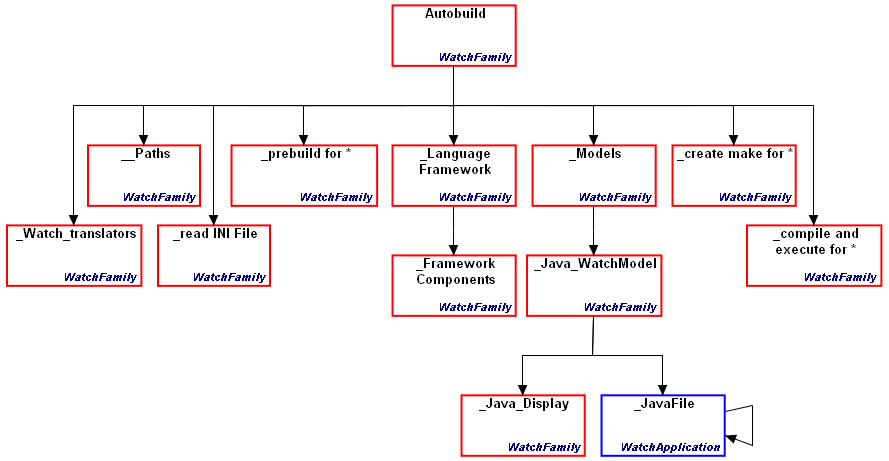
Figure 3-4. The watch code generator architecture, part 2
The
starting point for the generation is the generator called
‘Autobuild’. The role of ‘Autobuild’ is similar to that
of the ‘Build’ or ‘Run’ button in an IDE: it initiates
the whole generation process, compiles the generated code, and runs the
resulting application. These tasks are actually handled in sub-generators, with
Autobuild itself containing little else other than the calls to the
sub-generators. The sub-generators on the next level relate closely to those
steps of the auto-build process presented earlier in this chapter. The
generators at this level are as follows:
 | ‘_Watch_translators’
sets the translation shortcuts used in
subgenerators. |
| ‘__Paths’
defines the default locations for various add-ons like Java Development Kit
etc. |
| ‘_read
INI file’ reads and parses the plug-in
.ini
file |
| ‘_prebuild
for *’ generators carry out required initializations for various
generation
targets |
| ‘_Language
Framework’ and subsequent generator ‘_Framework Components’
output the pre-defined code for the components of the selected
framework |
| ‘_compile
and execute *’ generators only execute scripts produced during the earlier
steps of the generation
process |
| ‘_create
make for *’ generators create the scripts for compiling and executing the
generated
code |
| ‘_Models’
is the starting point for the generation of the actual watch
applications |
While most of these are
reasonably simple and straightforward, the last two subgenerators,
‘_create make for *’ and ‘_Models’, need to be explored
more thoroughly. The basic task of the ‘_create make for *’
sub-generators is to create the executable scripts that will take care of the
compilation and execution of the generated code. As this procedure varies
between platforms, there is an individual version of this sub-generator for each
supported target platform. If there are any specific platform-related generation
needs, they can be integrated with the ‘_create make for *’
sub-generator. More information about C# and Java specific versions of
‘_create make for *’ can be found in Sections
4.1 ‘
Code generator for C#’ and
5.1 ‘
Code generator for Java’.
It is the responsibility of the ‘_Models’ and
the subsequent ‘_Java_WatchModel’ subgenerators to handle the
generation of the various Watch models. The ‘_Java_Display’
subgenerator produces the code for the basic UI elements like buttons, icons and
timezone slots, whereas the call to the ‘_JavaFile’ subgenerator
will round things up and bring us to the generation of the state machine
implementations for individual WatchApplications, which we have seen already. An
example of the code generated for the X334 display definition is shown in
Listing 2.
01 public class DisplayX334 extends AbstractDisplay
02 {
03   public DisplayX334()
04   {
05     icons.addElement(new Icon("alarm"));
06     icons.addElement(new Icon("stopwatch"));
07     icons.addElement(new Icon("timer"));
08
09     times.addElement(new Zone("Zone1"));
10     times.addElement(new Zone("Zone2"));
11     times.addElement(new Zone("Zone3"));
12
13     buttons.addElement("Mode");
14     buttons.addElement("Set");
15     buttons.addElement("Up");
16     buttons.addElement("Down");
17   }
18 }
Listing 2. The generated code for the Stopwatch application
As
can be seen above, the code for the display definition is straightforward and
simple: a new concrete display class inherits from AbstractDisplay, and the
required user interface components are defined within the class constructor
method.
Having covered the modeling language and the code
generator, we will next discuss issues related to the domain framework
code.


