9.2.1 Getting started with your own application
While each API client program is – understandably
– different from any other, they quite often share certain common parts.
Typically, an API client needs to access various graphs and their contents and
representations in order to fetch information for further processing or to
change them. Many clients also need to create new conceptual and
representational elements.
The MetaEdit+ API interface may initially appear fairly
complex but from a client programmer’s point of view, the basic usage of
the API remains rather simple. At the core of the interface are three
API-specific data types: MEOop, METype and MEAny. Most API commands use these
types when passing data as API call arguments or as return values. The types are
described in more detail in Section
0,
but we will give a brief overview here.
MEOop stands for an object, graph, representation etc.,
and is the only way of referring to these in the API. There would be no way of
returning whole objects or graphs, since these would be of a different class for
each object type. Also there would be no way of knowing where to break the chain
of objects: asking for a single graph could return the entire contents of the
repository. For these reasons MEOop is used instead as a kind of proxy: answers
are returned to you as MEOops, and you make your next query using some of those
MEOops.
There are two ways to create MEOops: one is to build them
from numeric values for their areaID and objectID, obtained for example by
parsing the output of the oid command of the MERL generator language. The other,
easier, way is to use API methods that return an MEOop (return type MEOop or
MEOopArray, also often MEAny contains an MEOop).
METype simply contains a string that stands for a specific
type or GOPPRR metatype. For possible uses of METype, consider the following API
methods for finding a graph:
 | If
you just want all graphs of a given type, use
allGoodInstances(myType), where myType
is an METype whose name is set to the graph type’s name.
|
| If
you want all graphs regardless of type, you can use
allSimilarInstances (graphMetaType),
where graphMetaType is an METype with name "Graph".
|
| If
you want to search for a specific graph by name, use
instancesNamed (graphMetaType, instanceName,
typeName), again with graphMetaType being an METype with name
"Graph" and instanceName and typeName being
strings. |
MEAny is used to handle
polymorphism, to insulate ourselves from the patchy support offered in different
SOAP versions and framework implementations. For example, the value of a
property can be a String, a Number, an object (an MEOop), or a collection (an
MEOopArray). Since the data type of the return value varies so much, the API
method to return a property value returns an MEAny, setting its meType to the
name of the data type, and meValue to a string representation of the value. Like
MEOop, an MEAny can be created either by assigning proper string values for
meType and meValue or by having one returned from an API method.
We can use the Digital Watch example found in the
MetaEdit+ demo repository to illustrate how these basic types and API methods
are used to put together a non-trivial API client application. We will walk
through a program that creates a new Note object, adds it into the WatchFamily
diagram, and highlights the newly-added Note. The program is explained below
step by step, with pseudo-code examples. Real implementations of this program in
C#, Java and C/C++ can be found in the subsequent sections. The API methods
called will be linked to their entry in the API Method Reference in Section
9.4.
| 1) | Create
a new METype variable called
graphType: |
METype graphType
MEOop[] graphs = allGoodInstances(graphType)
| 3) | Create
a new METype variable for new object type called
objectType and assign its
name: |
METype objectType
ObjectType.name = "Note [Watch]"
| 4) | Create
a new temporary MEAny variable for null values called
nullAny and assign it into the first
element of an array of MEAnys called
props: |
MEAny nullAny
nullAny.meType = "MENull"
nullAny.meValue = ""
MEAny[] props
props[1] = nullAny
| 5) | Create
an MEAny variable for Note text and assign it as the first element of an array
of MEAnys called
values: |
MEAny textAny
textAny.meType = "Text"
textAny.meValue = "A new note created by the API"
MEAny[] values
values[1] = textAny
| 6) | Create
two further MEAnys called area and
np and assign them with
nullAny (i.e. create two new null
instances): |
MEAny area, np
area = np = nullAny
| 7) | To
create a new instance of the Note object type, call instProps (Section 9.4.2: Non-Properties and Properties) with
objectType,
props,
values,
np and
area as parameters and store the return
value in a variable called newObjectAny
(of type MEAny): |
MEAny newObjectAny = instProps(objectType, props, values, np, area)
| 8) | newObjectAny
has “MEOop” as meType and a string as meValue. The string has format
xx_yyyy, where xx stands of object’s areaID and yyyy its objectID. We need
to parse or tokenize this string to separate areaID and objectID and convert
them to integers so that we can create a new MEOop for our new
object: |
MEOop newObject
String[] tokens = <get tokens using "_" as splitter>
newObject.areaID = tokens[1].asInteger
newObject.objectID = tokens[2].asInteger
| 9) | To
add our new object into the graph fetched in steps 1 and 2, call addToGraph (Section 9.4.7: Graphs and bindings) with
newObject and the first graph in the
graphs array as
parameter: |
addToGraph(newObject, graphs[1])
| 10) | The
object instance has now been added to the graph but we still need to add a new
object representation into the respective diagram representation of the graph.
Therefore, we have to fetch the existing diagrams first: |
MEOop[] diagrams = diagrams(graphs[1])
| 11) | To
add a new representation for newObject
in an existing diagram, create an MEAny variable called
place (with “Point” as type
and a point string “390,180” as value) and call addNewObjectRepFor (Section 9.4.9: Diagram) with parameters: the first
diagram, newObject, an integer denoting
the representation’s position in the z-order, and
place. |
MEAny place
place.meType = "Point"
place.meValue = "400,360"
addNewRepFor(diagrams[1], newObject, 0, place)
| 12) | Finally,
to open the diagram and highlight the newly-added object, call animate (Section 9.4.6: Control) with the first graph and
newObject as
parameters: |
animate(graphs[1], newObject)
Running the client against the standard MetaEdit+ demo
repository will result in a new Note object with the label “A new note
created by the API” appearing in the ‘WatchModels’ diagram, as
in
Figure 9–2:
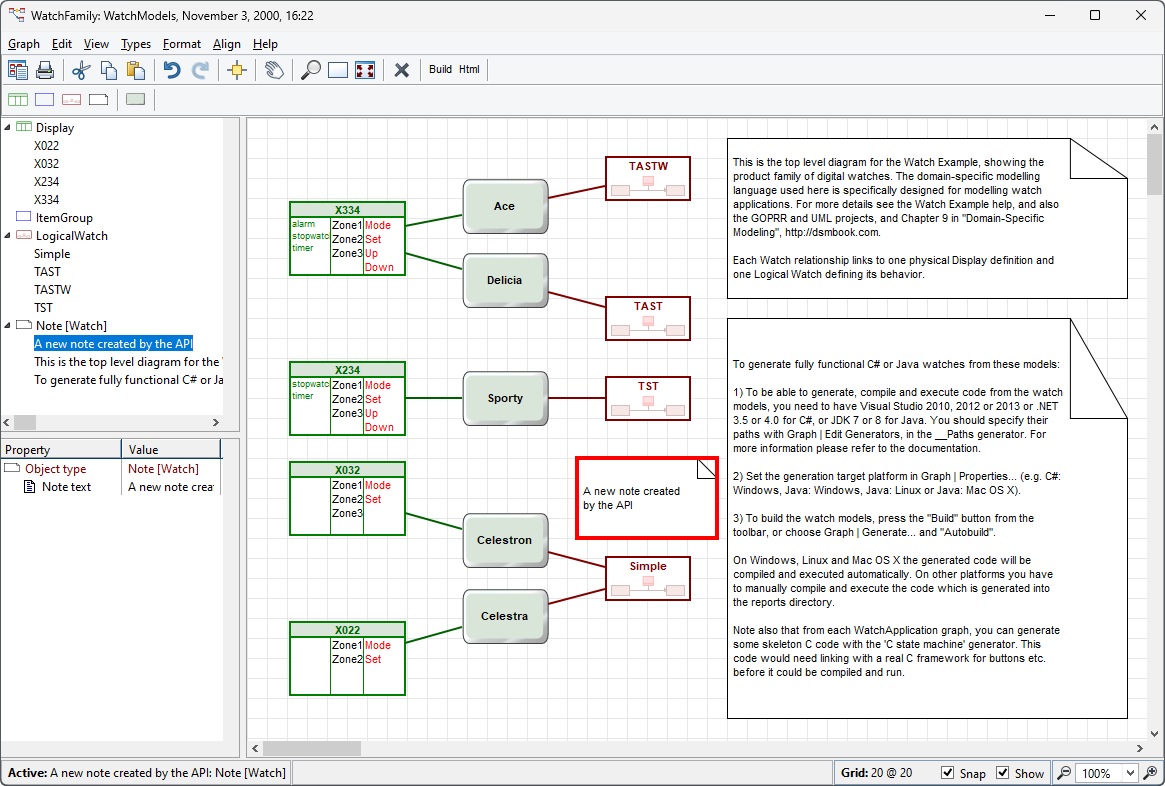
Figure 9–2. A new Note created by the API.
Let us
have a closer look at a few special usages of MEOops and MEAnys in our example.
The allGoodInstances API method returns
an MEOopArray containing several graphs of the type you specified. You can find
the one you want by using the
userPrintString command, which returns
the name of the graph. Once you have a graph you want, you can find its contents
using the 'Graph contents read' messages, e.g.
objectSet. Note also the handy
findString(graphOop, objectName), which
returns all elements in the graph matching the wildcard string,
objectName.
Another thing worth pointing out is the parameters of the
instProps method found in step 7. The
instProps method can be used to create
new instances of any non-property type, as here, and also to change property
values of an existing instance. The parameters are the type, the properties, the
values, the existing instance (if any), and the project. Let’s look at
those in more detail.
The first parameter,
receiver, is an METype for the
non-property type of the instance we are creating or changing.
The second parameter,
propColl, is a collection of MEAnys
that refer to the properties to be created or changed. Normally, you do not need
to worry about specifying properties, and each element can be an MEAny
containing an MENull. It this case, when creating a new non-property, a new
property of the default type will be created, and when modifying an existing
non-property, its existing properties will be left in place (although their
values may be changed by the third parameter). If you do want to explicitly
specify properties, e.g. to set up property sharing, each MEAny in this
collection can contain an MEOop that refers to a particular existing
property.
The third paramenter,
valueColl, is a collection of MEAnys
that refer to the values to be assigned to the properties. The structure of the
collections for the properties and values is shown in
Figure 9–3.
The fourth parameter,
np, determines whether this is a
creation or change. If this MEAny has an MENull as its value, a new instance
will be created; if the MEAny has an MEOop as its value, we change the instance
referred to by that argument.
The fifth parameter,
inArea, is an MEAny containing either
an integer for the area number of the home project for the instance, or an
MENull for the default (the same project as
np if it exists already, or the current
default project if creating).
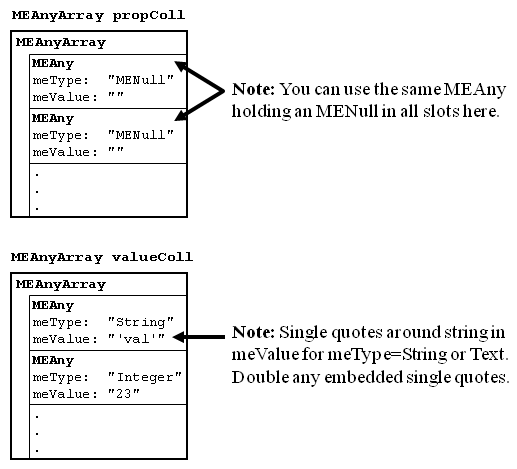
Figure 9–3. The array structures of parameters of the instProps method.
Most
API functions return an MEOop directly, but in this case the function has to
also be able to return an MENull value if the object creation failed, and so
must return its value as an MEAny. From this MEAny we read the area and object
id to reconstruct a true MEOop for the new object (step 8). Once we have that,
we can add the new object to the WatchFamily graph (we can use the first graph
in the array as we know that there is only WatchFamily graph in our demo
repository).
Before we proceed, let us conclude the exploration of our
API example with a few words about the final
animate operation. While being a
relatively simple API operation with its two MEOop parameters (the receiver
graph and the object to be highlighted),
animate requires some special
consideration when appearing in the generated code if you want to use it for
visualizing the execution of the code. If that is the case, the strategy of
fetching the required MEOops with other API commands as presented in our example
above does not work, but rather the oids for the objects to be highlighted must
be supplied at generation time. For example, if you are animating the execution
of a state machine generated from a state transition diagram, you have to tie
the oid of each state with its implementation in the code and use this oid when
highlighting the object during the execution. In the generator, you can output
the oid with the oid MERL command and
parse the areadID and objectID from the generated oid string as in our example
above, or alternatively, use projectId
and objectId MERL commands to separate
the two components already during the generation. For more information about the
use of animate for visual debugging
purposes please see the Digital Watch example in the MetaEdit+ demo repository
and refer to its documentation.
Finally, note that
animate will open the diagram if it is
not already open (as is the case here). However, if the diagram is already open
animate will not refresh the diagram to
show any new representations created since it was opened (as we would need it to
do here). Thus the WatchModels diagram should be closed before running the API
program (or a
refresh(newOop) command
could be added before
animate).


