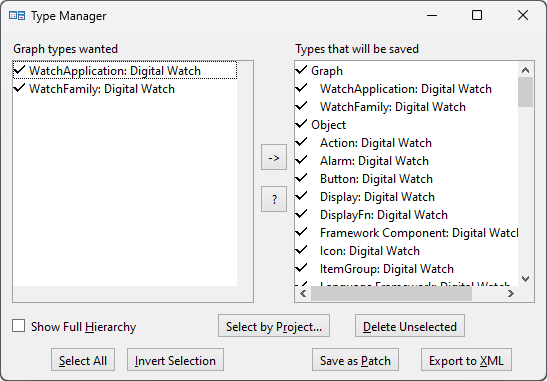
| 1) | Open the Type Manager (Figure 8–3) by selecting Metamodel | Type Manager from the MetaEdit+ menu bar. |
Figure 8–3. The Type Manager.
| 2) | In the Graph Manager, select the graph types you want to export from the list on the left. You can select them individually or by using the Select All or Unselect All buttons, and the Show Full Hierarchy checkbox if the types are in an inheritance hierarchy. |
| 3) | Press the Export to XML button at the bottom of the window. You will be then prompted for the name of the XML file to which the data is to be exported. The extension for the exported XML file will be .mxt, for MetaEdit+ XML Types. |
| 4) | Once the XML file has been written, MetaEdit+ will show a dialog reporting the success of the operation. Close this dialog. |