2.1.1 Repository locations: Roots File
The repository locations are stored in the Roots File,
artbase.roo, which is a binary file
consisting of a list of the available MetaEdit+
repositories and their paths. A repository must be listed here for you to be
able to log in to it. Initially there is only one repository,
‘demo’, supplied with MetaEdit+. Note that you may have other backup
or checkpoint repositories
to maintain a history of the
evolution of your repository, or even different repositories. Initially it is
best not to have several different repositories in use, as it is not possible to
share data in a real-time manner between repositories: an important feature of
MetaEdit+. Instead, create several projects within the same
repository.
The path for each repository should point to the directory
where that repository’s info file,
manager.ab, is. With the single
user version, the paths to the repositories should generally be relative paths
from the MetaEdit+ startup directory. In the multi-user version, the paths to
the repositories are generally fully qualified, e.g. UNC paths or mounted drives
or directories.
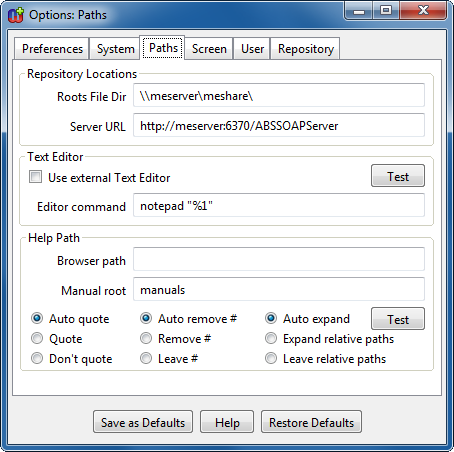
Figure 2. Paths page in Options Tool.
To
set the path where the client can find the
artbase.roo
file, open the Options Tool by pressing the
Options button in the Startup
Launcher and go to the
Paths page (as shown in
Figure 2). Enter the path of the directory
containing the
artbase.roo file into the text field
labeled
Roots File Dir, and choose
Accept from the pop-up menu to
accept the value. You can press
Save as Defaults to make the change
permanent by saving it in your
metaedit.ini
file.
In the multi-user version, you should also set the host
and port for the
Server URL, to match the host
running the server and the port given (or the default of 6370 if not) when
starting the server process (see Sections
3.1 and
3.3).


