3.7 Creating graphs
Currently our Graph Tool’s
Types page looks like
Figure 3-18, with all the required
metamodel fragments for the first version of our Family Tree modeling language
in place: the
Person object,
Family relationship, and
Parent and
Child roles. What we need to do now is to assemble
these fragments into a complete modeling language by defining the
bindings.
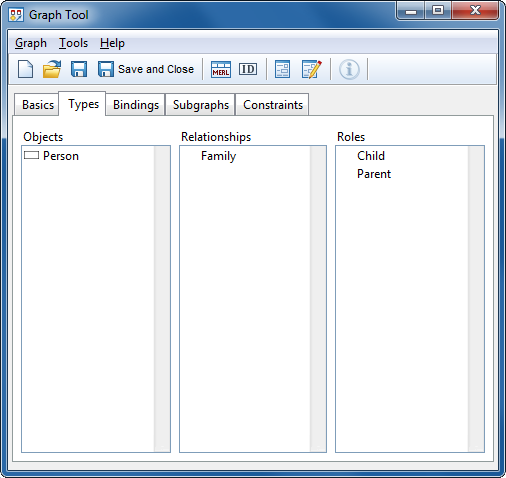
Figure 3-18. Graph Tool with types defined.
Go to the
Bindings page in the Graph Tool. Here you will create the bindings that
define how objects can be connected with relationships and roles. In the
Relationships list, press the right mouse button, select Add...
from the pop-up menu and choose ‘Family’ from the list.
Make sure that ‘Family’ is selected in the
Relationships list. Go to the Roles list and press the right mouse
button there. Choose Add... and select ‘Parent’ from the
list. Now, with both ‘Family’ and ‘Parent’ selected, add
‘Person’ to the Objects list (skip the Ports list).
You have now created a part of the binding that says: “A Family
relationship has a Parent role that connects to a Person
object”.
As there are always two
Parents for a
Person, proceed by keeping the same
Family relationship still
selected and add another
Parent role to the
Roles list and a
Person for it in the
Objects list. The Graph Tool should now look
like
Figure 3-19.
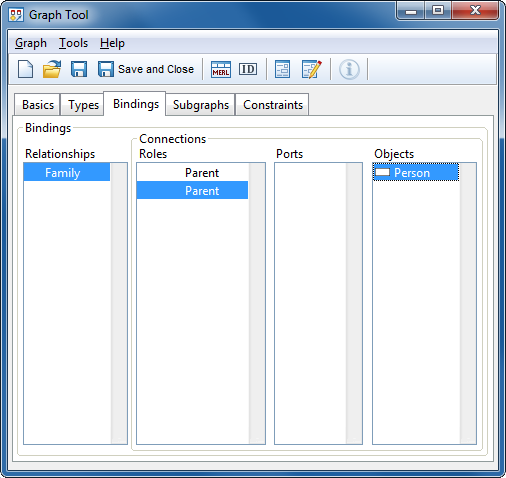
Figure 3-19. Graph Tool with a bindings.
In addition to a
Parent role, there is also a Child role in the Family
relationship. To create it, move the mouse over the Roles list, press the
right mouse button, choose Add... from the pop-up menu and then
‘Child’ from the list of available roles. As the Objects list
now becomes blank, go there and add the Person object again. We have now
created the part of a binding that says: “The Family relationship
has a Child role that connects to a Person
object”.
As the problem domain specification and our metamodel
implies, there are certain constraints that limit the set of possible
Family combinations: there can be two and only two
Parents but
zero to many
Children in a
Family. In GOPPRR, these constraints
are specified in the bindings. The requirement for two
Parents is already
taken care of with two separate
Parent roles, but the cardinality of
‘zero to many
Children’ must still be set. Select the
Child role from the
Roles list, press the right mouse button and
choose
Cardinality... from the pop-up menu. In the Cardinality Dialog
that appears (
Figure 3-20), set the
Minimum to 0 and the
Maximum to N and press
OK.
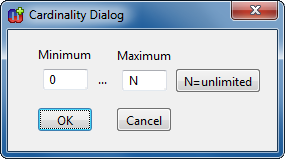
Figure 3-20. Setting binding cardinalities
Your Graph Tool
should now look like
Figure 3-21. Press
Save and Close to save the graph definition and close the Graph Tool.
Also remember to commit your work again.
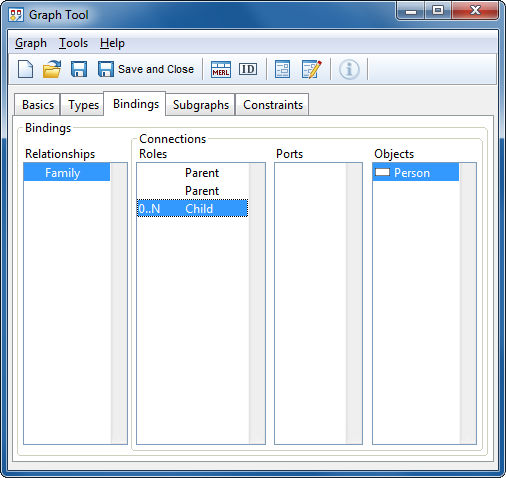
Figure 3-21. Graph Tool with binding defined.
Congratulations!
You have now completed the first version of our Family Tree modeling language.


