3.5 Creating relationships
What do we need to do next? Let’s take a look at our
problem domain specifications again. We have now created the concept of
Person. According to our sketch in
Figure 3-15 and metamodel in
Figure 1-3, we now have to define
Family, a relationship between
Parents and
Children.
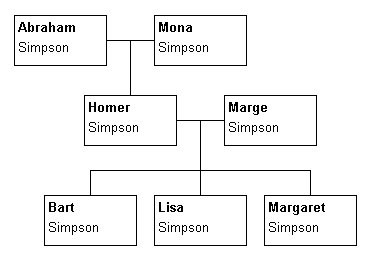
Figure 3-15. Sketch of a graphical notation for the Family Tree
In
addition to the Family relationship, we need concepts to represent the
roles a Person can play in that relationship. Simply, a
Person can be in either a Parent role or a Child role in a
given Family. Visually, each of the lines going towards a Person
is a role, and the central meeting point of the lines between the parents is the
relationship.
Looking at things a little more carefully, we can see
there are certain rules on how we are allowed to bind together Persons in
a Family. For instance, in any given Family relationship there
must always be exactly two objects in Parent roles, but there may be any
number of objects in Child roles.
To handle these kinds of issues, we need a new
metamodeling structure known as a binding. A binding contains the
information on which objects can take part in a relationship in which roles, and
how many times each role may occur. Each binding consists of one relationship,
two or more roles, and for each role, one or more objects.
First though we need to define the relationship and roles.
Like the creation of the Objects, this can be done from the Graph Tool’s
Types page. Start creating a new Relationship type: move the mouse cursor
into the Relationship list on the
Types page, click the right mouse
button and select
Add New... from the popup menu. This opens a new
Relationship Tool, which looks and works just like the Object Tool. For our new
Family relationship type, enter ‘Family’ in the Name field
(as in
Figure 3-16).
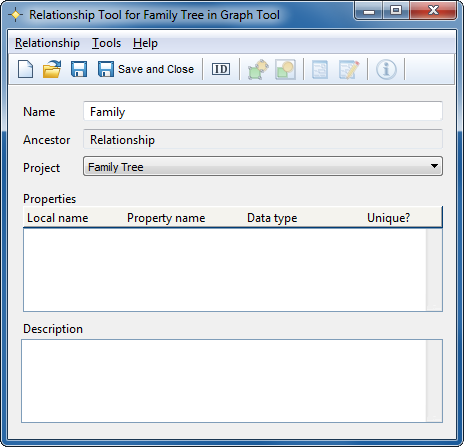
Figure 3-16. Relationship Tool
As we do not want to include
any properties in our
Family relationship at this time, and we
don’t want a special symbol for it, you can complete the generation of the
new relationship type by pressing the
Save and Close button in toolbar.
The new Family relationship is added to the Relationships list in the Graph
Tool.


