MetaEdit+ Server behind Windows Firewall
MetaEdit+ Server uses incoming TCP ports 6360 and 6370 by default, and this document shows how to open them in Windows Firewall.
- Open "Windows Firewall with Advanced Security" by Start | Run | WF.msc.
- (optional) Turn on logging of dropped packets from the "Windows Firewall Properties" link.
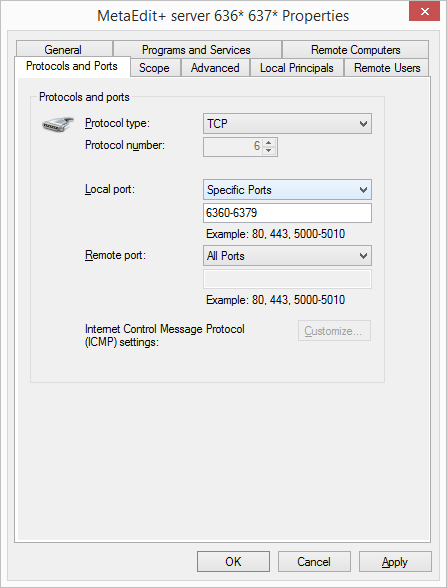
- Create a new Inbound Rule allowing incoming traffic on TCP ports 6360-6379.
We'll create a custom rule here, to allow full configuration. - It is generally best to allow all programs, so that the rule need not be edited when installing a new version of MetaEdit+ server.
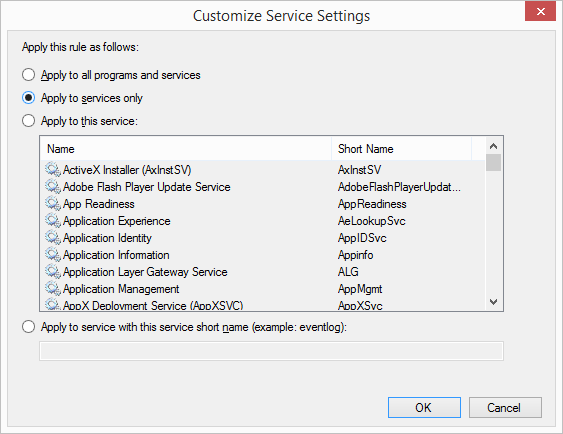
- Press the Services | Settings... button if you want to restrict this to only services. Choosing a particular service is generally not a good idea, as then each new server process will require editing the firewall.
- Open incoming TCP ports 6360-6379. The default port for client repository access is 6360, and that for server SOAP administration is 6370, but with several server processes it is common to use the subsequent ports too.

We will assume you are on a Domain network; use the appropriate tab if you are on a Private or Public network.


You can view the log to see client connections being dropped or allowed. Later when the communication is working, turn logging off.
Inbound Rules | New Rule... | Custom Rule.

New Inbound Rule's General page: