1.5 Committing/abandoning your work
Instead of storing each model in a separate file, MetaEdit+
uses an object database to store user data. This enables efficient reuse of data
between models, but does entail some differences in saving changes compared with
simpler file-based tools. Rather than saving files, MetaEdit+ uses a
transaction-based
approach to committing and abandoning
changes.
Starting MetaEdit+ and logging into the repository starts
a transaction. All changes you make to your design data are part of the
transaction, and are not propagated into the repository immediately. To store
the changes permanently, you need to explicitly commit the transaction.
Commit
will save the changes to the repository and start a
new transaction for a new set of changes. It is also possible to
abandon
the transaction, which means canceling the changes
and returning to the previously committed state.
To commit your current transaction, press the
Commit button on the Launcher toolbar (see
Figure 1-10), or select
Repository |
Commit from the Launcher’s menu. To abandon, press the
Abandon
button on the toolbar (see
Figure 1-10)
or select
Repository | Abandon.
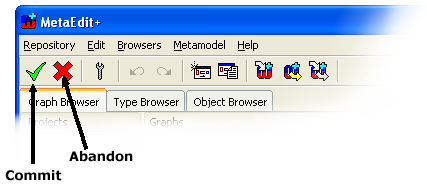
Figure 1-10. Commit and Abandon buttons in the Launcher toolbar.


