1.1 Starting MetaEdit+
MetaEdit+ is a repository-based application, which means that
a connection to the repository must be established during the launch of the
tool. This login procedure is initiated from the Startup Launcher (
Figure 1-1) that is opened when MetaEdit+
is started.
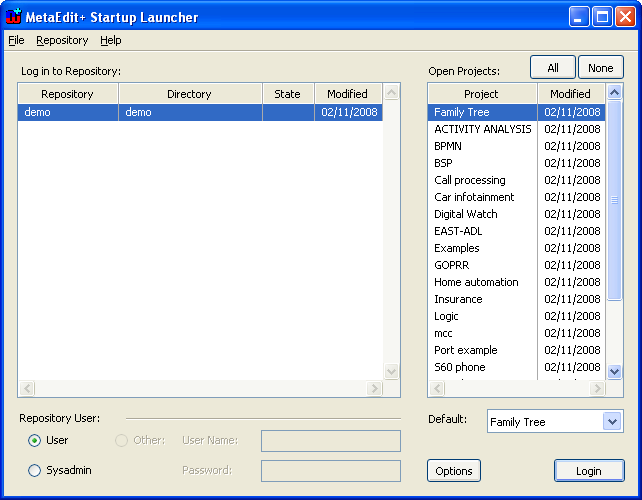
Figure 1-1. Startup Launcher.
In addition to login, several
other functions can be accessed from the Startup Launcher. For more information
about these, please refer to Section
3.1.1.
Login and opening the repository
To log in to a MetaEdit+ repository:
| 1) | Select
the repository to log in to from the ‘Log in to Repository:’ list.
|
| 2) | Select the
projects you want to open from the ‘Open Projects:’ list.
|
| 3) | Select the
proper user account in the ‘Repository user:’ pane. You can choose
either from the predefined default accounts (‘user’ and
‘sysadmin’) or enter the details for a specific user
account. |
| 4) | Press
the Login
button. |
| | Please
note that in a multi-user environment you may see a dialog saying your login has
failed because your server is not running, or because the number of users logged
in equals the limit of your server license (‘Login is not allowed
now’). |
After a successful login the Startup
Launcher will be replaced with the main MetaEdit+ Launcher. The login procedure
is now complete and we can proceed to explore the MetaEdit+
environment.


