In the Diagram Editor, press the leftmost button on the
toolbar that contains object and relationship types. You have now selected the
Person object type to be used. To place a
Person object in our
diagram, move the mouse over the drawing area and click the left mouse button.
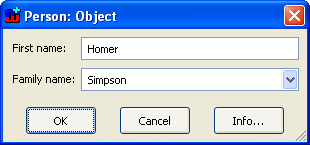
You can now enter the information about the object you are creating in the
dialog that opens (as in
Figure 3-21).
Enter the first name and family name for the Person you are about to create
(please note that you can also choose the family name from the list with the
mouse) and press
OK.
Figure 3-21. Entering information about an object
The
object is now shown with its properties in the drawing area of the Diagram
Editor. Now create a few more objects in the same way. Moving the symbols around
and resizing them works the same way as in any drawing tool. To change the
property values of a symbol double-click the symbol to bring up the property
dialog. When you have drawn a few more objects, your Diagram Editor should look
something like this:
Figure 3-22. The Diagram Editor with some objects