
|
Writing generators for graphs with decompositions |
Post Reply 
|
Page 12> |
| Author | ||||
iceman 
Major Contributor 

Joined: 19.Jun.2011 Points: 32 |
 Post Options Post Options
 Thanks(0) Thanks(0)
 Quote Reply Quote Reply
 Topic: Writing generators for graphs with decompositions Topic: Writing generators for graphs with decompositionsPosted: 06.Jul.2011 at 11:33 |
|||
|
I have written my own schema for state machine representation, but it has some semantics for the meta-modeler. Rather than a hierarchical representation of the xml nodes which can be edited , some nodes like the UI components have to be represented by another model, so that they can be separately authored. How can the xml be generated in such a case? Example of the xml is as follows:
<state no="1"> |
||||
 |
||||
|
jpt
MetaCase 

Joined: 25.Mar.2008 Points: 253 |
Post Options
Thanks(0)
Quote Reply
Posted: 06.Jul.2011 at 13:21 |
|||
|
Separating state machine behavior and UI is generally a good idea. In MetaEdit+ you could then have one Graph type for state machine and another for UI. There are several ways to combine these and after looking the example:
A state object type could have a property that refers to the UI components. This property type (called ‘screen components’ in XML) would be a collection that either refers to the component name (string value) or to the whole UI component object. In the former case the property type in the state object would having string data type whereas in the latter case the data type of the property would be a collection of objects containing the UI components. If you want to see an example of this, please check the digital watch example where the state object type refers to (now to one only) the display definition. In this example the display definition object (your UI component) is represented in the same graph type with the state machine but there could also be separate graph type for the display defnitions.
If you follow this latter approach and have different kind of UI component types in your language you could create them into inheritance hierarchy and refer to the supertype (e.g. ‘_general UI component’ which then have subtypes like ‘text component’, button component’ etc. The ‘_’ in ‘_general UI component’ makes the type abstract so that it can’t be selected when choosing the component in the selection lists.
Depending on your needs you may also consider having subdiagram that specifies the UI component and then there could be an explosion link from state in state machine diagram to the UI component Graph type.
To decide what works the best it would be good to have several examples. Now I would personally start with the direct reference to the object. In the generator when producing the xml from the state machine you can then access the UI component and its properties easily while navigating in the state machine.
If some of the properties of the UI component are defined in the graph type where the UI component is specified (like its connections to the other elements) you can navigate with MERL to that. The way navigation works is using the unique identifier (oid) and navigating with do graphs command to find the same object from UI component graph type.
I hope this helps.
|
||||
|
||||
|
iceman
Major Contributor
Joined: 19.Jun.2011 Points: 32 |
Post Options
Thanks(0)
Quote Reply
Posted: 06.Jul.2011 at 15:18 |
|||
|
Thanks for the suggestions.
The way I thought of modeling this was to have separate graphs for state machine and UI definition. Also, a problem is then to handle the complexity if there are lots of states. I could not understand when you said " direct reference to the object". is this for the first method(same graph) or the second method(separate graphs)? I was also thinking of improving my modeling concept used in the xml. Since, once there are many screens(states), it would be hard to define them even graphically using Metaedit+. What would be an output xml example from the technique you've described if there are multiple screens? Edited by iceman - 06.Jul.2011 at 15:46 |
||||
|
||||
|
jpt
MetaCase
Joined: 25.Mar.2008 Points: 253 |
Post Options
Thanks(0)
Quote Reply
Posted: 06.Jul.2011 at 16:04 |
|||
|
I think we are on the same page here looking to have two graph types keeping the design of state behavior and UI different.
By reference to the object I mean that the collection property in a state could refer to a number of screen components (like button, text). These screen components can be originally designed in the separate language (Graph type for UI definition), but only referred via the state. This would reflect to what you had as xml file for output.
Now, reading your original question again, I see that you are perhaps looking for a solution in which each state has a single subdiagram (via decomposition) containing the whole screen definition. While that works too then there is the challenge that you can’t anymore have a substate machine since the decomposition is already used. Perhaps this does not matter as the screens are defined only in the substates?
In my suggestion I followed the XML file where each state has to one screen definition, which again contains a number of components.
|
||||
|
||||
|
iceman
Major Contributor
Joined: 19.Jun.2011 Points: 32 |
Post Options
Thanks(0)
Quote Reply
Posted: 06.Jul.2011 at 16:19 |
|||
|
Yep, got that part. If there is a separate graph for UI component definition, then I would need to separate the event transitions coming from some of the UI components like buttons, because state change occurs because of that as well. How to do that?
I'm a bit confused when you said "explosion link from state in state machine diagram to the UI component Graph type". Is that a better design approach than having decomposition? I'm quite happy to change the xml schema to have a better design that would let tackle two things -one,the definition of UI components in another graph and second,having lots of states. |
||||
|
||||
|
jpt
MetaCase
Joined: 25.Mar.2008 Points: 253 |
Post Options
Thanks(0)
Quote Reply
Posted: 07.Jul.2011 at 17:37 |
|||
Yes, if you want to reuse the same UI component definition in many screens/states then the event part would go to the state transition diagram, most likely to the Transition relationship type (in terms of GOPPRR). This is basically like in almost any state machine where we specify the event that triggers the transition from one state to another. This transition could also have other properties if needed.
The other approach would be to move the UI definitions from model to metamodel. In other words, you would not have a modeling language to specify screens and UI components but those would be defined by the metamodeler. The S60phone shows such example if you want to look the details. While there text size, icon etc. are fixed nothing prevents to add such details to the UI element so that default setting could be overrided by entering them in the model.
In MetaEdit+ an object type, like State, can have only one decomposition target graph, whereas explosion that is semantically weaker can target several target graphs. This means that if you want to have both state hierarchy and link to screen definitions from a state you may not use only decomposition. Instead you could use explosion to target UI Graph and decomposition to sub state machine. To keep the designs still consistent there could be a report in MERL that checks that only one explosion link is defined. At the same time the checking could also report on states that do not have (yet) UI elements.
It is good if you have the possiblity to modify the XML schema but if the generator produces the XML file the structure of the metamodel can be quite different. I would thus try to define the language first that makes modeling of states and UI part fast and easy and then let the generator target whatever XML scheme is needed. Edited by jpt - 07.Jul.2011 at 22:08 |
||||
|
||||
|
iceman
Major Contributor
Joined: 19.Jun.2011 Points: 32 |
Post Options
Thanks(0)
Quote Reply
Posted: 13.Jul.2011 at 13:32 |
|||
|
Hello,
Thanks for the reply. In the meantime while you answered the question, I had come with some graphical design issues. My version of the state machine editor is a customized version of a generic State machine editor, in that it has definition of UI design in some states(not all). A generic state transition diagram can be used to describe the behavior of a class, a use case or a system. While searching for a proper representation I found that a lot of the confusions arise from the way the term "FSM" is used in literature and their representation(specially state charts versus state machine). I found that a form of state transition diagram given by the IETF standards here and a more common known one from UML here ( link , link ). There are other graphical representations such as SDL, BSCM etc. The UML notation in plain english converts to the following: when the specified event occurs, if the guard condition is true, perform the specified action and send the specified message. For my requirements, the xml i constructed for the domain does not exactly match the semantics of a standard state machine graphical representation, i.e the event definition is embedded in the button UI component definition. Hence, I am not able to have a better DSL design. I have the state definition according to the XML example below and constructed two graphs : one is a state transition diagram graph( link ) and another a UI layout graph(link). I can define the states, but since buttons are inside another graph, how can i specify the events defined by them in the state transition graph? How can I define multiple "backgroundactions" and "expectedevents" in my state transition diagram graph? If I specify them as Properties in a Relationship, I'm unable to add the "parameter" anymore Ref: There are couple of xml tags which can be confusing to understand. Their meanings are as follows: actions+backgroundactions - same as the concept of action in UML expectedevents - both asynchronous periodic(timeout)[ link ] and asynchronous sporadic(shown as "FD" and "FE" here) received by the state. These are not from any state but from external processes and clocks. There is no concept for representation of this in UML. events - asynchronous aperiodic events(button clicks) XML example: <state no="0"> <timeout>1</timeout> <backgroundactions> <rocosmessage name="FDSessionStart" type="EVENT_MESSAGE" senderid="RCP" receiverid="NA"> <parameter type="unsigned int" name="id" vartype="text">1</parameter> </rocosmessage> </backgroundactions> <expectedevents> <event name="TimeOut"> <action preconditions="no" name="randomtransition"> <parameter> <type>state</type> <name>n</name> <value>11010</value> </parameter> <parameter> <type>state</type> <name>n</name> <value>11020</value> </parameter> </action> <savedvalues> <save value="state" tag="VARFirstScreen"/> </savedvalues> </event> </expectedevents> </state> <state no="1"> <timeout>129</timeout> <screen> <components> <video x="142" y="144" width="720" height="480" repeat="yes"> <path>Introduction_final.flv</path> </video> <button label="EXIT" width="80" height="30" x="920" y="10" textsize="14" icon="none" iconx="20" icony="20" adjtext="-5"> <event name="clicked"> <action preconditions="no" name="transition"> <parameter> <type>state</type> <name>n</name> <value>1000</value> </parameter> </action> </event> </button> <button label="MENU" width="250" height="100" x="212" y="630" textsize="40" icon="iconRight2.png" iconx="65" icony="20" adjtext="-10"> <event name="clicked"> <action preconditions="no" name="transition"> <parameter> <type>state</type> <name>n</name> <value>800</value> </parameter> </action> </event> </button> <textfield x="200" y="50" width="924" textsize="80" background="0" border="0"> <text say="0"> <part type="text">PLEASE USE ME</part> </text> </textfield> </components> </screen> <expectedevents> <event name="FD"> <action preconditions="no" name="transition"> <parameter> <type>state</type> <name>n</name> <value>98</value> </parameter> </action> </event> <event name="FE"> <action preconditions="no" name="transition"> <parameter> <type>state</type> <name>n</name> <value>9000</value> </parameter> </action>> <savedvalues> <save value="value1" tag="VARFallUser"/> <save value="value2" tag="VARAlrmType"/> <save value="value3" tag="VARLandmark"/> </savedvalues> </event> </expectedevents> </state> Edited by iceman - 13.Jul.2011 at 14:02 |
||||
|
||||
|
jpt
MetaCase
Joined: 25.Mar.2008 Points: 253 |
Post Options
Thanks(0)
Quote Reply
Posted: 13.Jul.2011 at 15:33 |
|||
|
Because of the different semantics in different domains there is also a need for different domain-specific languages, here for different state transition diagrams. If I understood correctly, one UI graph (represented as a diagram) specifies one screen which again contains one or more screen elements (e.g. button). Right?
There are several possibilities but my first suggestion would be adding a new property type for the ‘Transition’ relationship type (or role types) in State Transition Diagram. This property type, called here ‘Screen component’ is of data type ‘Object’ and it contains a particular object type called ‘UI element’.
Since there are different type of screen components (text field, buttons, menus) the above structure expects that all screen components are subtypes of ‘UI element'. In this way the modeler can select which type of screen component is related to the event (e.g. a button).
The transition relationship could also include other property types, like
- Action precondition (datatype: string)
- Action name (datatype: sting)
- Parameters and additional design data as needed
For the modeler then the choices to be made would look like in the screenshot below. Here the Screen component field refers to elements defined in the UI graph and you may browse and select them via the selection tool shown in the right.
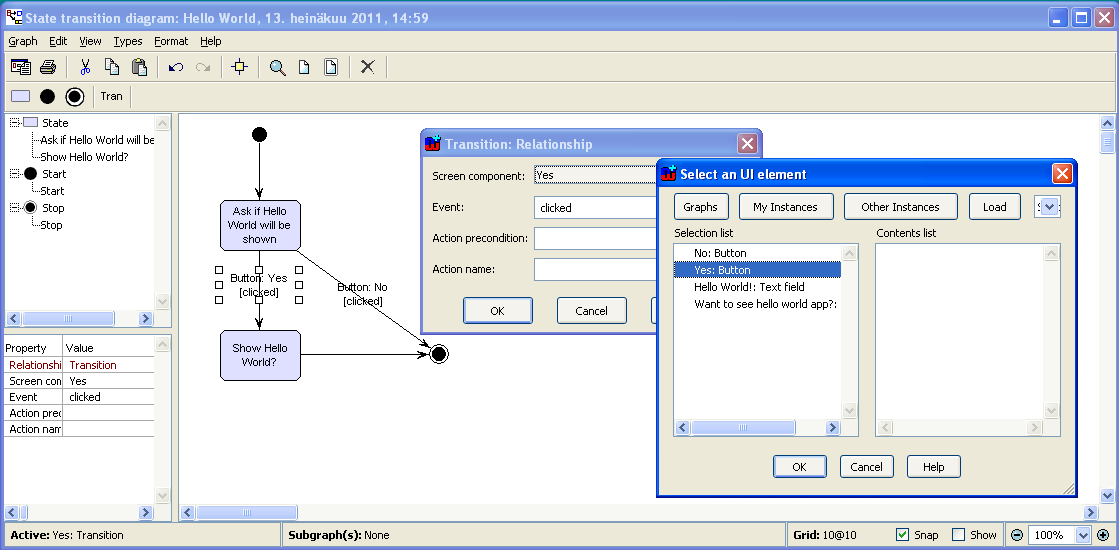 If you can analyze the domain further you may find that actions are dependent on the type of UI element. Therefore the Event property type that is currently specified to be part of the Transition relationship type could be given instead to the button use. Then the modeler would add a UI element, like button and get only respective events (like ‘clicked’). This way he would not be able to specify ‘clicked’ e.g. for a text field.
In the same way you can have other mappings, like have a property ‘Screen’ in State object. The ‘Screen’ property type is of data type ‘Graph’ and thus refers to the UI graph containing the screen definition.
I hope this helps. Edited by jpt - 14.Jul.2011 at 12:09 |
||||
|
||||
|
iceman
Major Contributor
Joined: 19.Jun.2011 Points: 32 |
Post Options
Thanks(0)
Quote Reply
Posted: 16.Jul.2011 at 02:27 |
|||
|
Thanks for the reply.Yes, you're right. one UI graph specifies one screen which again contains one or more screen elements (e.g. button).The former is called the state editor and later the screen editor.
You've answered some of the questions. I had a couple more in the last post. The state changes not only on events from screen elements, but also from external async events. The state also performs some actions. How to put these in the editor as metatypes which can be modeled while scenario authoring? The way I have defined the transition relation is here. Is it correct? The other issues I faced were as follows. I added the screen graph property to the state as shown here, but the state object blocks the screen editor till I press "all ok" on the state object. Is that preventable? I also happened to get an exception while adding graphs from the transition. |
||||
|
||||
|
stevek
MetaCase

Joined: 11.Mar.2008 Points: 643 |
Post Options
Thanks(0)
Quote Reply
Posted: 18.Jul.2011 at 13:27 |
|||
Normally, events are specified as part of a transition. Looking at your XML and the screenshot of your metamodel, I don't see transitions mentioning events - only screen elements defining events. Imagine you have a state "Nero's choice" with a screen with two buttons "Take red pill" and "Take blue pill", and you want the red one to go to the "Real world" state and the other to the "Matrix world" state. I'd define the button in the screen to have text "Take red pill" and trigger event "red", and then have a transition from "Nero's choice" when event "red" occurs that goes to "Real world".
When there are different kinds of events, as in your case with screen element events and async events, I prefer to have the event (or the element that causes it) directly visible in the diagram. Look at the Watch Example, e.g. Figure 2-8, where each transition is an n-ary relationship connecting a source state, a target state, and an event (a button press). You could use a similar approach, with your buttons (or the events they trigger) being directly in the diagram. You could then use async events directly in the diagram in the same way.
For actions, the Watch Example only has actions that occur during transitions, and these are represented by connecting them to the transition relationship with an extra role. If you have entry actions for a state, these could be part of the state (a collection property of Action objects), and similarly for exit actions.
I don't think so: you are allowing a Stop State to be the Source of a Transition. Normally it's: Transition (From (Start | State)) (To (State | Stop).
Sure: rather than adding the screen graph as a property to the state, add the screen graph as an explosion for a state.
Please email the meplus0.err log file from your MetaEdit+ working directory to metaedit.support@metacase.com, and we'll take a look.
|
||||
|
||||
|
Post Reply
|
Page 12> |
| Tweet |
| Forum Jump | Forum Permissions You cannot post new topics in this forum You cannot reply to topics in this forum You cannot delete your posts in this forum You cannot edit your posts in this forum You cannot create polls in this forum You cannot vote in polls in this forum |


 Topic Options
 iceman wrote: