
|
Extending transition in "watch application" sample |
Post Reply 
|
Page 12> |
| Author | |
miomy 
Contributor 

Joined: 22.Feb.2012 Points: 11 |
 Post Options Post Options
 Thanks(0) Thanks(0)
 Quote Reply Quote Reply
 Topic: Extending transition in "watch application" sample Topic: Extending transition in "watch application" samplePosted: 08.Mar.2012 at 15:34 |
|
Hello, everyone
What I want: I want to create a new transition type "BeepingTransition", whenever I use it to connect two status, there is always a "Beeping" action. What I did: I defined a subtype of "Transition" in Object Tool, called "BeepingTransition", and created symbol for it. I added it in Graph Tool -> Type Tab. But when I tried to save the change, there is always an error "You must give a name to the type". I have no idea how I could give a name. What I need to know: 1. Can I directly bind the "beeping" code generator to "BeepingTransition"? I mean without defining a "Beeping" action. 2. If not, what other options do I have? |
|
 |
|
|
stevek
MetaCase 

Joined: 11.Mar.2008 Points: 643 |
Post Options
Thanks(0)
Quote Reply
Posted: 08.Mar.2012 at 16:42 |
|
"You must give a name for the type!" is shown if you haven't entered a name for the type in the Name field.
If you've created a symbol for BeepingTransition, you must have successfully created the type, so I guess you've either cleared the name field or then are trying to create a new type with no name. The Digital Watch WatchApplication language specifies the actions that should happen during a Transition by attaching an Action object to the Transition. The various actions can then be connected to that Action object, e.g. an Icon action is connected to the Action with an Icon relationship. If you follow that pattern, life is pretty easy: You can just create a Beep object, Beep relationship and Beep role and a binding for them (with ActionBody role to the Action), then make a _Beep generator that produces the Java code needed to beep, e.g. just Report '_Beep' 'beep();' endreport I wouldn't suggest making BeepingTransition as a subtype, because then if a user draws a Transition (with all its Buttons and Actions attached), and later decides it should beep, he'll have to delete the Transition and draw it again as a BeepingTransition. An alternative might be to add a Boolean 'Beep?' property to Transition. That would allow the user to change later whether to beep or not on that transition. The downside would be an extra dialog whenever a Transition was created, because now there will be properties that could be filled in. You'd also have to work harder to make the code generator and update the framework, because the existing framework only supports Actions attached to Action objects, not directly on the Transition. You'd need to change the _TransitionData generator to add a new bool beep parameter, and update the framework to use it: add the beep bool to AbstractWatchApplication's addTransition(), add the beep bool to the Result class, and change AbstractWatchApplication's handleEvent() to beep as well as perform the Actions: if (result.action != 0) perform(result.action); if (result.beep) beep();
|
|
|
|
|
miomy
Contributor
Joined: 22.Feb.2012 Points: 11 |
Post Options
Thanks(0)
Quote Reply
Posted: 08.Mar.2012 at 18:19 |
|
Hi, Stevek
Thank you for the quick reply! Do you use any IM tool, like msn or chatzilla? I'm new to MetaEdit+. It would help if I can send u some screenshot in the conversation. |
|
|
|
|
stevek
MetaCase
Joined: 11.Mar.2008 Points: 643 |
Post Options
Thanks(0)
Quote Reply
Posted: 08.Mar.2012 at 18:49 |
|
You can post pictures here (press the 'tree' Image icon and upload the file), if that helps.
Have you done the 'Family Tree' Evaluation Tutorial? If not, that's the best way to learn the concepts and tools of MetaEdit+.
|
|
|
|
|
miomy
Contributor
Joined: 22.Feb.2012 Points: 11 |
Post Options
Thanks(0)
Quote Reply
Posted: 09.Mar.2012 at 17:46 |
|
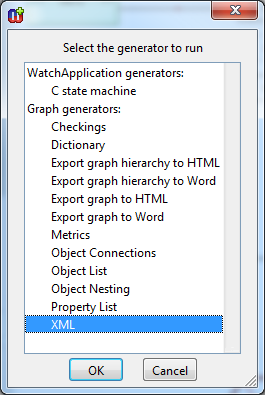
Thanks. The "Family Tree Tutorial" is very helpful, but there is still something not clear for me. I have finished the binding now, but when I try the generator part. I am not sure which generator I should choose. Is there a single generator I should modify to add the beeping function? or I have to modify multiple generators to disseminate the new function in different implementations (e.g. in java/C#)?
|
|
|
|
|
stevek
MetaCase
Joined: 11.Mar.2008 Points: 643 |
Post Options
Thanks(0)
Quote Reply
Posted: 09.Mar.2012 at 17:56 |
|
There are about 20 generators in the WatchFamily and WatchApplication graph types. I gave you some ideas above which ones you want to edit. If you're feeling lost, please see the Watch Example manual, particularly sections 2.5, 3.3 and 3.4. That will show you the architecture of the Watch generators, and how to modify them.
|
|
|
|
|
miomy
Contributor
Joined: 22.Feb.2012 Points: 11 |
Post Options
Thanks(0)
Quote Reply
Posted: 09.Mar.2012 at 18:33 |
|
Thanks for the suggestion. I am working on the manual now. I hope I can find the answers.
|
|
|
|
|
miomy
Contributor
Joined: 22.Feb.2012 Points: 11 |
Post Options
Thanks(0)
Quote Reply
Posted: 21.Mar.2012 at 13:45 |
|
Hello, Steve
Thank you for your advice. I have read through the chapters in the tutorial you suggested, and your famous book "DSM:enabling full code generation" as well. Unfortunately, I am still a bit confused about code generation in the sample. Questions: i). This is the generator hierarchy I have in the downloaded "watch application" sample. 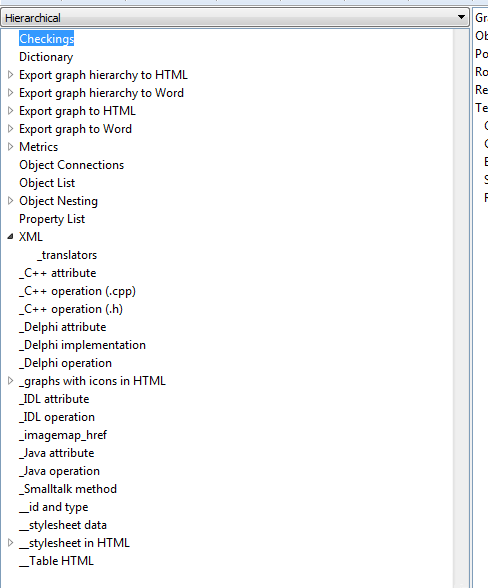
I was expecting the hierarchy as shown in figure 9.10 and 9.11 in your book, but I got lost. Where is the root "autobuild"? Where is the "_JavaFile"? Where is the "_Java"? ii). I took your advice, created a new relationship type "BeepingTransition" and bound it as well. 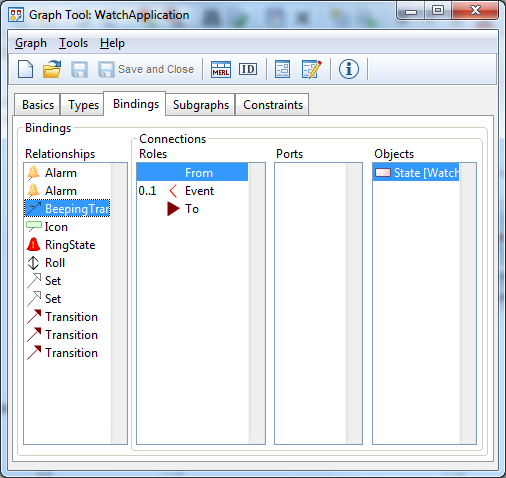
Here "Event" is for involving the button press event. But for the convenience of reusing "BeepTransition", I would not like to connect a "Beeping" action every time I use "BeepTransition". Is it possible that I just add a property (of type "Action", of meta type "Object") in "BeepTransition", and use the property to generate the actual "beeping" code? I tried, but failed. |
|
|
|
|
stevek
MetaCase
Joined: 11.Mar.2008 Points: 643 |
Post Options
Thanks(0)
Quote Reply
Posted: 21.Mar.2012 at 13:59 |
|
i) That hierarchy is showing generators for the generic Graph metatype, which is the supertype of all Graph types. You want to look at the hierarchy for WatchFamily - open the Generator Editor from a graph of type WatchFamily (or choose Change Graph Type in its toolbar).
|
|
|
|
|
miomy
Contributor
Joined: 22.Feb.2012 Points: 11 |
Post Options
Thanks(0)
Quote Reply
Posted: 21.Mar.2012 at 15:31 |
|
Thank you for the quick reply.
i). This is what I got by opening the generator editor from the graph "Watch Application: Stopwatch". 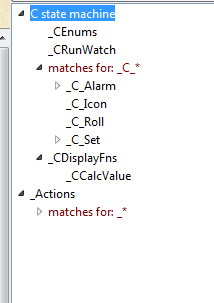
There seems to be only C code generator. Could you help to show me where is the Java generator? ii). Is this what you suggested? 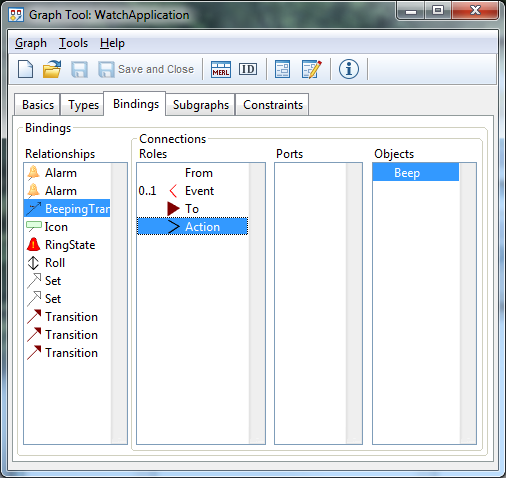
If so, how can I do the next step? i.e. to add a "_Beep" generator like: Report '_Beep' 'beep();' endreport |
|
|
|
|
Post Reply
|
Page 12> |
| Tweet |
| Forum Jump | Forum Permissions You cannot post new topics in this forum You cannot reply to topics in this forum You cannot delete your posts in this forum You cannot edit your posts in this forum You cannot create polls in this forum You cannot vote in polls in this forum |


 Topic Options