Extending transition in "watch application" sample
Printed From: MetaCase
Category:
Forum Name: MetaEdit+
Forum Description: All topics relating to MetaEdit+ or DSM
URL: https://www.metacase.com/forums/forum_posts.asp?TID=402
Printed Date: 27.Mar.2026 at 05:33
Software Version: Web Wiz Forums 12.05 - http://www.webwizforums.com
Topic: Extending transition in "watch application" sample
Posted By: miomy
Subject: Extending transition in "watch application" sample
Date Posted: 08.Mar.2012 at 15:34
|
Hello, everyone
What I want: I want to create a new transition type "BeepingTransition", whenever I use it to connect two status, there is always a "Beeping" action. What I did: I defined a subtype of "Transition" in Object Tool, called "BeepingTransition", and created symbol for it. I added it in Graph Tool -> Type Tab. But when I tried to save the change, there is always an error "You must give a name to the type". I have no idea how I could give a name. What I need to know: 1. Can I directly bind the "beeping" code generator to "BeepingTransition"? I mean without defining a "Beeping" action. 2. If not, what other options do I have? |
Replies:
Posted By: stevek
Date Posted: 08.Mar.2012 at 16:42
|
"You must give a name for the type!" is shown if you haven't entered a name for the type in the Name field. If you've created a symbol for BeepingTransition, you must have successfully created the type, so I guess you've either cleared the name field or then are trying to create a new type with no name. The Digital Watch WatchApplication language specifies the actions that should happen during a Transition by attaching an Action object to the Transition. The various actions can then be connected to that Action object, e.g. an Icon action is connected to the Action with an Icon relationship. If you follow that pattern, life is pretty easy: You can just create a Beep object, Beep relationship and Beep role and a binding for them (with ActionBody role to the Action), then make a _Beep generator that produces the Java code needed to beep, e.g. just Report '_Beep' 'beep();' endreport I wouldn't suggest making BeepingTransition as a subtype, because then if a user draws a Transition (with all its Buttons and Actions attached), and later decides it should beep, he'll have to delete the Transition and draw it again as a BeepingTransition. An alternative might be to add a Boolean 'Beep?' property to Transition. That would allow the user to change later whether to beep or not on that transition. The downside would be an extra dialog whenever a Transition was created, because now there will be properties that could be filled in. You'd also have to work harder to make the code generator and update the framework, because the existing framework only supports Actions attached to Action objects, not directly on the Transition. You'd need to change the _TransitionData generator to add a new bool beep parameter, and update the framework to use it: add the beep bool to AbstractWatchApplication's addTransition(), add the beep bool to the Result class, and change AbstractWatchApplication's handleEvent() to beep as well as perform the Actions: if (result.action != 0) perform(result.action); if (result.beep) beep();
|
Posted By: miomy
Date Posted: 08.Mar.2012 at 18:19
|
Hi, Stevek
Thank you for the quick reply! Do you use any IM tool, like msn or chatzilla? I'm new to MetaEdit+. It would help if I can send u some screenshot in the conversation. |
Posted By: stevek
Date Posted: 08.Mar.2012 at 18:49
|
You can post pictures here (press the 'tree' Image icon and upload the file), if that helps. Have you done the http://www.metacase.com/support/45/manuals/evaltut/et-Preface_.html - 'Family Tree' Evaluation Tutorial ? If not, that's the best way to learn the concepts and tools of MetaEdit+.
|
Posted By: miomy
Date Posted: 09.Mar.2012 at 17:46
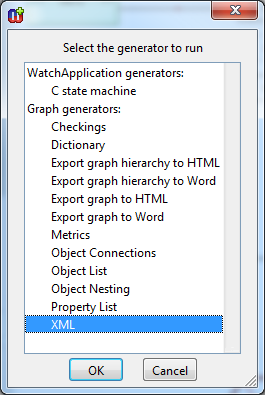
Thanks. The "Family Tree Tutorial" is very helpful, but there is still something not clear for me. I have finished the binding now, but when I try the generator part. I am not sure which generator I should choose. Is there a single generator I should modify to add the beeping function? or I have to modify multiple generators to disseminate the new function in different implementations (e.g. in java/C#)?
|
Posted By: stevek
Date Posted: 09.Mar.2012 at 17:56
| There are about 20 generators in the WatchFamily and WatchApplication graph types. I gave you some ideas above which ones you want to edit. If you're feeling lost, please see the Watch Example manual, particularly sections 2.5, 3.3 and 3.4. That will show you the architecture of the Watch generators, and how to modify them. |
Posted By: miomy
Date Posted: 09.Mar.2012 at 18:33
| Thanks for the suggestion. I am working on the manual now. I hope I can find the answers. |
Posted By: miomy
Date Posted: 21.Mar.2012 at 13:45
|
Hello, Steve
Thank you for your advice. I have read through the chapters in the tutorial you suggested, and your famous book "DSM:enabling full code generation" as well. Unfortunately, I am still a bit confused about code generation in the sample. Questions: i). This is the generator hierarchy I have in the downloaded "watch application" sample. 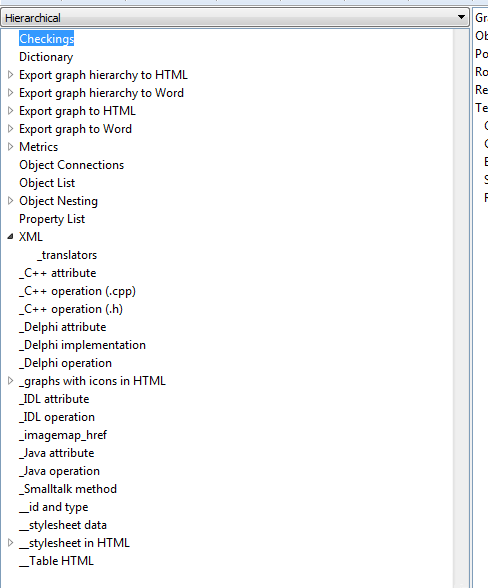
I was expecting the hierarchy as shown in figure 9.10 and 9.11 in your book, but I got lost. Where is the root "autobuild"? Where is the "_JavaFile"? Where is the "_Java"? ii). I took your advice, created a new relationship type "BeepingTransition" and bound it as well. 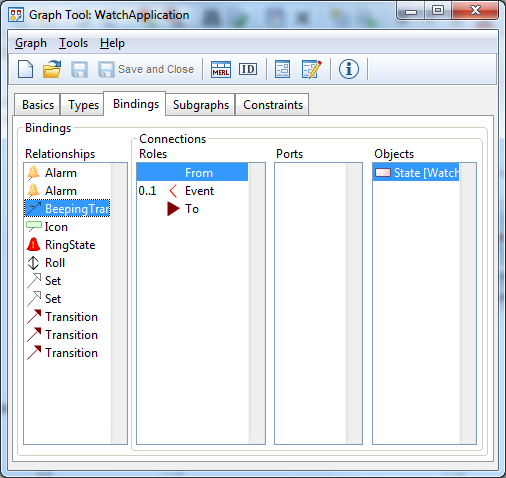
Here "Event" is for involving the button press event. But for the convenience of reusing "BeepTransition", I would not like to connect a "Beeping" action every time I use "BeepTransition". Is it possible that I just add a property (of type "Action", of meta type "Object") in "BeepTransition", and use the property to generate the actual "beeping" code? I tried, but failed. |
Posted By: stevek
Date Posted: 21.Mar.2012 at 13:59
|
i) That hierarchy is showing generators for the generic Graph metatype, which is the supertype of all Graph types. You want to look at the hierarchy for WatchFamily - open the Generator Editor from a graph of type WatchFamily (or choose Change Graph Type in its toolbar). |
Posted By: miomy
Date Posted: 21.Mar.2012 at 15:31
|
Thank you for the quick reply.
i). This is what I got by opening the generator editor from the graph "Watch Application: Stopwatch". 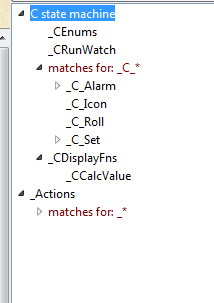
There seems to be only C code generator. Could you help to show me where is the Java generator? ii). Is this what you suggested? 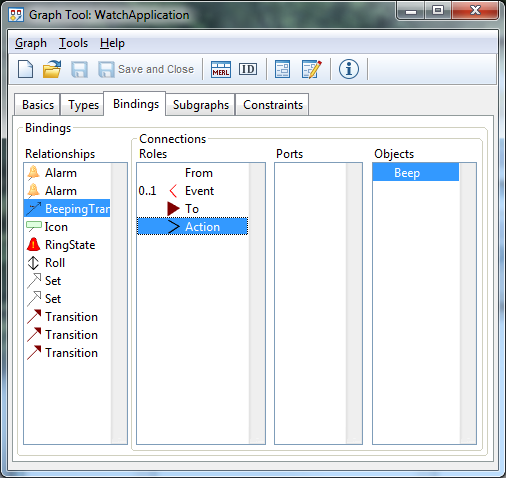
If so, how can I do the next step? i.e. to add a "_Beep" generator like: Report '_Beep' 'beep();' endreport |
Posted By: janne
Date Posted: 21.Mar.2012 at 15:59
|
Hi, i) Java generators start from the 'WatchFamily' (Graph type). Just select the 'WatchFamily' for the Graph type and then open and follow the structure under the '!Build' generator |
Posted By: stevek
Date Posted: 21.Mar.2012 at 16:39
|
ii) No, that's not what I meant. Or indeed what I said  . Maybe you want to slow down a bit, and if things don't seem to show what you expected, make sure you've read the earlier answers correctly. I don't mind answering again, I just don't want you to have to waste your time waiting for us to answer. . Maybe you want to slow down a bit, and if things don't seem to show what you expected, make sure you've read the earlier answers correctly. I don't mind answering again, I just don't want you to have to waste your time waiting for us to answer.The binding you have added is a new kind of transition from a State to a State, but that's not what you want. Instead, you want to be able to draw a line from an Action to a Beep, in a similar way to the current Icon binding. At least I suggest you do it this way first, as the watch language supports easy addition of new kinds of actions - once you can do that successfully, you can think about the alternatives, like parameterizing transitions with a property.
|
Posted By: miomy
Date Posted: 22.Mar.2012 at 18:04
| Sorry, my second question is a bit confusing. I mean the beep() function needs the file "windows.h" to be included to function correctly. Where should I add that "#include" line? |
Posted By: miomy
Date Posted: 22.Mar.2012 at 18:08
| Thank you! Finally, I find it. |
Posted By: miomy
Date Posted: 22.Mar.2012 at 18:17
|
Hi, Steve
Really sorry for wasting your time due to my awful question description. What I want to do at the beginning is to add a new transition between two states. Like 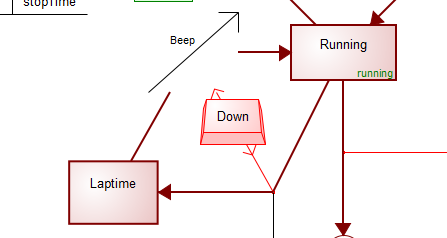
It just connects two states, with an event involved (like button pressing). I just want the system beep during the specific kind of transition. That is all. What I want to avoid is having to linking a Beep Action object every time I use this transition in the graph. That is why I said before I try to encapsulate the beep action into the transition. Do I make my question clear this time? Please feel free to point out any confusing description. |
Posted By: stevek
Date Posted: 22.Mar.2012 at 18:29
|
That's fine if you want to do it that way - I've said above why I would do it a different way, but let's do it like you say. You just need to create BeepingTransition as a subtype of Transition, and add it to the Relationships list on the Contents tabe of the Graph Tool for WatchApplication. That says it is a possible kind of relationship in graphs of this type, and adds it to the toolbar. You don't need to create a new binding for it, because WatchApplication already includes a binding for Transition, and BeepingTransition is legal in that binding by inheritance. In the generators you'll need to check any places that refer to Transition, and make them allow BeepingTransition too. E.g. if the generator has foreach >Transition You can replace that with foreach >(Transition | BeepingTransition) or indeed with a wildcard match foreach >(*Transition) That will make your BeepingTransitions work as Transitions, but you also need to extend the generators and framework so that they remember to beep for each BeepingTransition. You'd need to change the _TransitionData generator to add a new bool beep parameter, and update the framework to use it: add the beep bool to AbstractWatchApplication's addTransition(), add the beep bool to the Result class, and change AbstractWatchApplication's handleEvent() to beep as well as perform the Actions: if (result.action != 0) perform(result.action); if (result.beep) beep(); Of course that's all for Java, but you mention windows.h, which sounds like Windows C/C++ programming. That of course is possible too, but you'd have to build the framework and generators from scratch. |
Posted By: miomy
Date Posted: 26.Mar.2012 at 13:41
|
Hi, Steve
I am working on the C# generators. Sorry, I get lost again. I understand _Cs_LogicalWatches generator is for generating the subclasses of AbstractWatchApplication (like stopwatch). But I can't find the generator for generating the super class. I've added the bool parameter to the _TransitionData generator. 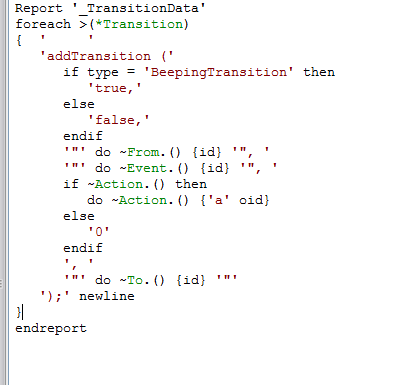
But that only update the invocation of addTransition method, not the declaration. Another question is: where is the generator for Result class? I didn't find it down through _*Model generator tree. |
Posted By: stevek
Date Posted: 26.Mar.2012 at 19:16
|
AbstractWatchApplication and Result are both part of the domain framework: they are written once, and don't depend on what's in the model. Normally such unchanging files wouldn't be in the modeling tool, but separately as in-house components, and would be linked in with the generated files. In the case of the Digital Watch example, MetaCase needed to supply the files to you, and the best (?) way was to 'hide' them in the model. You can find the domain framework classes from the "Language Frameworks" properties of the 2012Models: WatchFamily model. There are two frameworks, C# and Java, and within each are all its domain framework classes -"Framework Components". Some of the classes are there multiple times, e.g. for different versions for WPF vs. WP7. Adding beeping transitions probably affects all the different versions. In a Framework Component's Source Code text property, you can choose Editor from the pop-up menu to open the source in a larger window.
|
Posted By: miomy
Date Posted: 27.Mar.2012 at 16:11
|
Hi Steve
How can I access the "Language Frameworks" properties? I am using the latest 50beta33 version. And I did not find any directory named "Language Frameworks" or "Framework Components" from the root level. There are only 2 folders from the root "demo50d21" (there is a folder "areas/Digital Watch" here, but I don't think it has any code template within it) and "reports" (like cg output folder). Is there any menu or operation in the MetaEdit+ can lead me to open these "Framework Components"? |
Posted By: stevek
Date Posted: 27.Mar.2012 at 17:42
| When you log in, the top graph is 2012Models; open its Properties from its pop-up menu. |