8.2 Using the API from a client program
In order to access the MetaEdit+ API from your client program,
you need to have a SOAP framework for your programming language or platform
installed. As SOAP is a widely recognized standard, these frameworks are
available for most platforms.
As an example, we describe here the setting up of the SOAP
framework for Java 2 Standard Edition. Please note that the following
instructions expect you to have a working knowledge of Java and the Java 2
development environment. It is also assumed that you already have the Java 2 SDK
installed.
To set up the SOAP framework, the following two components
are needed (both of them can be downloaded from
xml.apache.org):
 | The
Apache Xerces2 XML parser for Java (version 2.5.0 was used for this
example). |
| The
Apache Axis SOAP library (for this example, we used version
1.1). |
Once you have installed both these
additional libraries, consider the example Java code in Listing 1.
 1  import java.util.*;
 2
 3  class APIExampleApp {
 4    public static void main(String[] args) throws Exception {
 5
 6      com.metacase.MetaEditAPI service =
 7        new com.metacase.MetaEditAPILocator();
 8      com.metacase.MetaEditAPIPortType port =
 9        service.getMetaEditAPIPort();
10      com.metacase.METype graphType =
11        new com.metacase.METype();
12      com.metacase.MEOop[] graphs;
13      com.metacase.METype objectType =
14        new com.metacase.METype();
15      com.metacase.MEAny[] props = new com.metacase.MEAny[1];
16      com.metacase.MEAny[] values = new com.metacase.MEAny[1];
17      com.metacase.MEAny area = new com.metacase.MEAny();
18      com.metacase.MEAny np = new com.metacase.MEAny();
19      com.metacase.MEAny objectInfo =
20        new com.metacase.MEAny();
21      com.metacase.MEOop newObject = new com.metacase.MEOop();
22      com.metacase.MEAny tempAny;
23
24      graphType.setName("WatchFamily");
25      graphs = port.allGoodInstances(graphType);
26      objectType.setName("Note [Watch]");
27      tempAny = new com.metacase.MEAny();
28      tempAny.setMeType("MENull");
29      tempAny.setMeValue("");
30      props[0] = tempAny;
31      tempAny = new com.metacase.MEAny();
32      tempAny.setMeType("Text");
33      tempAny.setMeValue("'A new note created by the API'");
34      values[0] = tempAny;
35      np.setMeType("MENull");
36      np.setMeValue("");
37      area.setMeType("MENull");
38      area.setMeValue("");
39      objectInfo =
40        port.instProps(objectType, props, values, np, area);
41      StringTokenizer st = new
42        StringTokenizer(objectInfo.getMeValue(), "_", false);
43      newObject.setAreaID(Integer.parseInt(st.nextToken()));
44      newObject.setObjectID(Integer.parseInt(st.nextToken()));
45      port.addToGraph(newObject, graphs[0]);
46    }
47  }
Listing 1. Sample Java application using the API.
This
small application adds a new ‘Note’ object with some text into the
‘2004Models’ WatchFamily diagram that can be found from
‘demo’ repository. To understand how this is done, please read on
and follow the code from line 24 onwards. First we retrieve all graphs of type
WatchFamily and store them in an array (lines 24 – 25). Then we start to
set the variables that are needed for creating a new object: object type (line
26), properties (lines 27 – 30) and their values (lines 31 – 34),
possible existing non-property (lines 35 – 36) and the database area
(lines 37 – 38). When these have been set, the creation request can be
sent (lines 39 – 40) and the return value – an MEAny pointing to the
new object – is stored to a temporary variable.
Before we proceed, let us have a closer look at the
parameters of the instProps method
found in line 40. The instProps method
can be used either – as in this case – to create new instances of
any non-property type or to change property values of an existing instance. The
first parameter is the non-property type of the instance we are creating or
changing. Whether this is a creation or change operation depends on the fourth
argument. If this MEAny has an MENull as its value, a new instance will be
created; it the MEAny has an MEOop as its value, we change the instance referred
to by that argument. The last argument is an MEAny denoting the home project for
the instance, used only when creating a new instance.
Somewhat more complicated are the second and third
arguments, which provide the new or modified instance’s properties and
their values. The second parameter is the collection of the MEAnys that refer to
the properties to be created or changed. Each MEAny in this collection can
contain either an MEOop that refers to a certain existing property, in which
case that existing property is used (e.g. to set up property sharing).
Alternatively, and more normally, each element can be an MEAny containing an
MENull, in which case when creating a new non-property, a new property of the
default type will be created, and when modifying an existing non-property, its
existing properties will be left in place. The third parameter then carries a
collection of values that are assigned to the properties defined by the previous
argument. The datatype of the elements of this collection is also MEAny. The
structure of these collections is presented in
Figure 8–1.
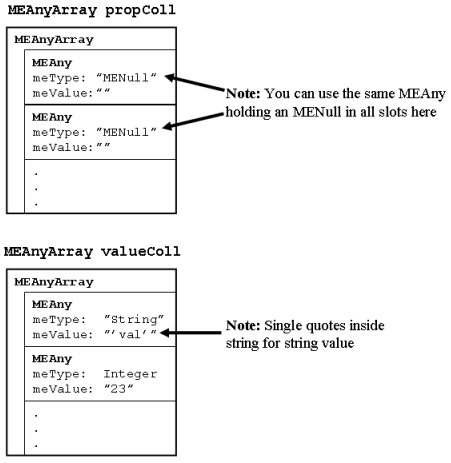
Figure 8–1. The array structures of parameters of the instProp method.
Most
API functions return an MEOop directly, but in this case the function has to
also be able to return an MENull value if the object creation failed, and so
must return its value as an MEAny. From this MEAny we read the area and object
id to reconstruct a true MEOop for the new object (lines 41 – 44). Once we
have that, we can add the new object to the WatchFamily graph (we can use the
first graph in the array as we know that there is only WatchFamily graph in our
demo repository).
When compiling the code, we must remember to introduce the
additional libraries. As an example of how this is done, see the batch file
sample in Listing 2.
 1  set path=%path%;c:\java\j2sdk\bin
 2  set axisdir=c:\java\axis-1_1
 3  set xercesdir=c:\java\xerces-2_5_0
 4
 5  set classpath=%axisdir%\lib\axis.jar;
 6  %axisdir%\lib\axis-ant.jar;
 7  %axisdir%\lib\commons-logging.jar;
 8  %axisdir%\lib\log4j-1.2.8.jar;
 9  %axisdir%\lib\saaj.jar;%axisdir%\lib\wsdl4j.jar;
10  %axisdir%\lib\jaxrpc.jar;%xercesdir%\xmlParserAPIs.jar;
11  %xercesdir%\xercesImpl.jar;.
12
13  java org.apache.axis.wsdl.WSDL2Java -p com.metacase MetaEditAPI.wsdl
14
15  javac APIExampleApp.java com\metacase\*.java
Listing 2. Sample script for compiling Java code with SOAP extensions.
In
the first three lines we set the paths for the Java compiler and Axis and Xerces
libraries – remember to change these to match your installation
directories. The classpath for the libraries is set in lines 5 – 11, which
should be unwrapped to a single line. Please note that the path setting for
log4j*.jar depends on the Axis version you are using, so check the .jar file
names in your installation. The next step is to use Axis’s WSDL2Java to
translate the MetaEdit+ WSDL file into Java code. This is done in line 13 (note
that in this example the WSDL file is expected to be in the same directory as
the sample Java code). The output from WSDL2Java is stored in the com\metacase
directory. Finally, in line 15, we compile our APIExampleApp along with the
WSDL2Java output.
To try out this API example, login to MetaEdit+, open the
API Tool, and start the API server. Once that is running, execute the
APIExampleApp. Now, go back to MetaEdit+ and open the ‘2004Models’
WatchFamily diagram. As we remember, we have so far only added the
concept of the new ‘Note’ into this diagram, but not a
representation for it. To create a new representation for the new concept,
select
Graph | Import Graph, and the new ‘Note’ symbol with
text ‘A new note created by the API’ will appear. If your Diagram
Editor window is not large enough, the symbol may be created outside the window
border – just zoom to fit or resize the window to find
it.


