5.2 Generator Debugger
Generator Debugger
is a tool that helps
the development of generators by providing means to follow, control and inspect
the execution of a generator. An example of Generator Editor window is shown in
Figure 5–5.
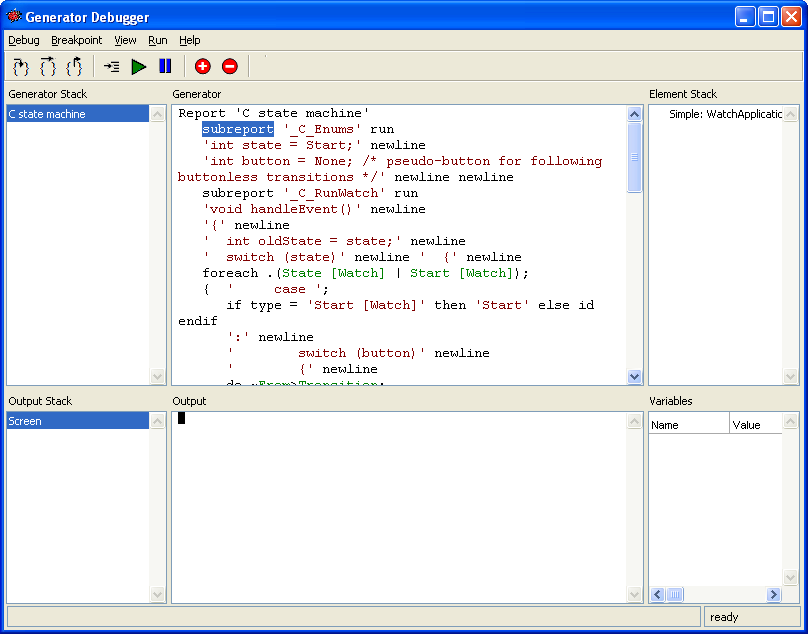
Figure 5–5. Generator Debugger.
On top of the
Generator Debugger window (as shown in
Figure 5–5) you will find the usual
menu bar and toolbar. Below them is the working area that is divided as
follows:
The Generator stack at the top-left corner of the
working area provides a list of the generators currently in the execution stack,
the generator in execution being shown at the bottom of the list. The
Generator view contains the currently executed generation definition. The
part of the definition that is being processed is shown highlighted (please note
that it is not possible to edit the generator definition here). The Element
stack on the right of Generator window displays the stack of design
elements that are being accessed by the generator, the currently accessed one
being on the bottom of the list. The accumulation of this stack is the result of
the generator’s navigation structure.
The Output stack on the lower-left corner of the
window shows the target output streams like screen, files, etc., used by the
generator. The current output is the last one in the list. The Output
view in the middle of the lower part of the window displays the generated output
for the current or the selected output. The Variables list on the
lower-right corner of the window shows the currently allocated variables with
their values.
Pop-up menu commands and/or double-clicking in the
Generator Stack, Element Stack or Output panes will take you to the selected
element or provide other operations on it.


