4.2 Matrix Editor
The Matrix Editor
is a tool for
handling graphs by representing them as matrices
,
containing two axes and related cells.
Figure 4-24 shows a Matrix Editor window.
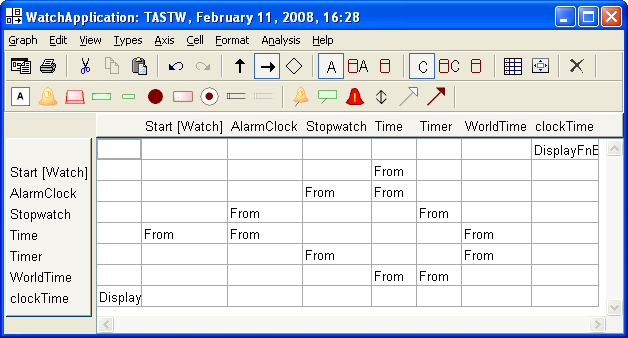
Figure 4-24. Matrix Editor.
The Matrix Editor follows the
same rules as other MetaEdit+ tools. Each element, whether it is on an axis or
in a cell, has dialog(s) for adding, viewing and editing further information
about the element. Modifications made to an element via the Matrix Editor are
stored to the repository and reflected in other tools.
The Matrix Editor is capable of representing and editing
any graph of any type, even if the graph was originally created with a Diagram
or Table Editor. Thus the Matrix Editor can be used both to view graphs first
made as graphical diagrams, like Data Flow Diagrams, and to work with
specifically matrix-based
languages (like Business
Systems Planning, which is almost totally matrix based).
The Matrix Editor offers the special functions needed for
working with matrix based graphs. Some examples of these are diagonalization,
subsystem decomposition, and viewing.
Matrix Editor window
The Matrix Editor window (as shown in
Figure 4-24) consists of three parts: menu
bar, toolbar area and the matrix itself.
The toolbar area can show up to three toolbars: action
tools, object types and relationship types (
Figure 4-25). The object and relationship
toolbars change according to the current language to show the available object
and relationship types in that language. The commands on the action toolbar are
fixed, and are (from left to right):
 | Generate,
Print |
| Cut,
Copy,
Paste |
| Undo,
Redo
|
| Show
Column Role, Show Row Role, Show Relationship
|
| Axis
display options: Show Text, Show Text + Symbol, Show
Symbol |
| Cell
display options: Show Text, Show Text + Symbol, Show Symbol
|
| Autowidth
and Fit Window to
Matrix. |
| Delete |
Depending
on the modeling language in use, quick-access buttons for various generators may
appear next to Delete button.
The visibility of the toolbars in each Matrix Editor
window can be set from the
View | Toolbar menu. Default visibility and
layout of toolbars can be set in the Options Tool (see Section
3.1.3).

Figure 4-25. Matrix Editor toolbars.
The matrix area
consists of a horizontal axis, a vertical access, and a matrix of cells between
them. The axes contain representations of objects, and each cell shows the
binary relationships or roles between the corresponding objects on the
horizontal and vertical axes. Note that because a matrix only has two axes, it
can only show relationships with two roles, i.e. binary relationships. N-ary
relationships and their roles are not visible in a
matrix.


