Export graph to vector format
Printed From: MetaCase
Category:
Forum Name: MetaEdit+
Forum Description: All topics relating to MetaEdit+ or DSM
URL: https://www.metacase.com/forums/forum_posts.asp?TID=962
Printed Date: 26.Mar.2026 at 22:50
Software Version: Web Wiz Forums 12.05 - http://www.webwizforums.com
Topic: Export graph to vector format
Posted By: bram.bolder
Subject: Export graph to vector format
Date Posted: 06.Nov.2023 at 17:00
|
Hi, I would like to insert a graph into a publication where the publishers have specific requirements on the image quality (300dpi). I have tried exporting a graph to PNG, then taking the width in pixels and rescale the image in cm until it matches the dpi requirements. Unfortunately this leaves the image a bit too narrow, as it's only roughly 1.5k pixels wide = 5 inch -> roughly 60% of an A4 paper. I have also tried the code generator to Word, but that also creates an image with a certain resolution. What I wanted to ask: is there is maybe some way to export the graph into a vector format (like SVG)? This would allow arbitrary scaling and is very efficient with respect to file size. Or as a fallback: is there a way to set the image width when exporting to a pixel format? Thanks.
|
Replies:
Posted By: stevek
Date Posted: 06.Nov.2023 at 18:01
|
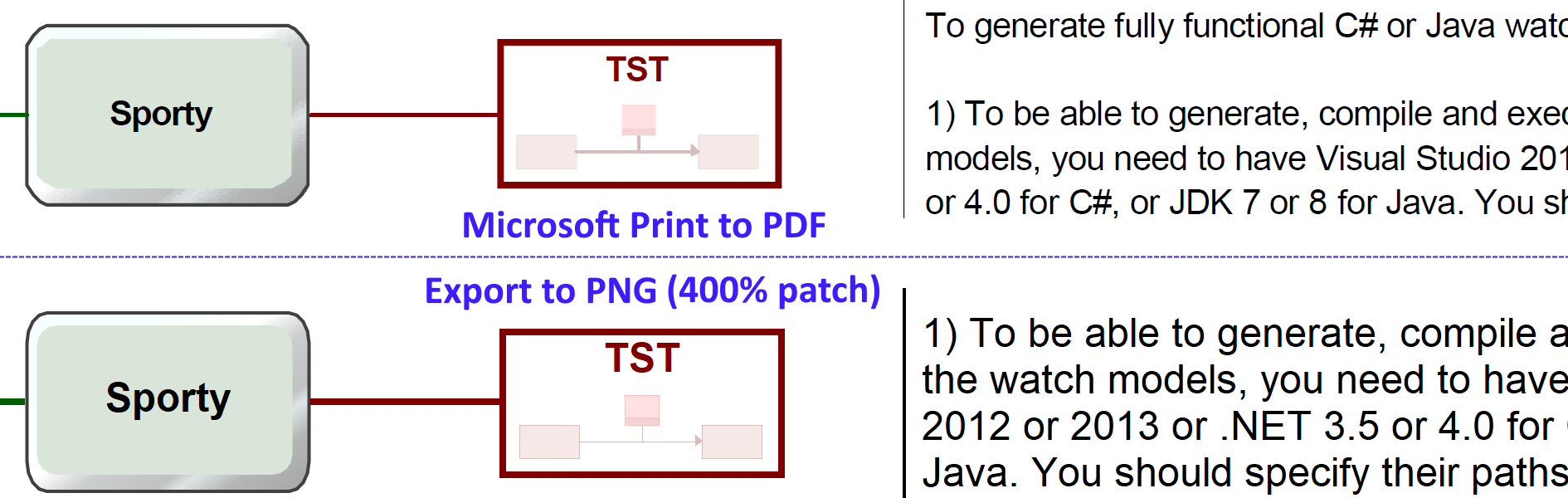
The ideal for publishers is often vector graphics, and MetaEdit+ supports that by https://metacase.com/support/55/manuals/meplus/Mp.html#Mp-5_1.html" rel="nofollow - printing to PDF. The details vary somewhat by platform (see e.g. https://metacase.com/download/metaedit/morelinux55sr1.html#print" rel="nofollow - Linux readme ) and what printer drivers are on offer, and the results will vary similarly. We tell each 'printer' the same things to draw, but they choose how to draw it. In some cases, the correct dpi is what is on the screen, e.g. if you also want to show the window around the diagram. That of course is easy, a simple screen shot. In other cases, what is wanted is a bitmap at a higher resolution. One way is then to zoom in, and (unless you have a very large screen) probably make the image as a composite of several screenshots. (Note that at least on Windows, font scaling isn't always accurate, so you will probably need to resize some elements slightly if you have particular requirements for how text wraps etc.) When we wrote the http://dsmbook.com" rel="nofollow - DSM book we had to make a lot of screenshots, so we made a patch to MetaEdit+ to scale up PNG output by a factor of 4; here's an updated version for any MetaEdit+ 5.5: https://www.metacase.com/forums/uploads/3/png55_400.mep" rel="nofollow - png55_400.mep Below is an example of the output from both PDF and scaled-up PNG with the above patch: click to open at full size. https://www.metacase.com/forums/uploads/3/WatchModelsPDFvs400.png" rel="nofollow">
 |
Posted By: bram.bolder
Date Posted: 07.Nov.2023 at 09:32
|
Unfortunately, in our Linux environment (where I run MetaEdit+) we don't have a printer installed that writes to PDF since everyone can just use the command line tools to do the conversions. I tried the factor 4 PNG patch, and that works fine. Thanks!
|
Posted By: bram.bolder
Date Posted: 07.Nov.2023 at 10:16
|
Small update: when I do not provide a printer name, the output PostScript file is just saved to the current directory. Perfect! Only drawback is that the "gradient fill" and the dashed line features seem not to be supported. For the gradient it is just the mean value of the gradient components. |
Posted By: stevek
Date Posted: 09.Nov.2023 at 22:28
|
Thanks for pointing out that image upload problem. Looks like an update at the service provider lost the rights on the upload directories: now fixed. I added an example picture above. The PostScript is really just a fallback, for when there are no printers installed. I'll have a look if we can add dashed lines (and dotted etc.); gradient fills are unlikely to be added.
|