Graph animation :: display refresh
Printed From: MetaCase
Category:
Forum Name: MetaEdit+
Forum Description: All topics relating to MetaEdit+ or DSM
URL: https://www.metacase.com/forums/forum_posts.asp?TID=25
Printed Date: 27.Mar.2026 at 02:17
Software Version: Web Wiz Forums 12.05 - http://www.webwizforums.com
Topic: Graph animation :: display refresh
Posted By: martind
Subject: Graph animation :: display refresh
Date Posted: 18.Apr.2008 at 13:06
|
Hello all, I have a question concerning the animation of a ME model via the API tool from another application. I have a model with several statecharts and I want to visualize the process of stepping through it. Actually it is most convenient to have all statecharts of interest opened at once and fit them to the screen, because they influence each others behaviour and that is what should be observed. When I use the API server to highlight the states and transitions while stepping through the model I have the problem, that the red frames used for animation, leave some kind of artefacts on the already visited elements. I could use an refresh after each step, which would resolve that problem, but then the display would be flashing up all the time, which is somehow awkward for the viewer. Does anybody of you know a possibility how to solvethis issue? Regards, Martin |
Replies:
Posted By: stevek
Date Posted: 18.Apr.2008 at 13:27
|
Hello Martin,
I think what is happening is that your diagrams are opening zoomed to fit, and there seems to be a rounding error at some zoom levels when calculating the area of the red frame used for animation. When the red frame around an object is removed, the area updated is thus sometimes too small, so thin slivers on the outside can be left. We're looking into the problem, and should be able to correct it soon.
In the meantime, you will probably find that certain zoom levels work fine. As you are opening and zooming the diagrams manually anyway, you can hopefully find a zoom level that works well and use it for all of them.
If you are letting MetaEdit+ open the animated diagrams as needed, try turning off "Zoom large diagrams to fit when opening" (Repository | Options | System). That should help, and you can choose whether to keep that setting with Save as Defaults, or just switch it when animating. [Edit: reposted from correct account] |
Posted By: martind
Date Posted: 18.Apr.2008 at 14:44
|
Hello Steve, thank you for youre really fast reply. I tried to find an appropriate zoom level by hand, but was not successful with that. I also tried to deselect the auto-zooming feature in the options pane, but unfortunately that also didn't resolve the problem. I added a screenshot for demonstration purposes: 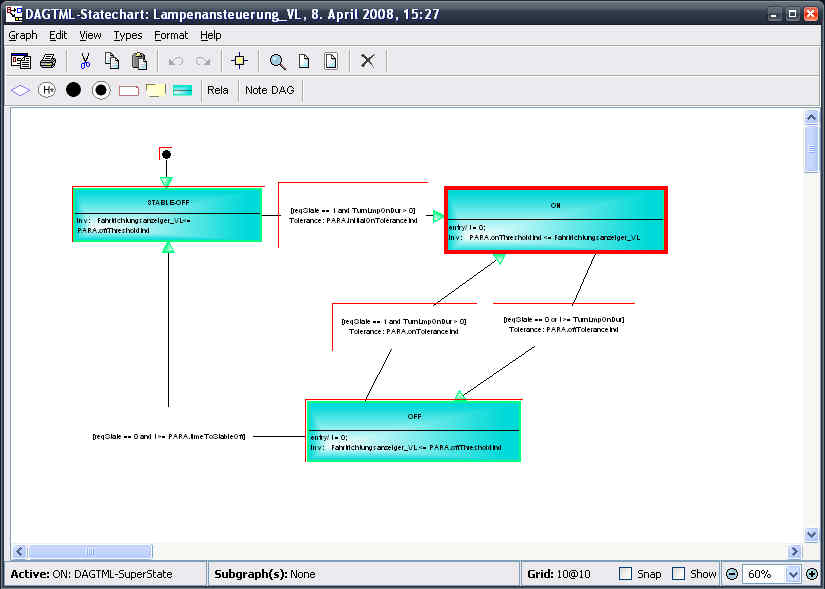 Another thing is: if I don't adjust the size of the windows showing the graphs so that they don't overlap everything goes terribly wrong and weired things are beeing displayed. 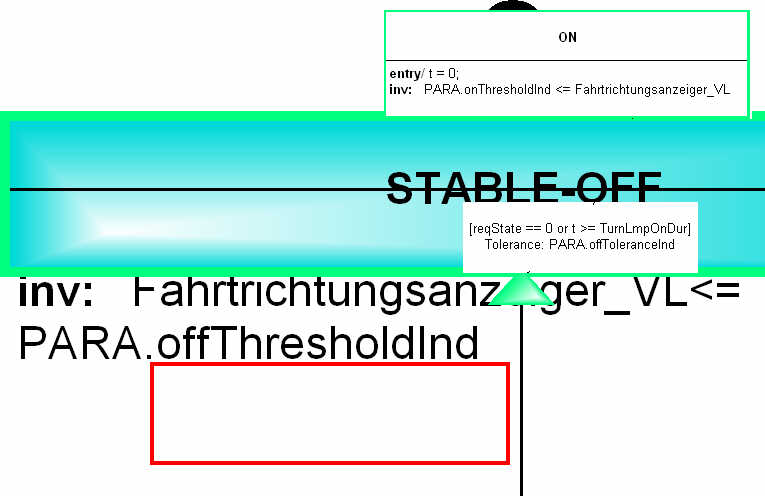 P.S.: I'm sorry about the really poor image quality, but somehow the PNG-upload did not work. The server complained that the filetype is not in (jpeg, png, gif,...) |
Posted By: stevek
Date Posted: 21.Apr.2008 at 16:56
|
I've created a patch, http://www.metacase.com/support/45/program/animateframe.mep - animateframe.mep , that should resolve the problem with red animate frames being incompletely erased when zoomed. The only change is to the display of the animation frames, making the area to redraw larger, so it won't have adverse effects elsewhere. See http://www.metacase.com/support/45/program/ - How to use patch files . Please let me know if this solves that problem for you, and I will add the patch to our support pages.
I can't reproduce your problems with individual objects being scaled randomly. In my load tests with the Digital Watch example I could make the Java applet in IE display garbage, and eventually crash itself or IE, but I couldn't persuade MetaEdit+ to misbehave. If you are sending multiple animate commands programmatically, you might want to consider only animating when the user requests - otherwise most of the effort will be spent marshalling and unmarshalling the SOAP requests and updating the Diagram Editors, rather than actually running your program.
Uploading PNG files seems to work, but maybe your file was larger than the limit. I've increased the limit to 250KB - let me know if you still have trouble.
|
Posted By: martind
Date Posted: 24.Apr.2008 at 15:52
|
Hi steve, I'm sorry that I didn't give you feedback any earlier but I had some other issues to resolve that came up with my application. However, I tried to apply your patch but have a short question about how to do that. I copied the mep-file into the MetaEdit+ working directory as it says on the support page you linked me to. But I don't know how to edit the command line or shortcut that starts MetaEdit+. Can you give me a hint on that? Regards, Martin |
Posted By: stevek
Date Posted: 24.Apr.2008 at 17:04
|
Hi Martin,
You just need to use your normal operating system procedures. Below are instructions for Windows - the exact paths will vary depending on whether you have the Evaluation version or not.
Now when you start MetaEdit+ from the edited shortcut, the patch will be included. You should see the progress dialog flash briefly before the Startup Launcher opens, and Help | About should show the name or date of the patch in the left list. You can revert back to the version without the patch simply by removing the command line parameters you added above: patches are included dynamically at each MetaEdit+ startup. If you want several patches, precede each with fileInPatch:. Alternatively, you can switch to a single command line argument, fileInPatches (with no patch name). That will include all patches named in a patches.txt file in the current directory or patches subdirectory, or, if there is no patches.txt file, all .mep patches from the patches subdirectory in alphabetical order.
|
Posted By: martind
Date Posted: 24.Apr.2008 at 17:19
|
Thank you for your reply. I'm normally a mac user so I'm not really good with less obvious windows features... |
Posted By: martind
Date Posted: 25.Apr.2008 at 17:53
|
Hello steve, I finally got to try out your patch. When I start MetaEdit+ there is a failure message which says that "Your image has the wrong patch level to read this patch...". I'm using the commercial MetaEdit+ 4.5 version but not the SR1 release. |
Posted By: stevek
Date Posted: 25.Apr.2008 at 18:49
Yes, you'll need to install 4.5 SR1 first - which you'll want to do anyway because of all the cool http://www.metacase.com/support/45/program/45sr1.html - new features  . Your site license manager will have received instructions for this around April 4th 2008. Email me if there are any problems! . Your site license manager will have received instructions for this around April 4th 2008. Email me if there are any problems!
|
Posted By: stevek
Date Posted: 22.Jul.2008 at 13:11
|
Hi Martin,
Now that you are using SR1, can you confirm that the above patch solved your problem?
Thanks,
Steve
|
Posted By: martind
Date Posted: 22.Jul.2008 at 14:55
|
Yes. It works! I tried some arbitrary zoom levels while highlighting elements in the model and all of them seem to work good. Thank you, for the patch! |