More restrictive bindings
Printed From: MetaCase
Category:
Forum Name: MetaEdit+
Forum Description: All topics relating to MetaEdit+ or DSM
URL: https://www.metacase.com/forums/forum_posts.asp?TID=175
Printed Date: 27.Mar.2026 at 02:17
Software Version: Web Wiz Forums 12.05 - http://www.webwizforums.com
Topic: More restrictive bindings
Posted By: newbie01
Subject: More restrictive bindings
Date Posted: 18.Sep.2010 at 22:15
|
Hi, I'm trying to figure out how to make some of my bindings more restrictive than they currently are. Let's say I have a Relationship with 2 roles but several different objects. But only certain objects can be used in these roles with certain other objects. That is, all objects cannot be used with all other objects. For example, let's say my relationship is "causal" and the roles are either "causes" or "is caused by". Let's say object A can "cause" object B and object B can cause object C but object B is not allowed to cause object B (or object A). I don't see a way in the Bindings tab of the Graph tool to make the bindings "more specific." If I have a lot of possible objects that can all use the causal role, but they should only work in specific combinations, how do I define that? Thanks. |
Replies:
Posted By: jpt
Date Posted: 18.Sep.2010 at 23:24
|
You can define several bindings using the same relationship type and role types but having different object types for each individual binding. Using your example two bindings (containing <Object types><Role types><Relationship type><Role types><Object types>) that specify the rules are:
<object A><causes><causal><is caused by><object B>
<object B><causes><causal><is caused by><object C>
In the graphical GOPPR this would look like:
 Having defined these bindings the more restrictive bindings you mentioned are defined as there is no causal relationship B->B or B->A. Also A->A, A->C, C->A and C->C are not possible either. You may add such bindings if they are needed.
You may also use constraints for roles and relationships to specify which kind of connections objects may have with relationships and roles.
|
Posted By: stevek
Date Posted: 18.Sep.2010 at 23:32
You can make as many bindings as you like: you don't need to put all the rules for one relationship type in the same binding.
You see this quite often, e.g. Data Flow Diagrams can have Flow from Process to Store, External or Process, and also from Store, External or Process back to Process - but not between a combination of just Stores and Externals. Not all metamodeling languages (i.e. metametamodels) can cope nicely with things like that. That's why GOPPRR has the concept of binding, and bindings are owned by graph types - rather than trying to say that a relationship type owns its bindings, or a relationship type owns its roles, or (worst) an object type knows its bindings.
|
Posted By: stevek
Date Posted: 18.Sep.2010 at 23:34
Heh, Juha-Pekka was faster this time! Extra points for the pretty picture too  . .
|
Posted By: newbie01
Date Posted: 19.Sep.2010 at 02:22
|
I'm not using the graphical GOPPR, I'm using the form-based Graph tool. I don't see how I can create separate bindings using the Graph tool. Does this mean I have to create separate graph types to do this? When using constraints, could I use the idea of an object being in "at most zero" relationships or roles? Thanks. |
Posted By: jpt
Date Posted: 19.Sep.2010 at 12:51
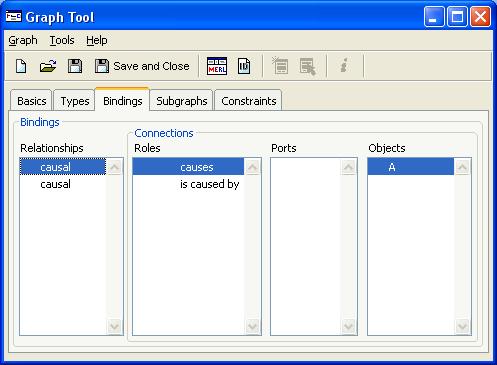
You can just add new bindings by opening the pop-up menu and choosing add... The same relationship type and role types are used in the different bindings but just the object types are different. The result in binding tool should look then something like shown below:
 |
Posted By: newbie01
Date Posted: 19.Sep.2010 at 21:33
| Hey, that's pretty easy! Thanks. |
Posted By: newbie01
Date Posted: 19.Sep.2010 at 21:38
| That leads to another question, though. If I've already created a model based on this metamodel, how do I re-validate the model based on the updated metamodel? |
Posted By: stevek
Date Posted: 20.Sep.2010 at 12:59
|
The quick answer is that there is no magic "revalidate" button. Generally metamodel changes fall in two phases: 1) metamodel development and 2) metamodel use. 1) During development, the only real user is the metamodeler, and models at that stage are small and often just for playing around with the language. Those kind of models are updated by hand (or even thrown away if the language changes completely). At this stage there's little point trying to automate model updates (beyond what MetaEdit+ offers automatically), because it would take longer to build the automation than simply do it once by hand.
2) During metamodel use, existing models generally shouldn't be rendered invalid by metamodel changes. They represent real products, and probably a fair amount of work by the modelers. Just as with the evolution of programming languages, the old structures should be allowed - in other words, the models must still open OK, and generators must still work with them. Modelers need to be warned of the obsolesence, not only in the "language version release notes" but also in the models themselves. The best way to do this is often with a little generator that finds the old structures; this can then be run as part of a checking report, and also by the symbols of the elements in question - e.g. so they show a red exclamation mark or some other warning sign. Where possible there should also be advice on the recommended way to update the models, e.g. "Please replace instances of Foo with NewFoo".
Of course if the change can be specified precisely, it's easy enough to use the API to write a model transformation that automates the update. In practice this is actually vanishingly rare - there's just something about language evolution, whether in human languages or computer languages, that makes this kind of change unusual.
In fact, most changes to metamodels in production are benign, not requiring changes to existing models. Nine times out of ten, the changes are structural extensions which are handled automatically by MetaEdit+, which upgrades the existing models. Rules are more often relaxed than tightened - the metamodeler initially often tries to lock things down too much. Modelers intuition of the domain and language allows them to see things like new ways of connecting objects, along with the appropriate semantics of what that would mean. The metamodeler then relaxes the rule forbidding that kind of connection, and extends the generators to provide appropriate code for that case.
|
Posted By: newbie01
Date Posted: 21.Sep.2010 at 23:36
|
You mention a checking report generator. Do you have instructions on how to create one of these or maybe an example? When you mention displaying a red exclamation point, you're referring to doing that in the checker, not in the model itself, right? |
Posted By: newbie01
Date Posted: 22.Sep.2010 at 03:18
|
Regarding the Graph Tool (bindings, constraints, etc.), is there a way to specify that a particular object type must be in a relationship with, say, 2 other object types? So, this would not fall under the "at most" rules under the Constraints tab (there's no "at least" option), but even more than that I want to go "through" the relationship to the other object it's attached to. Is this possible or is this something you'd do in a checker generator? |
Posted By: stevek
Date Posted: 22.Sep.2010 at 11:02
|
We don't have rules in bindings that require things like that - they tend to be tricky because they make it impossible to build a legal graph without going through some illegal states. E.g. if object type A must be related to a B and a C, creating a new A makes the graph illegal. As you say, those kind of rules are best handled by a checker generator. That way the user can choose when to run it. For instance, you can run the generator called "Checkings" in any graph. It lists all objects without any relationships, and all objects with empty properties. It's defined in the supertype of all graph types, Graph; you can see it from any Generator Editor with Generator | Change Graph Type... | Graph. (You'd probably define your own checking generators in the appropriate graph type, though.)
As I mentioned elsewhere, if you want you can also make a particular symbol display a warning message or icon of some kind, if a particular rule isn't fulfilled. E.g. in the symbol for your type A you could put a text element "Please connect to a B", with a generator condition source: "do .B {'x'}" and the condition string left blank -- i.e. the warning text is only shown if the generator produces no x's, because there are no B's connected. You'd have a similar element for C's.
Of course, if you build warning symbols for every possible case, you'll end up with models that for much of the time look like the cockpit display of a 747 in free fall -- so many warnings that they're no longer useful, and the modeler will just ignore them. If domain knowledge already tells the modeler than A should be connected to B and C, you probably don't need a warning symbol for it. Try thinking instead of how best to make the modeling language work like the modelers' understanding of the problem domain, so using it is natural.
Another hint is "convention over configuration": rather than requiring a B and a C connected to every A, consider what would be the default B and C, and build your code generator to assume those in cases where B or C is missing. (Obviously this isn't always possible, but surprisingly often it is.) This keeps models small, which is a major factor in making them easy to understand, build and maintain. It also helps with evolution: if you change your mind as to the default B, one person (you) updates the generator in one place - rather than every modeler updating every B in every model.
|