
|
Objects with fixed ports |
Post Reply 
|
| Author | ||
Tahir 
Major Contributor 
Joined: 01.Mar.2012 Points: 27 |
 Post Options Post Options
 Thanks(0) Thanks(0)
 Quote Reply Quote Reply
 Topic: Objects with fixed ports Topic: Objects with fixed portsPosted: 10.Sep.2013 at 11:13 |
|
|
Hi!
I was wondering if and how it is possible to pre-define ports of an object. For example, I am trying to model a hydraulic valve as an object. It can have two or four ports depending on the selection. I am thinking of the following two alternatives: 1. Define an object "Valve" with a property named "type" such that the ports are automatically generated based on the type. 2. Define two different objects corresponding to two different valve types with pre-defined ports. Which one of the above is possible and how? Regards /Tahir
|
||
 |
||
|
stevek
MetaCase 

Joined: 11.Mar.2008 Points: 643 |
Post Options
Thanks(0)
Quote Reply
Posted: 10.Sep.2013 at 11:28 |
|
|
2. works, using static ports.
1. can't be done in a nice way. The dynamic ports have to be real objects, and you can't generate objects on the fly. Nor would you want to: it has to be the same dynamic port object each time, not a newly created one each time you ask. Another way would be to create one valve type with dynamic ports, fetching them from a subgraph. Then you can have two instance graphs, one with 2 of the dynamic port objects and the other with 4. When you create each valve instance, you'd link it by decomposition to one or other graph. That approach would be best if you think you are going to need many different kinds of valves, and want modelers to be able to create new kinds on the fly. [Edit: But remember YAGNI - if you can use 2. above, that's simpler for both metamodeler and modeler.] Of course it doesn't have to be a subgraph, it can be any reference you can follow at runtime, e.g. an Editable List property "Valve Type" could name the kind of valve, and you could have a Table graph called Valve Types that contained similarly-named specifications, each with a collection property containing the respective valve ports. The template would fetch its subobjects like this: do graphs where type = 'Valve Types' { foreach .ValveType; where :Valve Type; = :Valve Type;2 { do :Valve Ports; { id newline } } }
Edited by stevek - 10.Sep.2013 at 11:29 |
||
|
||
|
Tahir
Major Contributor
Joined: 01.Mar.2012 Points: 27 |
Post Options
Thanks(0)
Quote Reply
Posted: 10.Sep.2013 at 13:04 |
|
|
In that case, I would like to know how to define static ports in the symbol editor. Or is there any other easy approach?
|
||
|
||
|
stevek
MetaCase
Joined: 11.Mar.2008 Points: 643 |
Post Options
Thanks(0)
Quote Reply
Posted: 10.Sep.2013 at 13:45 |
|
|
Create a Port type with Metamodel | Port Tool, giving it the properties each port will need (e.g. a Name and a Direction). Edit an object's symbol, add a connectable where you want one such port to go, choose Format and Add... a new port to the Ports list, giving it appropriate properties. Each connectable in a given symbol must have different ports, but the same port can be reused in several symbols with Add Existing... You'll also want to add the Port type to the appropriate Bindings in the Graph Tool, and consider whether you want a Constraint (e.g. the Direction at one end must be different from the Direction at the other).
See also: Port Tool, Port Constraints, Ports in Connectables, Ports in Bindings, Ports in Generators. The Port Examples project contains some sample metamodels and models with static ports, e.g. Electronics.
|
||
|
||
|
Tahir
Major Contributor
Joined: 01.Mar.2012 Points: 27 |
Post Options
Thanks(0)
Quote Reply
Posted: 10.Sep.2013 at 16:42 |
|
|
This helped to some extent. Now I want to know the following:
1. How to use the generator in symbol editor to display the properties of the port. For example, assume the battery tester model of the electronics in the port example project. How to display the selected direction, voltage and signal type using the generator. 2. Is it possible to dynamically arrange dynamic ports. For example, the class diagram model shows dynamic ports based on the property "Attributes". Is it some how possible to move the ports as in the movable ports example? |
||
|
||
|
jpt
MetaCase

Joined: 25.Mar.2008 Points: 253 |
Post Options
Thanks(0)
Quote Reply
Posted: 11.Sep.2013 at 22:17 |
|
You may add a text element to the symbol definition and define there a generator producing the information you want. The screenshot below shows how the port information for the battery is defined in the symbol definition with a text element next to the battery symbol including the generator. Diagram Editor behind then shows the resulting values (+5V, Out) when the models are created. 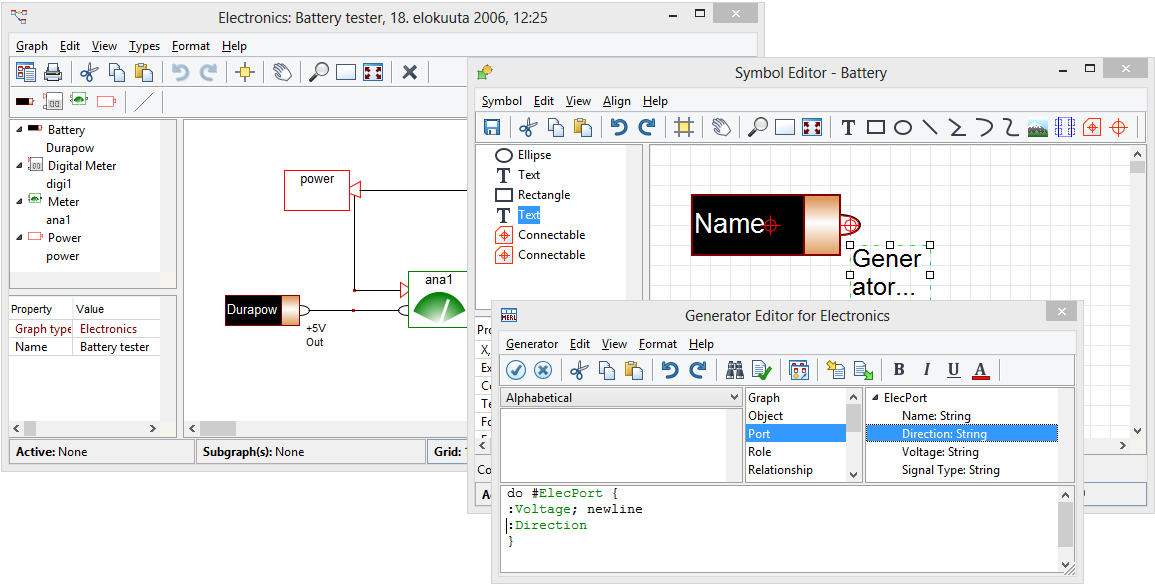 A number of other possibilities also exist, like instead of having the port information as part of the Battery object you may have it in the connecting role, or even hide parts of the battery port details once the connection is made.
In the class diagram example, moving attributes of the class also moves the dynamic ports. This is because the list shown is directly the collection of the attributes as given in the list. You can also have alternative ordering by writing a generator in the ‘subobjects’ tab’s Generator field, like do :Attributes; orderby :Access level; { id newline } in which case the attributes are ordered by their access level (public, private, protected). The list can be sorted ascending, descending etc. using normal MERL commands. Similarly if the attributes would be defined in another subdiagram you could access the port data from there or even use the layout of the model (like x, y, size, content) data for the basis of sorting. There is a short video demonstrating how ports can defined along with a different cases at: http://www.metacase.com/webcasts/EnhancedDynamicBehaviorWithTemplates.html. I hope these help. Edited by jpt - 11.Sep.2013 at 22:25 |
||
|
||
|
stevek
MetaCase
Joined: 11.Mar.2008 Points: 643 |
Post Options
Thanks(0)
Quote Reply
Posted: 11.Sep.2013 at 22:49 |
|
|
Actually, the answer to question 1 isn't really correct. The generator in Battery can only navigate to the #ElecPort port if there is a role attached to it. But with static ports as in this case, the metamodeler knows the properties of the port when designing the Battery symbol, so he can show exactly what he wants just with fixed text elements. Personally I think in most cases that's unnecessary - with static ports it's better to make the distinction between the various ports graphically obvious, as the Electronics example does.
If question 1 were asked for dynamic ports, that's easy. The subobjects will each display their own information, according to their symbol (or whatever library symbol is chosen in the Template). For question 2, there are some possibilities involving creative use of relationship co-ordinates, but I suggest you don't invest too much effort for now. We have ongoing work to make it possible to move ports around and change their order by dragging the end of the attached role. In all cases with ports, and particularly with dynamic ports, be careful not to build something that becomes a nightmare for modelers to create, read and maintain, because the models are full of many ports and relationships between them. Most port-based languages I've seen made by people from a UML, Components or Electronics background fall into this trap. Always think about how you can raise the level of abstraction with a true domain-specific language, saving the modeler from having to specify all the low-level details.
|
||
|
||
|
jpt
MetaCase
Joined: 25.Mar.2008 Points: 253 |
Post Options
Thanks(0)
Quote Reply
Posted: 12.Sep.2013 at 09:29 |
|
|
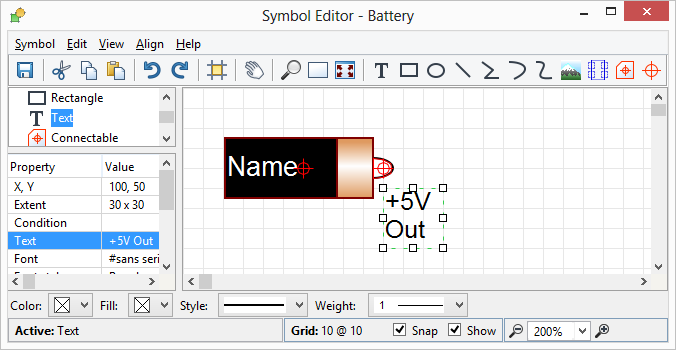
Indeed, if you want to show the
values of static port regardless if it is connected the following plain text
output will do it. If you want to show values only when the port is used then
the previously described can be used.
 |
||
|
||
|
Tahir
Major Contributor
Joined: 01.Mar.2012 Points: 27 |
Post Options
Thanks(0)
Quote Reply
Posted: 12.Sep.2013 at 10:33 |
|
|
That solved all the major issues related to port. The only thing remaining is how to change the background color of the text for the port name id.
Referring to the picture below, I want to remove the white background of the text for the port name as well as the black vertical lines on its side. 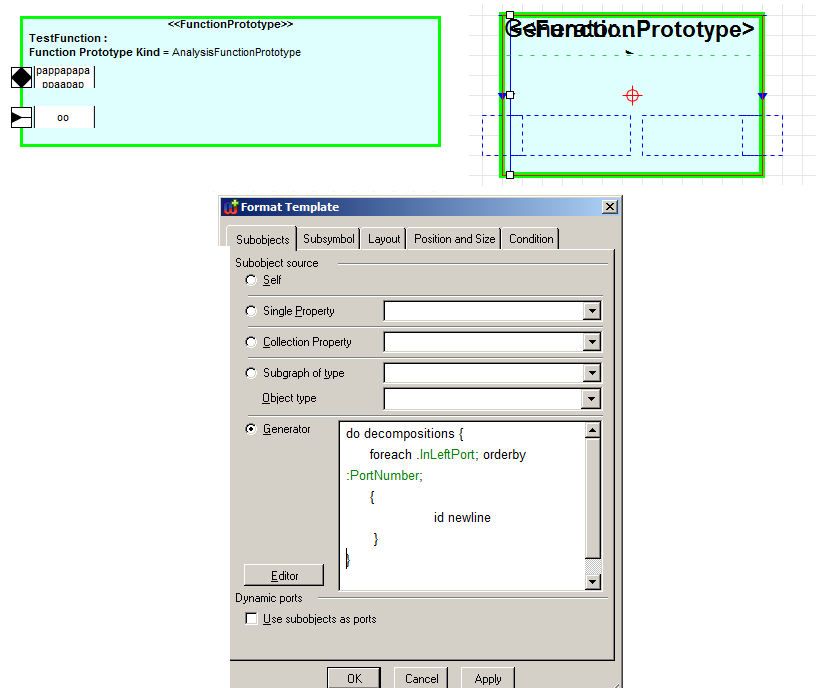 |
||
|
||
|
janne
MetaCase

Joined: 25.Mar.2008 Points: 58 |
Post Options
Thanks(0)
Quote Reply
Posted: 12.Sep.2013 at 10:47 |
|
|
Hi,
Please define an own subsymbol definition for that text label to refer to the Library symbol (in the following named as 'id_left_subsymbol'): 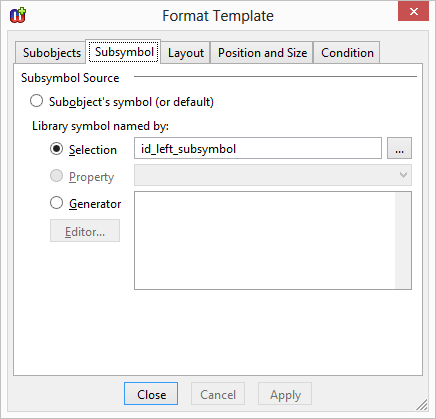 And 'id_left_subsymbol' definition (Generator with transparent background color): 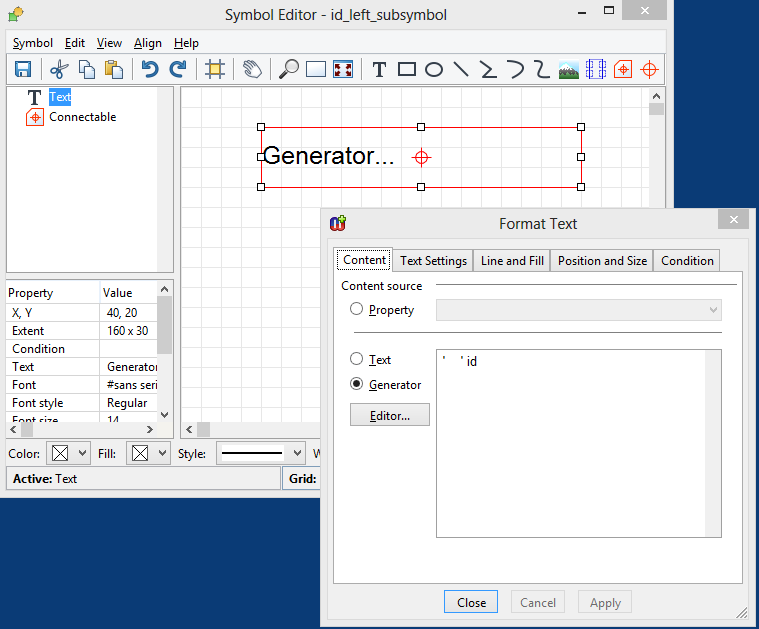 |
||
|
||
|
Post Reply
|
|
| Tweet |
| Forum Jump | Forum Permissions You cannot post new topics in this forum You cannot reply to topics in this forum You cannot delete your posts in this forum You cannot edit your posts in this forum You cannot create polls in this forum You cannot vote in polls in this forum |


 Topic Options
 This helped to some extent. Now I want to know the following: