
|
Item Selection |
Post Reply 
|
| Author | |
jianliu 
Major Contributor 
Joined: 12.Sep.2014 Location: Melbourne Points: 23 |
 Post Options Post Options
 Thanks(0) Thanks(0)
 Quote Reply Quote Reply
 Topic: Item Selection Topic: Item SelectionPosted: 02.Jun.2015 at 04:17 |
|
Hi,
I'm developing a DSL with a generator to retrieve items from another graph as shown in the diagram below. What I want is to allow user to select some of the items from the graph. A possible solution is to have a check box on the lefthand side of each of the items, then the generator can test which items have been selected by user. But, I don't have any idea how to implement the solution. Could you please suggest a practical approach? 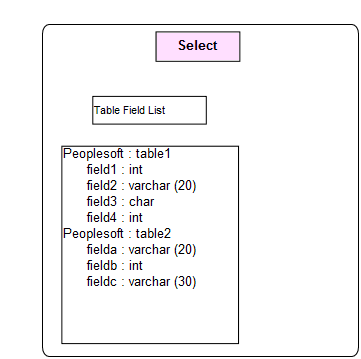
|
|
 |
|
|
jpt
MetaCase 

Joined: 25.Mar.2008 Points: 253 |
Post Options
Thanks(0)
Quote Reply
Posted: 02.Jun.2015 at 14:07 |
|
Hi,
I believe the solution depends on what kind of items you want to be available for selection.
For example, if user can choose among tables, then having a collection of tables is enough. MetaEdit+ supports reuse, so with ’Add existing’ a user can refer to the tables already defined elsewhere (in some other graph, possibly based on different graph type, defined by someone else). In metamodel this would mean that the element listing two tables has a collection property that can contain tables. The same would work if you want user to select fields instead.
Juha-Pekka
|
|
|
|
|
jianliu
Major Contributor
Joined: 12.Sep.2014 Location: Melbourne Points: 23 |
Post Options
Thanks(0)
Quote Reply
Posted: 03.Jun.2015 at 03:52 |
|
Hi Juha-Pekka,
As shown in the diagram below, I have extracted tables and fields from another graph and displayed them by using a text generator. Further, I want users to pick up some of the displayed items (tables or fields) from the graph. For a traditional desktop application, users may either double click the item or select a check box on the lefthand side of the item. I don't know what is the MetaEdit+'s way to implement this feature. It will be very appreciated, if you can give a sample from the demo applications. 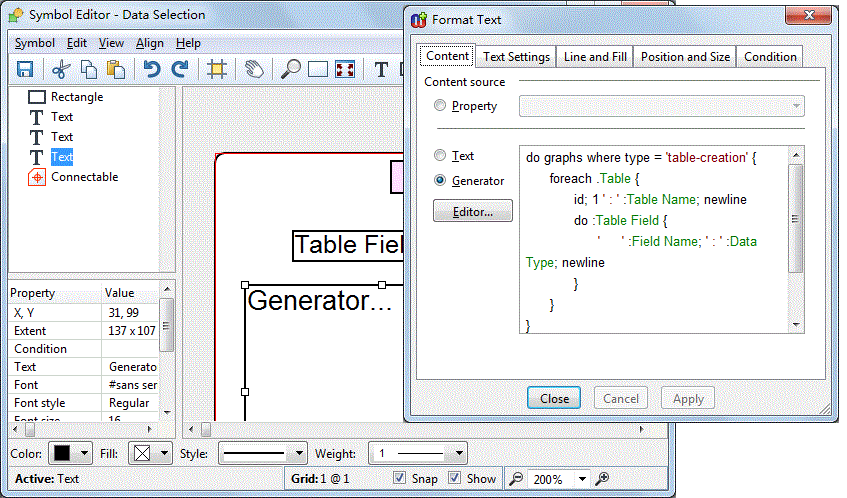
|
|
|
|
|
jpt
MetaCase
Joined: 25.Mar.2008 Points: 253 |
Post Options
Thanks(1)
Quote Reply
Posted: 03.Jun.2015 at 16:09 |
|
Hi and thanks for providing a sample.
Currently the generator retrieves all tables (and their fields) from the repository and when the number of tables and fields grows showing them all inside a symbol is not likely to scale.
Without knowing other details of the language, my first proposal is allow user to simply select among all tables and field available. To implement this approach, I would add a collection property (e.g. Data) that can refer to the fields to be selected (or to tables to be selected, or to both. Referring both can be achieved by having a common and abstract supertype so the Data collection property contains the supertype (so tables or fields)).
If user chooses just Table we can expect that all its values are selected. Alternatively user can select just fields individually. The actual selection is made with Selection tool allowing the person to use different filters to select, like show all fields, show all tables, navigate into fields by table, etc (see Selection tool and its functionality).
If you prefer that user still sees selected elements in the diagram as in your sample, MERL script can show table and field information accordingly – depending on what means if only table is selected without fields, if just field is selected, or perhaps you expect that table should be selected if any fields of it are selected. As an example, in the screenshot below PeopleSoft2 is grey as user has not selected the table but just a fieldB (and PeopleSoft1 table and Field1). Similarly other visualizations are possible, like if just Table is selected we could then expect that all its fields are selected too.
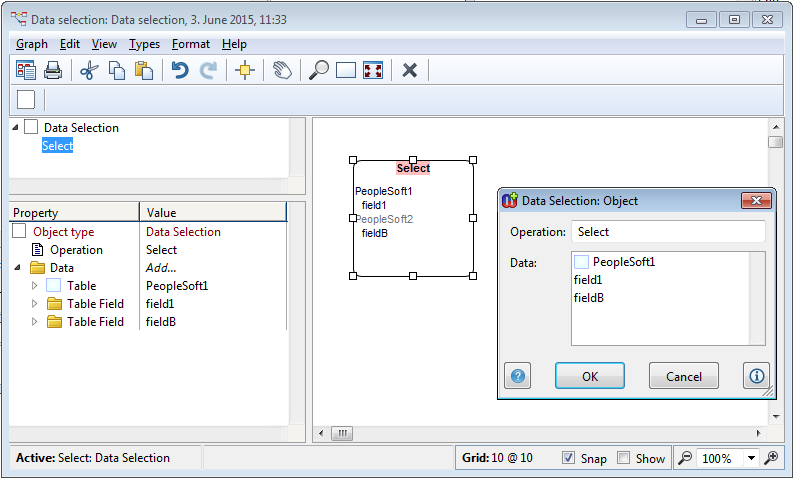 Also other selection approaches are possible. For example, if you want to describe in addition to selection how the table or field is used (e.g. create, read, update, delete), there can be a relationship from the individual field or table to another element indicating also more than selection but also the operation (like read or delete). Implementation for this would follow the same idea as you have done for templates in earlier post.
I hope this helps. Edited by jpt - 03.Jun.2015 at 23:06 |
|
|
|
|
jpt
MetaCase
Joined: 25.Mar.2008 Points: 253 |
Post Options
Thanks(0)
Quote Reply
Posted: 08.Jun.2015 at 13:49 |
Hi Jian,
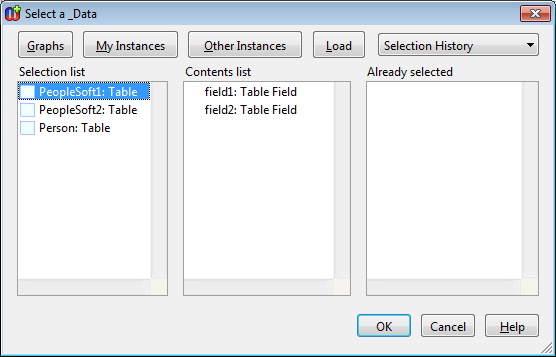
Selection tool shows model elements along with the values of their identifyng property. It is a single property or MERL-based ID generator. By default, MetaEdit+ sets the property defined first as an identifier. It looks that perhaps the identifying property has been removed or otherwise identifier is not defined.
Please add identifier to table and field objects by setting Object tool for 'Table' (and Field) and then selecting identifying property (like Table name) in the list and choose from the pop-up menu 'Set as identifier'. Now the result should look like below. Alternatively define MERL-based identifier by choosing Tools | Set Identifier Generator.
 Juha-Pekka
|
|
|
|
|
jianliu
Major Contributor
Joined: 12.Sep.2014 Location: Melbourne Points: 23 |
Post Options
Thanks(0)
Quote Reply
Posted: 08.Jun.2015 at 15:00 |
|
Hi Juha-Pekka,
Thanks for your reply! I have another problem. My table contains a string property Table Name and a collection property of table field object, which has table name and other field properties (refer to the screenshot below). I put table name in each table field object is because I will refer to table field objects by table name. 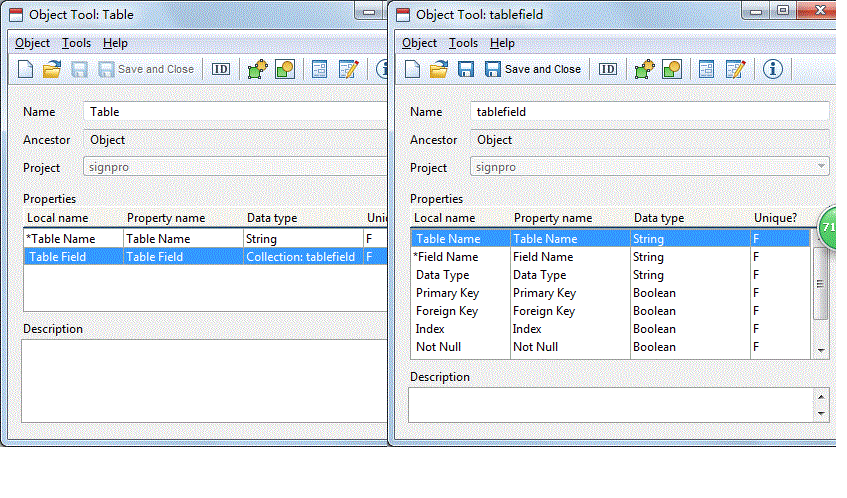 To avoid entering table name for each table field repeatedly, I want to reuse the entered table name at table object level for each table field. Could you please advice how I can do this? Jian |
|
|
|
|
jpt
MetaCase
Joined: 25.Mar.2008 Points: 253 |
Post Options
Thanks(0)
Quote Reply
Posted: 08.Jun.2015 at 15:40 |
|
I would try to avoid copying the same information to many places as otherwise your language user needs to also maintain many instnaces of the same table name as the model evolves. Thus, my first solution would be to remove ’Table name’ property from ’tablefield’ object totally.
When using Selection tool you may then select first by table and then navigate into its table field to select them (above dialog in my previous answer shows such a case as first among Tables ’PeopleSoft1’ is selected and then you may see two tables of it (field1, field2) and select them (Add from the pop-up menu).
If you later need to access TableName for a given selected table field, MERL can find the one and only instance (name of table) and show it. This gives several benefits like keeping the model small, need to change table name only once, check consistency...
|
|
|
|
|
Post Reply
|
|
| Tweet |
| Forum Jump | Forum Permissions You cannot post new topics in this forum You cannot reply to topics in this forum You cannot delete your posts in this forum You cannot edit your posts in this forum You cannot create polls in this forum You cannot vote in polls in this forum |


 Topic Options
