|
Eclipse can't find MetaEdit+ 's API |
Post Reply 
|
Page 12> |
| Author | |
Emad 
Major Contributor 
Joined: 15.Jan.2015 Points: 20 |
 Post Options Post Options
 Thanks(0) Thanks(0)
 Quote Reply Quote Reply
 Topic: Eclipse can't find MetaEdit+ 's API Topic: Eclipse can't find MetaEdit+ 's APIPosted: 30.Jan.2015 at 02:06 |
|
I'm trying to get Eclipse and MetaEdit+ connected through API.
Followed all the instructions ,which is available in ''metaedit-plugin-for-eclipse", but unfortunately could not succeed with it. When I am trying to get them connected it is just not responding by Ecplise :( Wondering if any one has had such an issue before and get it fixed somehow!
|
|
 |
|
|
stevek
MetaCase 

Joined: 11.Mar.2008 Points: 643 |
Post Options
Thanks(0)
Quote Reply
Posted: 30.Jan.2015 at 10:28 |
|
When you want to know whether someone has had such an issue before, the toolbar at the top of the forum offers a Search button that may be helpful:
http://www.metacase.com/forums/forum_posts.asp?TID=788&title=integrating-eclipse-with-metaedit-50-for-mac Edited by stevek - 30.Jan.2015 at 10:29 |
|
|
|
|
Emad
Major Contributor
Joined: 15.Jan.2015 Points: 20 |
Post Options
Thanks(0)
Quote Reply
Posted: 30.Jan.2015 at 11:53 |
|
Thanks Steve,
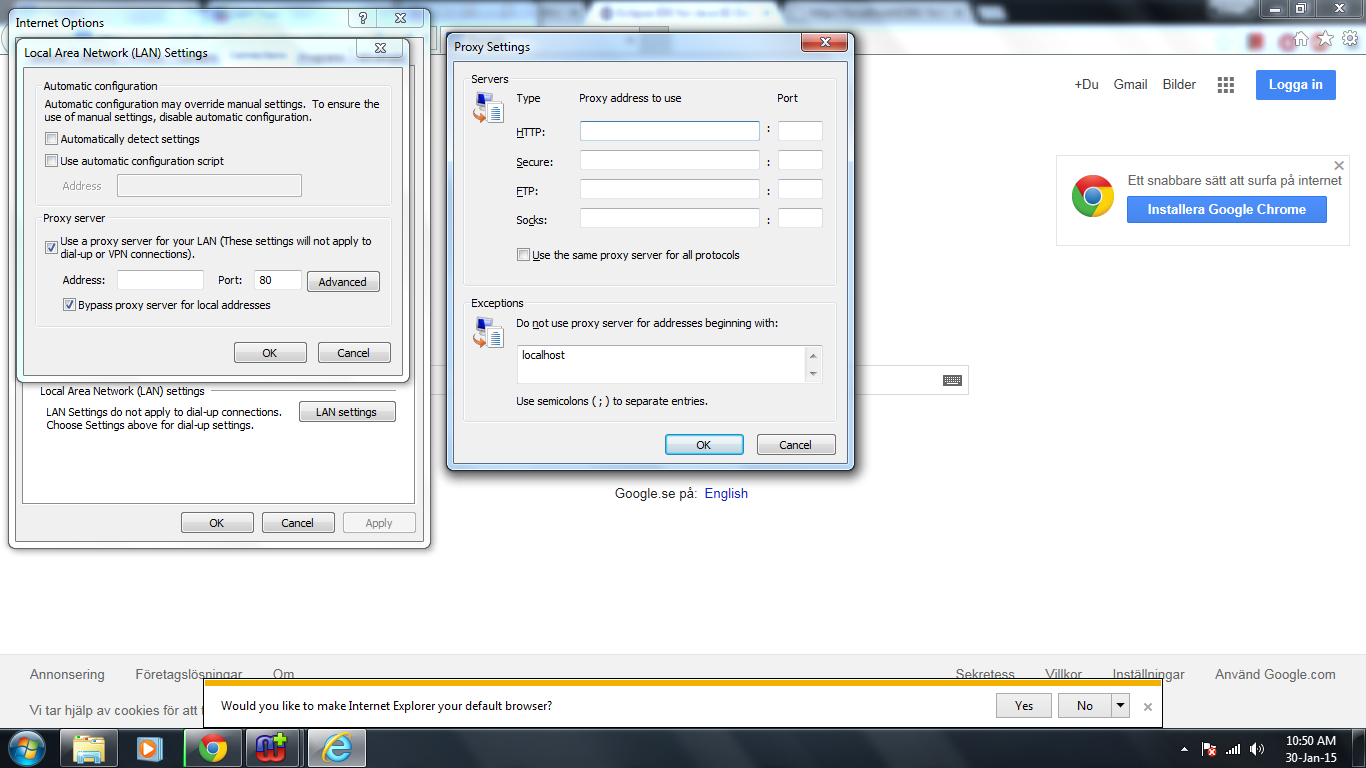
I am using windows 7 ,so this post can not help me that much! I have even turned off my firewall and the localhost had already been added as an exception into my internet explorer proxy server ,if you mean like the picture attached here!
|
|
|
|
|
stevek
MetaCase
Joined: 11.Mar.2008 Points: 643 |
Post Options
Thanks(0)
Quote Reply
Posted: 30.Jan.2015 at 11:58 |
|
According to your proxy settings, you use a proxy, but you never supply the proxy address. Without knowing your IT setup it's hard to be sure, but that doesn't look like it would work: when I try to make those settings, IE tells me "The proxy settings are blank. This will prevent access to the internet". Whether that's relevant to the local communication used by the API I don't know, but it doesn't look like a good idea :)
|
|
|
|
|
stevek
MetaCase
Joined: 11.Mar.2008 Points: 643 |
Post Options
Thanks(0)
Quote Reply
Posted: 30.Jan.2015 at 12:04 |
|
The solution in the post I referred to wasn't Mac-specific (start MetaEdit+ from Eclipse, or if you start it manually make sure it's running the API).
The netstat command referenced in the stackoverflow link there is available on Windows (e.g. netstat -ano). What exactly do you mean by "When I am trying to get them connected it is just not responding by Ecplise :(". What step are you taking, and what is shown? The Axis / Eclipse options for how SOAP / http connections (mentioned in that post) are formed are platform independent AFAIK, so worth looking into. Edited by stevek - 30.Jan.2015 at 12:05 |
|
|
|
|
Emad
Major Contributor
Joined: 15.Jan.2015 Points: 20 |
Post Options
Thanks(0)
Quote Reply
Posted: 30.Jan.2015 at 16:13 |
|
Hello Steve!
I followed the instructions ,which led to Eclipse found the activated API from MeatEdit+. Then I corrected that wrong paths with that red marks ,when one gets the MeatEdit plugin for the first time in the Eclipse. Then I clicked on the ok to confirm the found API.What I got was a marker-mouse- which is tending to spin for ever! The Metaedit's API can be found by Eclipse ,but what Eclipse can not do is to call the graph into it. I assume it does have with those security setting to do within Explorer. I even turned off firewall. The only thing ,which I am not still sure about is Proxy settings. I run "netstat -a" ,which confirms TCP is listening to 6390.  |
|
|
|
|
stevek
MetaCase
Joined: 11.Mar.2008 Points: 643 |
Post Options
Thanks(0)
Quote Reply
Posted: 30.Jan.2015 at 17:04 |
|
OK, so MetaEdit+'s API is working fine, and the problem is in Eclipse or Windows. In Internet Explorer's proxy settings, turn off "Use a Proxy server for your LAN". You'll need to restart Eclipse after making changes to the proxy settings.
The Eclipse download link you posted is to the original tested version, Indigo. My installation of that won't even start anymore, nor will my old installation of Juno, the next version. Whether that's a Java 8 problem, a Windows 8.1 problem, or just Eclipse bit-rot I don't know just yet. If you really did install Indigo, you might be better off using a more modern Eclipse - we've tested the plugin up to Luna. I'm not sure you've proved that Eclipse can find the MetaEdit+ API. To find out, you can stop the API server in the API Tool in MetaEdit+, turn on the Log Events checkbox, and restart the server. Any API SOAP messages sent from Eclipse will then be shown in the log when you press Update Log. |
|
|
|
|
stevek
MetaCase
Joined: 11.Mar.2008 Points: 643 |
Post Options
Thanks(0)
Quote Reply
Posted: 30.Jan.2015 at 17:13 |
|
I just tried with a fresh install of Eclipse Luna (4.4), and everything worked as expected. We have a proxy here that requires a password, so to download the plugin in Eclipse I had to set Window | Preferences | General | Network | Active Provider: Manual, check HTTP and HTTPS and Edit them to set Auth=Yes and give proxy user name and password. Windows showed a firewall permission request for both Eclipse and MetaEdit+, and I allowed both.
|
|
|
|
|
Emad
Major Contributor
Joined: 15.Jan.2015 Points: 20 |
Post Options
Thanks(0)
Quote Reply
Posted: 30.Jan.2015 at 17:42 |
|
I had actually tested it with many different version of Eclipse.But the thing is that none of them are installed they actually work as virtual machines.
I have done exactly as you said regarding "you were not sure i've proved that Eclipse can find the MetaEdit+ API",but with the Luna version this time. When I start Server in the Metaedit+ and updated log so i got nothing in the serverlog. Then I pushed the button in the Eclipse " Start Metaedit+".This time when I updated log I got alot of scripts-text- as it is follwed :( "16:28:52.393 addingServerConnection: Transport<http> in: Adaptor<http/172.27.115.133:6390> 16:28:52.407 receivingPackage: POST /MetaEditAPI HTTP/1.0 Host: localhost:6390 Content-type: text/xml;charset=utf-8 Accept: application/soap+xml, application/dime, multipart/related, text/* User-agent: Axis/1.4 Cache-control: no-cache Pragma: no-cache Soapaction: "http://metacase.com/MetaEditAPI.typeName" Content-length: 687 <?xml version="1.0" encoding="UTF-8"?><soapenv:Envelope xmlns:soapenv="http://schemas.xmlsoap.org/soap/envelope/" xmlns:xsd="http://www.w3.org/2001/XMLSchema" xmlns:xsi="http://www.w3.org/2001/XMLSchema-instance"><soapenv:Body><ns1:typeName soapenv:encodingStyle="http://schemas.xmlsoap.org/soap/encoding/" xmlns:ns1="http://metacase.com/wsdl/"><receiver href="#id0"/></ns1:typeName><multiRef id="id0" soapenc:root="0" soapenv:encodingStyle="http://schemas.xmlsoap.org/soap/encoding/" xsi:type="ns2:METype" xmlns... size: 687 in: Transport<http> 16:28:52.411 receivingRequest: SOAPRequest[nil]{MetaCase.MetaEditAPI typeName: a MetaCase.METype} in: Transport<http> 16:28:52.411 evaluatingMessage: SOAPRequest[nil]{MetaCase.MetaEditAPI typeName: a MetaCase.METype} in: Transport<http> 16:28:52.412 sendingReply: SOAPReply[SOAPRequest[nil]{MetaCase.MetaEditAPI typeName: a MetaCase.METype}]{'Graph'} in: Transport<http> 16:28:52.414 sendingPackage: HTTP/1.1 200 OK Content-type: text/xml;charset=utf-8 Connection: close <?xml version="1.0" encoding="UTF-8"?> <SOAP-ENV:Envelope xmlns:xsi="http://www.w3.org/2001/XMLSchema-instance" xmlns:ns="http://metacase.com/wsdl/" xmlns:SOAP-ENV="http://schemas.xmlsoap.org/soap/envelope/" xmlns:ns0="http://www.w3.org/2001/XMLSchema"><SOAP-ENV:Body><ns:typeNameResponse SOAP-ENV:encodingStyle="http://schemas.xmlsoap.org/soap/encoding/"><result xsi:type="ns0:string">Graph</result></ns:typeNameResponse></SOAP-ENV:Body></SOAP-ENV:Envelope> size: nil in: Transport<http> 16:28:52.415 removingServerConnection: Transport<http> in: Adaptor<http/172.27.115.133:6390> 16:29:00.939 addingServerConnection: Transport<http> in: Adaptor<http/172.27.115.133:6390> 16:29:00.941 receivingPackage: POST /MetaEditAPI HTTP/1.0 Host: localhost:6390 Content-type: text/xml;charset=utf-8 Accept: application/soap+xml, application/dime, multipart/related, text/* User-agent: Axis/1.4 Cache-control: no-cache Pragma: no-cache Soapaction: "http://metacase.com/MetaEditAPI.typeName" Content-length: 687 <?xml version="1.0" encoding="UTF-8"?><soapenv:Envelope xmlns:soapenv="http://schemas.xmlsoap.org/soap/envelope/" xmlns:xsd="http://www.w3.org/2001/XMLSchema" xmlns:xsi="http://www.w3.org/2001/XMLSchema-instance"><soapenv:Body><ns1:typeName soapenv:encodingStyle="http://schemas.xmlsoap.org/soap/encoding/" xmlns:ns1="http://metacase.com/wsdl/"><receiver href="#id0"/></ns1:typeName><multiRef id="id0" soapenc:root="0" soapenv:encodingStyle="http://schemas.xmlsoap.org/soap/encoding/" xsi:type="ns2:METype" xmlns... size: 687 in: Transport<http> 16:29:00.942 receivingRequest: SOAPRequest[nil]{MetaCase.MetaEditAPI typeName: a MetaCase.METype} in: Transport<http> 16:29:00.942 evaluatingMessage: SOAPRequest[nil]{MetaCase.MetaEditAPI typeName: a MetaCase.METype} in: Transport<http> 16:29:00.943 sendingReply: SOAPReply[SOAPRequest[nil]{MetaCase.MetaEditAPI typeName: a MetaCase.METype}]{'Graph'} in: Transport<http> 16:29:00.943 sendingPackage: HTTP/1.1 200 OK Content-type: text/xml;charset=utf-8 Connection: close <?xml version="1.0" encoding="UTF-8"?> <SOAP-ENV:Envelope xmlns:xsi="http://www.w3.org/2001/XMLSchema-instance" xmlns:ns="http://metacase.com/wsdl/" xmlns:SOAP-ENV="http://schemas.xmlsoap.org/soap/envelope/" xmlns:ns0="http://www.w3.org/2001/XMLSchema"><SOAP-ENV:Body><ns:typeNameResponse SOAP-ENV:encodingStyle="http://schemas.xmlsoap.org/soap/encoding/"><result xsi:type="ns0:string">Graph</result></ns:typeNameResponse></SOAP-ENV:Body></SOAP-ENV:Envelope> size: nil in: Transport<http> 16:29:00.944 removingServerConnection: Transport<http> in: Adaptor<http/172.27.115.133:6390> 16:29:00.949 addingServerConnection: Transport<http> in: Adaptor<http/172.27.115.133:6390> 16:29:00.950 receivingPackage: POST /MetaEditAPI HTTP/1.0 Host: localhost:6390 Content-type: text/xml;charset=utf-8 Accept: application/soap+xml, application/dime, multipart/related, text/* User-agent: Axis/1.4 Cache-control: no-cache Pragma: no-cache Soapaction: "http://metacase.com/MetaEditAPI.allSimilarInstances" Content-length: 709 <?xml version="1.0" encoding="UTF-8"?><soapenv:Envelope xmlns:soapenv="http://schemas.xmlsoap.org/soap/envelope/" xmlns:xsd="http://www.w3.org/2001/XMLSchema" xmlns:xsi="http://www.w3.org/2001/XMLSchema-instance"><soapenv:Body><ns1:allSimilarInstances soapenv:encodingStyle="http://schemas.xmlsoap.org/soap/encoding/" xmlns:ns1="http://metacase.com/wsdl/"><receiver href="#id0"/></ns1:allSimilarInstances><multiRef id="id0" soapenc:root="0" soapenv:encodingStyle="http://schemas.xmlsoap.org/soap/encoding/" xsi:t... size: 709 in: Transport<http> 16:29:00.951 receivingRequest: SOAPRequest[nil]{MetaCase.MetaEditAPI allSimilarInstances: a MetaCase.METype} in: Transport<http> 16:29:00.951 evaluatingMessage: SOAPRequest[nil]{MetaCase.MetaEditAPI allSimilarInstances: a MetaCase.METype} in: Transport<http> 16:29:00.952 sendingReply: SOAPReply[SOAPRequest[nil]{MetaCase.MetaEditAPI allSimilarInstances: a MetaCase.METype}]{#(9_377 9_371 9_392 9_386 9_380 9_374 9_395 9_389 9_398 9_383)} in: Transport<http> 16:29:00.954 sendingPackage: HTTP/1.1 200 OK Content-type: text/xml;charset=utf-8 Connection: close <?xml version="1.0" encoding="UTF-8"?> <SOAP-ENV:Envelope xmlns:SOAP-ENC="http://schemas.xmlsoap.org/soap/encoding/" xmlns:xsi="http://www.w3.org/2001/XMLSchema-instance" xmlns:ns="http://metacase.com/wsdl/" xmlns:ns1="http://www.w3.org/2001/XMLSchema" xmlns:SOAP-ENV="http://schemas.xmlsoap.org/soap/envelope/" xmlns:ns0="http://metacase.com/type"><SOAP-ENV:Body><ns:allSimilarInstancesResponse SOAP-ENV:encodingStyle="http://schemas.xmlsoap.org/soap/encoding/"><result SOAP-ENC:arrayType="ns0:MEOop[10]" xsi:ty... size: nil in: Transport<http> 16:29:00.954 removingServerConnection: Transport<http> in: Adaptor<http/172.27.115.133:6390> 16:29:01.006 addingServerConnection: Transport<http> in: Adaptor<http/172.27.115.133:6390> 16:29:01.007 receivingPackage: POST /MetaEditAPI HTTP/1.0 Host: localhost:6390 Content-type: text/xml;charset=utf-8 Accept: application/soap+xml, application/dime, multipart/related, text/* User-agent: Axis/1.4 Cache-control: no-cache Pragma: no-cache Soapaction: "http://metacase.com/MetaEditAPI.type" Content-length: 1066 <?xml version="1.0" encoding="UTF-8"?><soapenv:Envelope xmlns:soapenv="http://schemas.xmlsoap.org/soap/envelope/" xmlns:xsd="http://www.w3.org/2001/XMLSchema" xmlns:xsi="http://www.w3.org/2001/XMLSchema-instance"><soapenv:Body><ns1:type soapenv:encodingStyle="http://schemas.xmlsoap.org/soap/encoding/" xmlns:ns1="http://metacase.com/wsdl/"><receiver href="#id0"/></ns1:type><multiRef id="id0" soapenc:root="0" soapenv:encodingStyle="http://schemas.xmlsoap.org/soap/encoding/" xsi:type="ns2:MEOop" xmlns:soapenc=... size: 1066 in: Transport<http> 16:29:01.008 receivingRequest: SOAPRequest[nil]{MetaCase.MetaEditAPI type: 9_377} in: Transport<http> 16:29:01.008 evaluatingMessage: SOAPRequest[nil]{MetaCase.MetaEditAPI type: 9_377} in: Transport<http> 16:29:01.008 sendingReply: SOAPReply[SOAPRequest[nil]{MetaCase.MetaEditAPI type: 9_377}]{a MetaCase.METype} in: Transport<http> 16:29:01.009 sendingPackage: HTTP/1.1 200 OK Content-type: text/xml;charset=utf-8 Connection: close <?xml version="1.0" encoding="UTF-8"?> <SOAP-ENV:Envelope xmlns:xsi="http://www.w3.org/2001/XMLSchema-instance" xmlns:ns="http://metacase.com/wsdl/" xmlns:ns1="http://www.w3.org/2001/XMLSchema" xmlns:SOAP-ENV="http://schemas.xmlsoap.org/soap/envelope/" xmlns:ns0="http://metacase.com/type"><SOAP-ENV:Body><ns:typeResponse SOAP-ENV:encodingStyle="http://schemas.xmlsoap.org/soap/encoding/"><result xsi:type="ns0:METype"><name xsi:type="ns1:string">Graph_ClockApplication_sysadmin_3150525787</name></result></ns:ty... size: nil in: Transport<http> 16:29:01.009 removingServerConnection: Transport<http> in: Adaptor<http/172.27.115.133:6390> "
|
|
|
|
|
Emad
Major Contributor
Joined: 15.Jan.2015 Points: 20 |
Post Options
Thanks(0)
Quote Reply
Posted: 01.Feb.2015 at 02:27 |
|
Hi Steve,
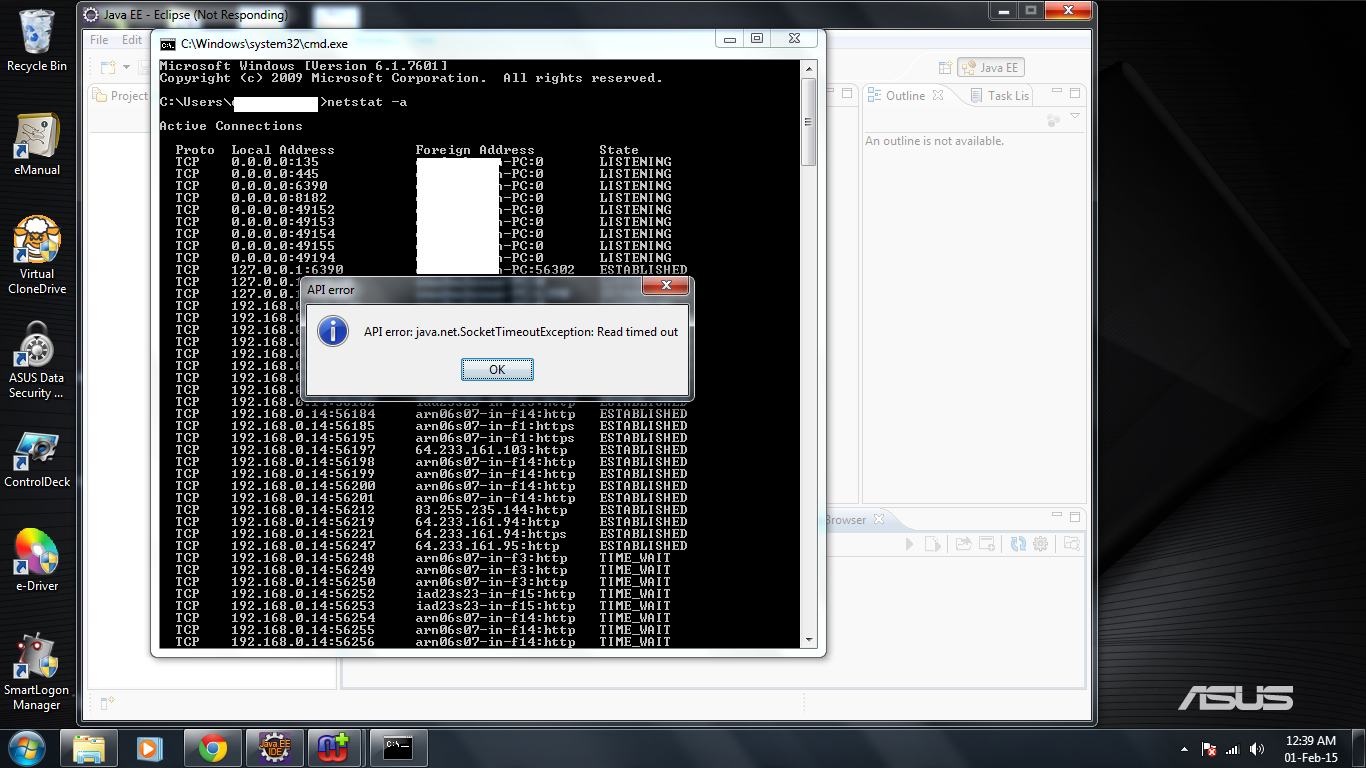
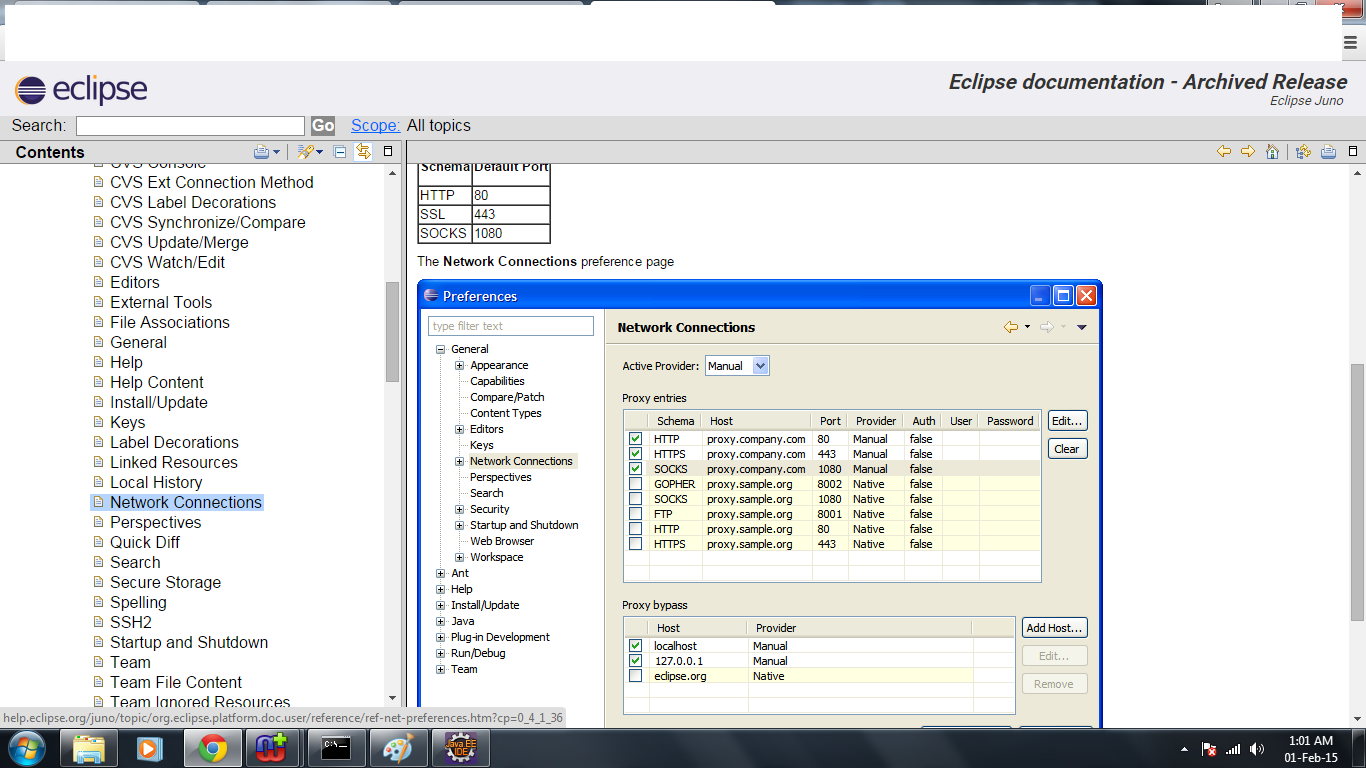
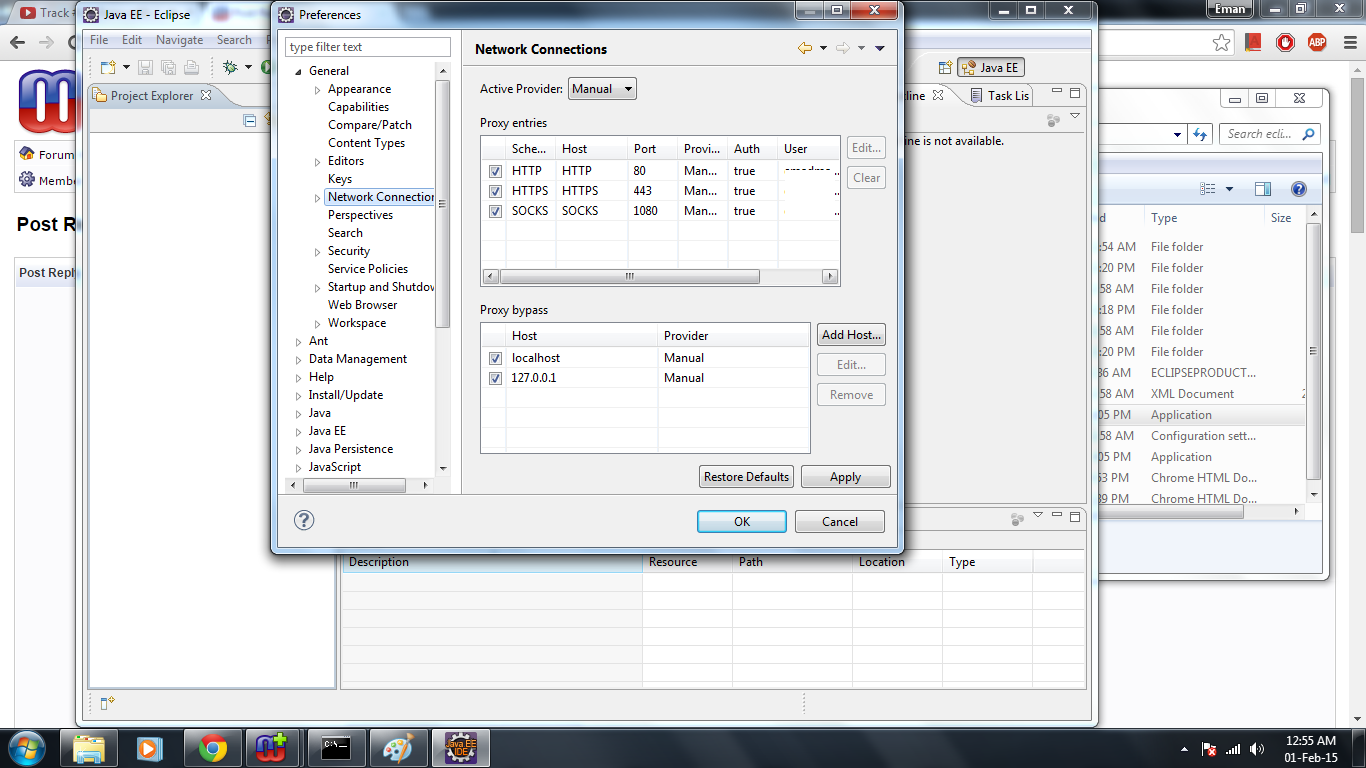
I just made some adjustments according to your advice on the Eclipse at following directory -Windows|Preferences|General|Network connection. I followed mostly Eclipse help website about this settings.The image associated to this changes is attached here. I ran cmd using "neststat -a" ,which illustrates TCP port state.Once TCP is Listening to 6390 ,but the other time shows "Established". Anyways,The error I got this time is "API error:java.net.Socket.TimeoutException Read timed out".  Any help please? |
|
|
|
|
Post Reply
|
Page 12> |
| Tweet |
| Forum Jump | Forum Permissions You cannot post new topics in this forum You cannot reply to topics in this forum You cannot delete your posts in this forum You cannot edit your posts in this forum You cannot create polls in this forum You cannot vote in polls in this forum |


 Topic Options
 2/tillforum.png