
|
Moving ports (allow moving dynamic ports) |
Post Reply 
|
| Author | |
jpt 
MetaCase 

Joined: 25.Mar.2008 Points: 253 |
 Post Options Post Options
 Thanks(0) Thanks(0)
 Quote Reply Quote Reply
 Topic: Moving ports (allow moving dynamic ports) Topic: Moving ports (allow moving dynamic ports)Posted: 07.Aug.2014 at 13:47 |
|
Some earlier topics (696, 724, 773) have discussed various options to define languages that have static and dynamic ports and in particular how to allow modeler to move ports.
MetaEdit+ 5.1 brings one option more with a setting for individual templates used to define dynamic ports. In the screenshot below the window on the left shows part of the language definition for a port template with an option ’Allow moving of ports’. Diagram Editor on the right then shows a number of input (green), output (red) and input/output (yellow) ports. Ports that are labeled with text ’Moved’ have been moved to a new position by the modeler whereas others have the place given by default in the template. This is possible because of the setting 'allow moving of ports'. This setting can also be used in your existing languages and their template definitions (And as always, your languages and models made will update automatically to the new MetaEdit+ version). In addition, there is also possibility to ask MetaEdit+ to organize the ports automatically so that the relationship lines avoid crossing each other (see http://www.metacase.com/forums/forum_posts.asp?TID=773) which is often better way than requiring modeler to do it manually. Naturally, you may combine both options so that MetaEdit+ organizes the ports automatically based on your preference (e.g. by port type, by its properties, by the connections it has etc.) and yet allow ports to be moved individually if needed. 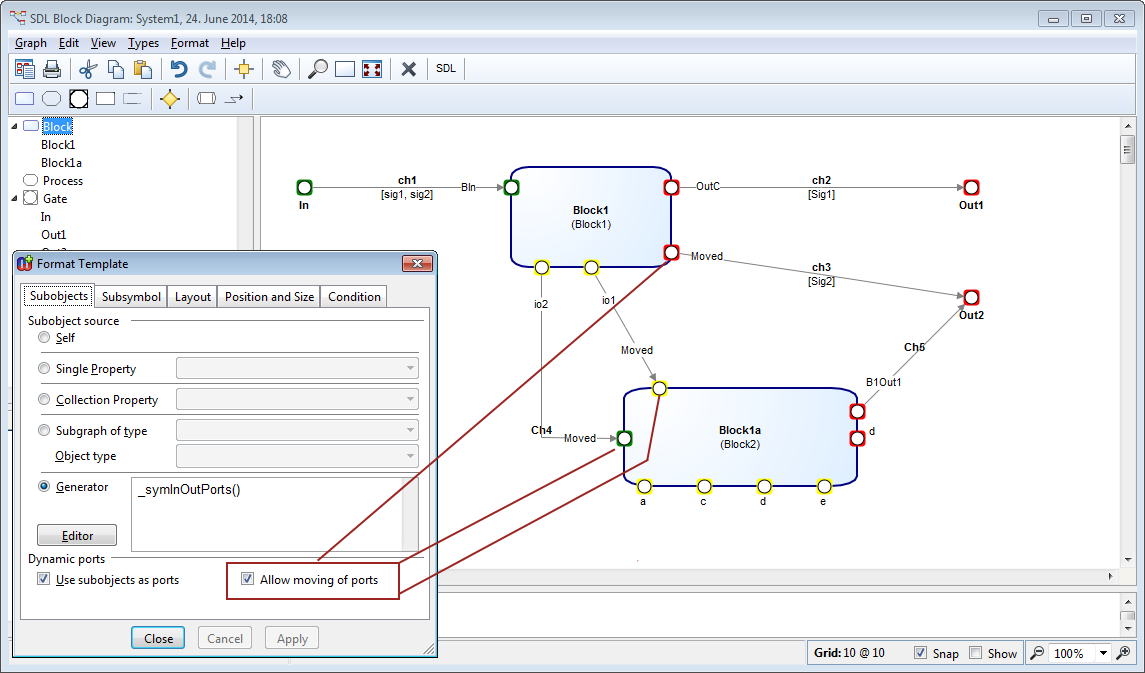 More on MetaEdit+ 5.1 is available at: http://www.metacase.com/news/ME51_beta.html |
|
 |
|
|
Post Reply
|
|
| Tweet |
| Forum Jump | Forum Permissions You cannot post new topics in this forum You cannot reply to topics in this forum You cannot delete your posts in this forum You cannot edit your posts in this forum You cannot create polls in this forum You cannot vote in polls in this forum |


 Topic Options