
|
Getting the details right in display |
Post Reply 
|
| Author | |
Angelo 
Member 

Joined: 03.Oct.2008 Location: The Netherlands Points: 4 |
 Post Options Post Options
 Thanks(0) Thanks(0)
 Quote Reply Quote Reply
 Topic: Getting the details right in display Topic: Getting the details right in displayPosted: 17.Nov.2009 at 00:49 |
|
Right now, I'm building a set of related languages to generate a web site. You could call it a graphical version of WebDSL, but I started before I learned about that one.
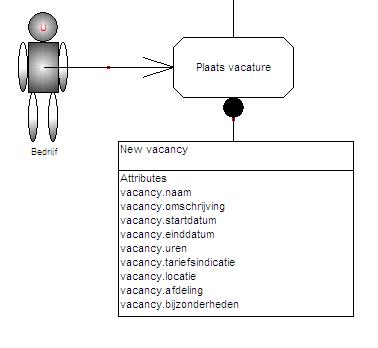
One of the nice tricks I want to use (see also ME+ Web Application example) is define forms based on attributes of different entities. Instead of abusing UML and its Qualifiers, I created an entity language and a process/form language, where I specify which attributes from different entities to display/edit in the forms. Here's what I have right now 1) My Form object has an attribute 'Attributes', which is a Collection of Attribute (Attribute is of course an Attribute of an Entity) 2) I fill this collection using the Component Selection Tool 3) I display a list of selected attributes in the Form symbol, which shows the attribute name And here's what I've been staring at for the past hour: Multiple entities in my model have attributes of the same name (e.g. name, startdate and so on). How can I change the generator that I use to display the Attributes of my form in such way that it displays something of the form 'Entity.Name : Attribute.Name'? Here's the generator I use now:
EDIT: Another question just came to mind. Some of the form fields are not related to attributes, but rather to relations between entities. Is there a way to select these related entities into my form as well - possibly using the Object Selector, so I can create droplists for 1:m relations? Edited by Angelo - 17.Nov.2009 at 01:05 |
|
 |
|
|
stevek
MetaCase 

Joined: 11.Mar.2008 Points: 643 |
Post Options
Thanks(0)
Quote Reply
Posted: 17.Nov.2009 at 11:55 |
|
At the moment an Attribute has no link to its Entity. You can find the right Entity dynamically though, by searching through the entities to find that Attribute. If you are in the
Attribute in the form, the following will print out the name of the Entity that contains that Attribute.
do graphs where type = 'Entity Language'
{ foreach .Entity
{ do :Attributes; where oid = oid;2
{ id
}
}
}
Obviously this is O(N^2) and pretty naive. If you want something more scalable, try adding the Entities or Entity graphs to the Form graph as "include" references. That way you significantly reduce the search space, and also make it more understandable.
The other option is to include explicit links from Attribute to Entity, and maybe from Entity to Database (if you have such a thing). If you copy the Entity, it's easy to go through each of its Attributes and paste the Entity into a 'Parent Entity' field in the Attribute's property dialog.
In all cases you can make the symbols or a checking report show if there are problems, e.g. 'Attribute not found' - making the font red for that Attribute reference is a simple way.
|
|
|
|
|
Angelo
Member
Joined: 03.Oct.2008 Location: The Netherlands Points: 4 |
Post Options
Thanks(0)
Quote Reply
Posted: 17.Nov.2009 at 22:23 |
|
Thanks Steve, that should solve it (and answers both questions).
EDIT: provided I change oid;2 to oid;3 ;-)
BTW, nice webinar this afternoon, I even spotted a nice example, from a certain contest in The Netherlands. Edited by Angelo - 17.Nov.2009 at 22:42 |
|
|
|
|
Post Reply
|
|
| Tweet |
| Forum Jump | Forum Permissions You cannot post new topics in this forum You cannot reply to topics in this forum You cannot delete your posts in this forum You cannot edit your posts in this forum You cannot create polls in this forum You cannot vote in polls in this forum |


 Topic Options