
|
Importing CSV file |
Post Reply 
|
Page 12> |
| Author | ||
bernardino 
Contributor 

Joined: 16.Oct.2014 Location: Brazil Points: 14 |
 Post Options Post Options
 Thanks(0) Thanks(0)
 Quote Reply Quote Reply
 Topic: Importing CSV file Topic: Importing CSV filePosted: 22.Jan.2015 at 18:29 |
|
|
Hi folks! I want to attach a *.CSV file into a graph object. A workaround implemented was to create a graph to represent the values stored into file. This graph is represented as Matrix (see Figure). I would like if it is possible to parse a CSV file to transform it into graph object. Is there any similar example in the user guides or tutorials? 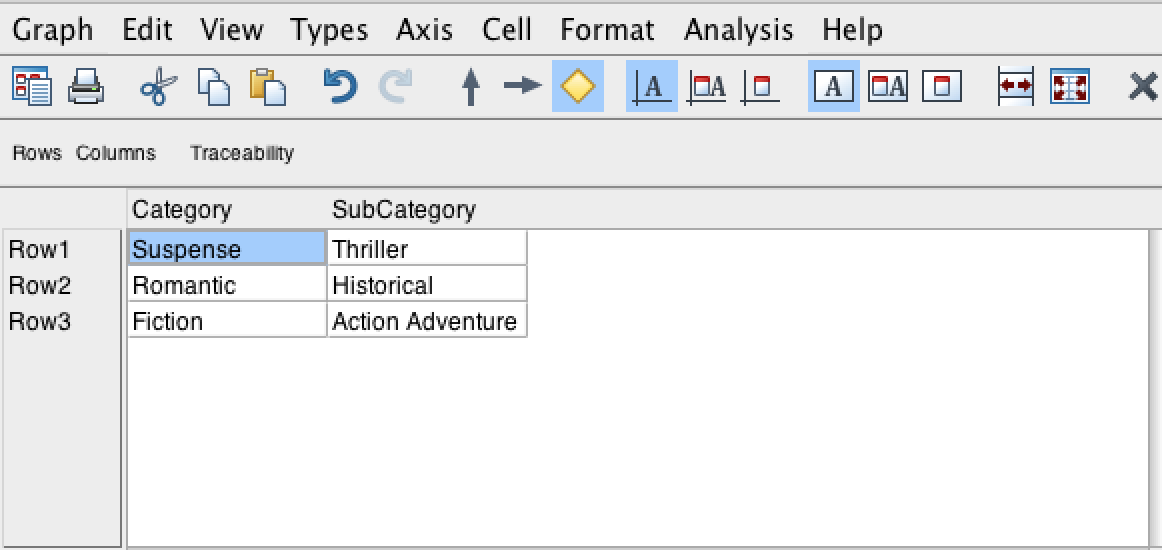 Thank you very much!
|
||
 |
||
|
jpt
MetaCase 

Joined: 25.Mar.2008 Points: 253 |
Post Options
Thanks(0)
Quote Reply
Posted: 22.Jan.2015 at 22:17 |
|
|
You may import data into MetaEdit+ in many different ways including parsing the files with MERL generators. An example of such file parsing with MERL is included in ‘Reverse Engineering Java’ generator available in Class Diagram of UML in the ‘demo’ repository.
Alternative options include use of API (see http://www.metacase.com/papers/importing_API.pdf) and use of external tools utilizing XML format for importing (see example of XML model import in http://www.metacase.com/papers/import_XSLT.pdf). XML import (and export) is available for both models and metamodels. While I don’t know about the use case for importing content of .CSV file into MetaEdit+, one possible option is not to import at all but just refer to it via a property of a model element. For this kind of need there is a string property with ‘External element’ widget that refers to a file. During code generation you may then read the file, parse it and use its content for code generation, checking etc. similarly to the first option of MERL parsing. |
||
|
||
|
bernardino
Contributor
Joined: 16.Oct.2014 Location: Brazil Points: 14 |
Post Options
Thanks(0)
Quote Reply
Posted: 20.Feb.2015 at 21:08 |
|
|
I am trying to parse the file with MERL generator, using the "filename 'name.txt' read" function, once I need formatting their output into a generator. Is there any way to read from file line by line?
|
||
|
||
|
stevek
MetaCase

Joined: 11.Mar.2008 Points: 643 |
Post Options
Thanks(0)
Quote Reply
Posted: 20.Feb.2015 at 21:38 |
|
|
Sure: just read it into a variable, and iterate over it (which does a line at a time), and within that split each line into its fields with a translator, and iterate over the fields: variable 'csvContents' write filename 'input.csv' read close to /* define translator to convert semicolons to newlines */ '%fields ; \ ' endto /* iterate over lines, then fields within lines */ do $csvContents { 'Line: ' id newline do id%fields { ' Field: ' id newline } }
|
||
|
||
|
stevek
MetaCase
Joined: 11.Mar.2008 Points: 643 |
Post Options
Thanks(0)
Quote Reply
Posted: 21.Feb.2015 at 00:02 |
|
By the way, a more natural match to a CSV is normally a Table rather than a Matrix. Each line in the CSV becomes an object in a row, and each field in the CSV is a property of that object. The object type is defined with a property slot for each field in the CSV header line. To import the CSV, you can make the generator read it and output MXM: an <object> for each row, and a <slot><value><string> for each field (let's just assume strings for now, and an object type "Row" with a property for each field). We'll add a Table representation while we're at it, and make the generator import the resulting MXM too. Just change the "do $csvContents" block above to be like this:
Edited by stevek - 25.Feb.2015 at 23:14 |
||
|
||
|
bernardino
Contributor
Joined: 16.Oct.2014 Location: Brazil Points: 14 |
Post Options
Thanks(0)
Quote Reply
Posted: 24.Feb.2015 at 20:13 |
|
|
Are there an easy way to format the output text?
I like to generate a textual language with pre-defined spaces for each column. Something like that: 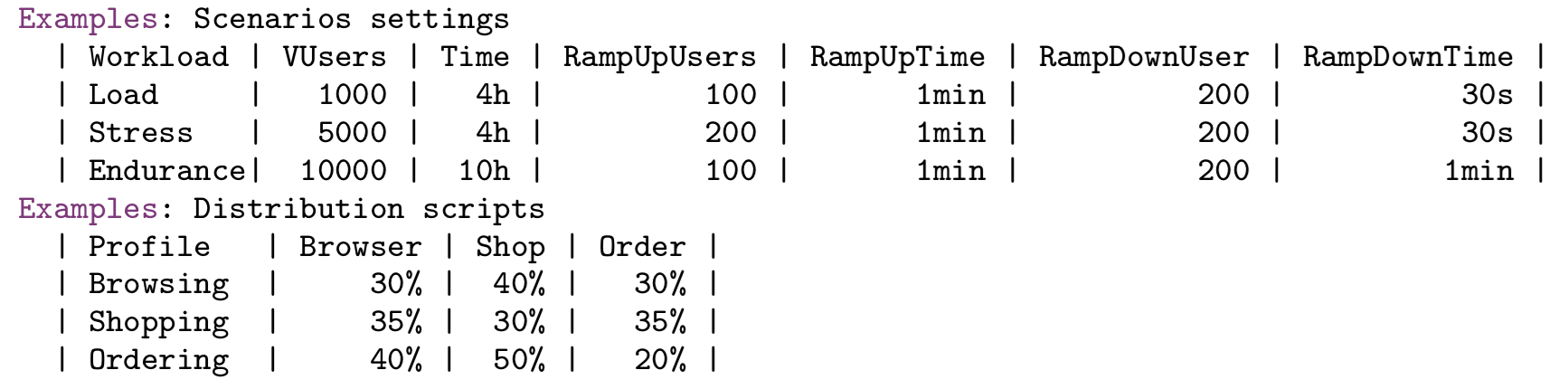 |
||
|
||
|
stevek
MetaCase
Joined: 11.Mar.2008 Points: 643 |
Post Options
Thanks(0)
Quote Reply
Posted: 24.Feb.2015 at 21:41 |
|
|
Here's a MERL subgenerator that takes a string and a pattern showing the maximum length, and uses a translator to return the string forced to the same length as the pattern, either by padding before with spaces or stripping off extra characters from the end.
_fit(@string, @pattern) /* first define two little translators that turn all chars into dots and spaces */ to '%dots * .' endto to '%spaces * \ ' endto /* Now build and apply a translator that fits the string to the pattern length */ to '/^ *(' @pattern%dots ').*$/' /* e.g. match ....., i.e. last 5 chars */ ' ' /* separates left & right sides of translator */ '$$1' /* output is the desired parenthesized match */ translate @pattern%spaces @string endto Here's a test generator to show how it behaves: Test() _fit('hello', '1234567890') newline _fit('hello', '12345678') newline _fit('hi', '1234567890') newline _fit('hi', '12345678') newline _fit('hello', '1234') newline The pattern string can have any content, e.g. your example seems to use the length of the name of the column, so something like below will output all objects from a graph in a table for each type (note the new use of containers in 5.1 to output a property's local name inside do :()): @prevType = '' foreach .() { if type <> @prevType then /* Type row and column headings row */ @prevType = type 'Type: ' type newline ' |' do :() { ' ' containers ' |' } newline endif ' |' /* Output each property, made to fit the same space as its column name */ do :() { ' ' _fit(id, containers) ' |' } newline } If you want more accuracy than your current example, whose Workload and Profile column widths seem off by one character, I guess you need to read through all values in a column first, to determine the longest one. If you want left alignment as well as right alignment, the main regex body becomes '/^(' @pattern%dots ').* *$/'
|
||
|
||
|
bernardino
Contributor
Joined: 16.Oct.2014 Location: Brazil Points: 14 |
Post Options
Thanks(0)
Quote Reply
Posted: 25.Feb.2015 at 20:16 |
|
|
Hi Steve! Your tips were very useful! I applied the _fit function and "almost" reached my expected result. It will be important beyond Color format output, it would be interesting that the tool allows choose some Font Type. In my case, I need a monospaced font / fixed-pitch, since the visual results does not apply the expected results. See attached figures, one was generated by MERL, another it would be my expected result. If I copy this result and paste in the text tool with monospaced font the result is the same. Despite that, I am glad for the result that my language is becoming. 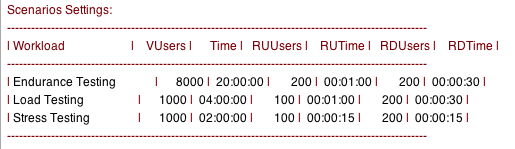  Thanks!
|
||
|
||
|
bernardino
Contributor
Joined: 16.Oct.2014 Location: Brazil Points: 14 |
Post Options
Thanks(0)
Quote Reply
Posted: 25.Feb.2015 at 20:41 |
|
|
Hi Steve, I again! ;-)
I try matched from a CSV file to a Table using the output MXM approach that you suggested apply to. However I am having some troubles. At the end of processing, the MetaEdit+ shows a critical error. Strange that if I perform with debug mode the error does not happens.  See the MXM output result generated by MERL. Despite that both MXM file and the Graph has been generated, the Graph was generated without any information extracted from CSV. 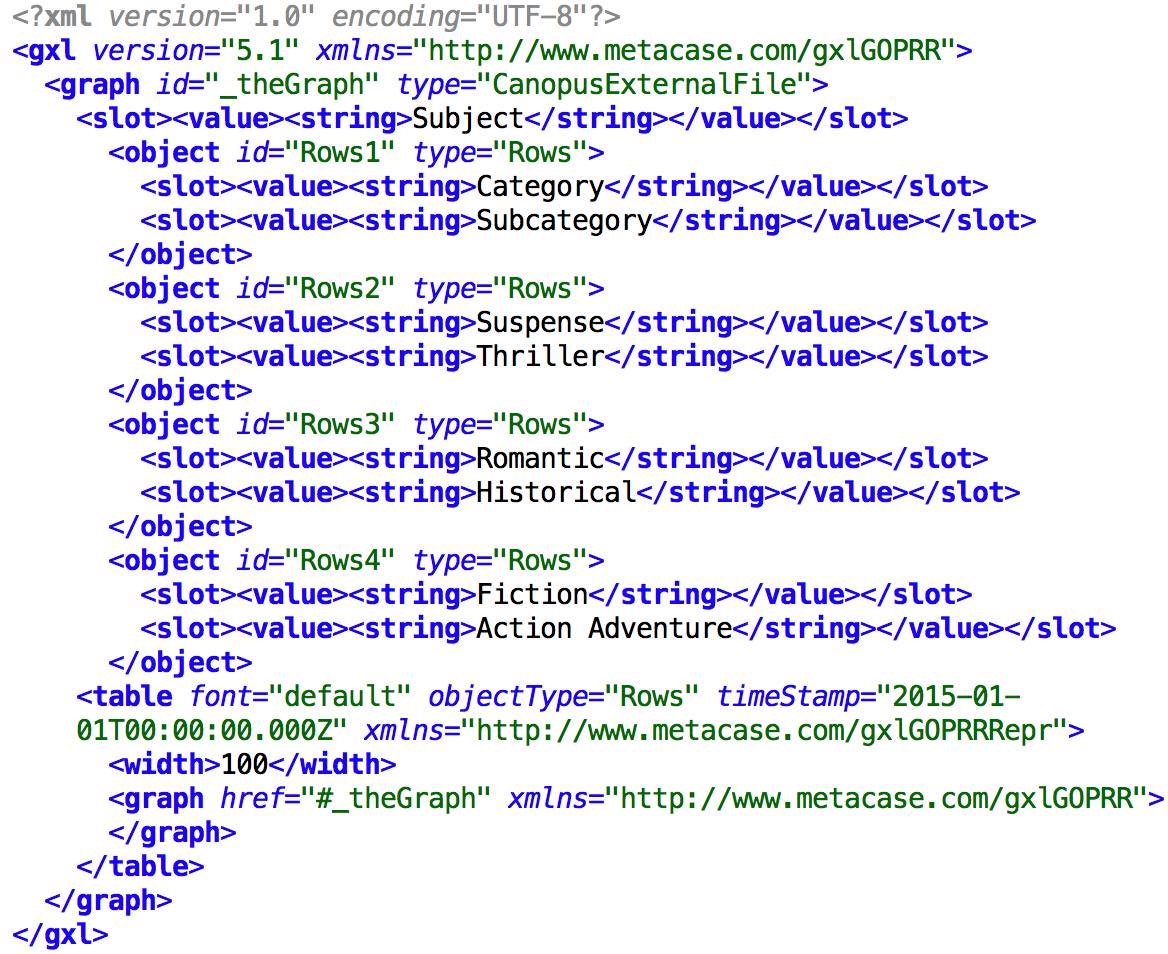 |
||
|
||
|
stevek
MetaCase
Joined: 11.Mar.2008 Points: 643 |
Post Options
Thanks(0)
Quote Reply
Posted: 25.Feb.2015 at 22:29 |
|
Like most generator languages, MERL is primarily intended for producing the plain output characters rather than formatted text. We allow some really basic formatting like bold and colour: things that work the same on all platforms and machines. We stopped short of allowing font selection, leaving that to be handled either 1) as a setting in the editor displaying the generated output, or then 2) by generating something that includes the formatting as part of the output itself, e.g. HTML, RTF, LaTeX. You can do 1) in the MetaEdit+ Generator Output window with View | Font... and choosing one of code, fixed, or pixelFixed. Another approach to 1) is to write the output to a file, and open it with an external editor that uses a fixed width font. Outputting text-based formatting in HTML etc. as in 2) is often the better choice, and also gives you padding and table layout 'for free'. Just put the output commands in the body of a filename command and execute the file:
|
||
|
||
|
Post Reply
|
Page 12> |
| Tweet |
| Forum Jump | Forum Permissions You cannot post new topics in this forum You cannot reply to topics in this forum You cannot delete your posts in this forum You cannot edit your posts in this forum You cannot create polls in this forum You cannot vote in polls in this forum |


 Topic Options
 bernardino wrote: