
|
Port problem |
Post Reply 
|
Page 12> |
| Author | |
Shawn 
Member 
Joined: 02.Apr.2009 Points: 6 |
 Post Options Post Options
 Thanks(0) Thanks(0)
 Quote Reply Quote Reply
 Topic: Port problem Topic: Port problemPosted: 02.Apr.2009 at 08:17 |
|
Hello, everyone!
I just follow the manuals step by step to create the instance of "Family tree". When it comes to the Chaper 4, somethings wrong happen. I follow every step of the manuals, when I delete the former family tree which I set up before and recreate it again with the latest version of the Family Tree modeling language like this: 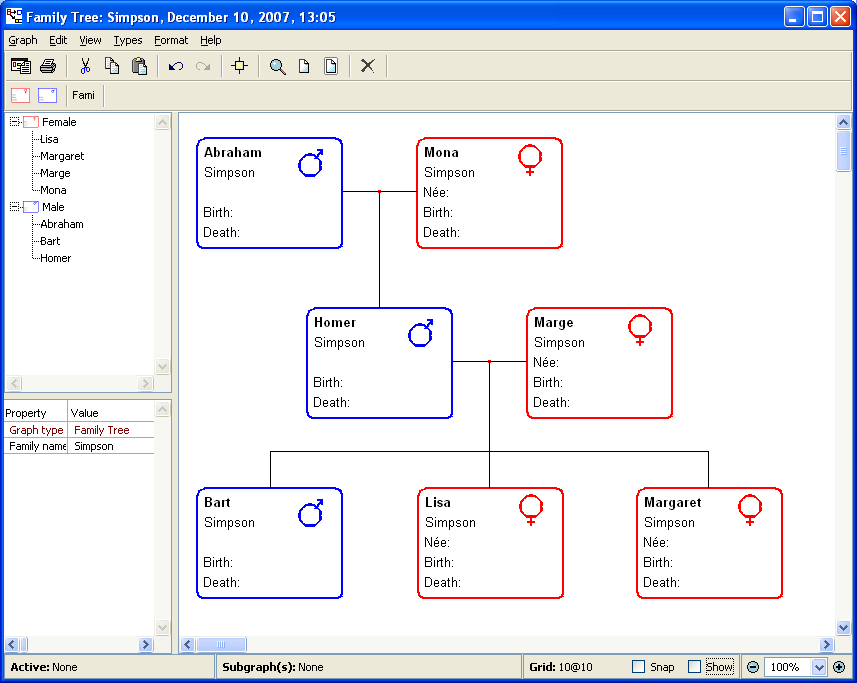 I try out to set up the relationship between Homer and his parents, a dialog appears.  I have no idea how to figure it out. Any suggestions would be appreciated. shawn |
|
 |
|
|
stevek
MetaCase 

Joined: 11.Mar.2008 Points: 643 |
Post Options
Thanks(0)
Quote Reply
Posted: 02.Apr.2009 at 10:51 |
|
Hi Shawn,
"You cannot add a role from this Family relationship to a Male" tells you as the modeler that there is no binding in the Family Tree graph type that includes the Family relationship with the same roles and objects as you already have in that relationship, plus one extra Male object connected via the port you clicked in the diagram.
First, make sure that as the modeler you're doing things right.
If that still doesn't work, the bindings and ports in the metamodel have probably not been created correctly. Have a look at the bindings in the Graph Tool for your Family tree graph type, as in Figure 4-13, and make sure you have:
REL ROLE PORT OBJ
Family-------Parent--Parent--Male
|------Parent--Parent--Female
|-0..N-Child---Child---Person
It's important that the port instances are the exact same ports, not two different ports that both happen to be called Parent. You can see how many instances there are in the main MetaEdit+ window, Type Browser tab, selecting your project in the Projects list and to Show: Ports under the middle list. If you have several ports with the same names, the easiest solution is to rename all but the first to XXX, and go through the ports in the bindings, and the Male and Female symbols' connectables, replacing any XXX ports with the correct port (Remember to use Add Existing... in the Symbol Editor so that you're using the existing port, not Add... which would create a new port).
Hope this helps,
Steve
|
|
|
|
|
Shawn
Member
Joined: 02.Apr.2009 Points: 6 |
Post Options
Thanks(0)
Quote Reply
Posted: 02.Apr.2009 at 16:45 |
|
Thank you so much. Steve.
I tried the way you told me, But it didn't work. I don't know how to delete the instance I set up before. When I create a new instance with the same name, it asks me if allow the duplicated one. Moreover, I created several "family name" the first time I used it. I tried to discard them, but it seems to be difficult when I have commited. Could you tell me how to abandon the former instances(maybe objects) except reinstalling the software? I think that's the point which result in the outcome. I don't come from an English speaking country, maybe my English is a little hard for you to understand. Anyway, thank you so much! Shawn |
|
|
|
|
stevek
MetaCase
Joined: 11.Mar.2008 Points: 643 |
Post Options
Thanks(0)
Quote Reply
Posted: 02.Apr.2009 at 16:57 |
|
I'm leaving for the evening, so just a quick answer:
"Family name" is a type, "Simpson" is an instance of that type
"Family Port" is a type, "Parent" is an instance of that type.
You don't need to delete any types or instances, all you need to do is make sure you have the right port instances mentioned in your metamodel, i.e. in the bindings and in the symbols.
If you want to me take a look, exit MetaEdit+, zip the demo directory in your My Documents\MetaEdit+ 4.5 directory, and email it to metaedit.support@metacase.com. Otherwise I'm just trying to guess what you might have done wrong, and we might be struggling with the language barrier and the fact that since you're new to MetaEdit+, you'll not be familiar with all the concepts and terms yet.
All the best,
Steve
|
|
|
|
|
Shawn
Member
Joined: 02.Apr.2009 Points: 6 |
Post Options
Thanks(0)
Quote Reply
Posted: 02.Apr.2009 at 18:19 |
|
OK. I will email to you soon. Thank you.
All the best, Shawn |
|
|
|
|
stevek
MetaCase
Joined: 11.Mar.2008 Points: 643 |
Post Options
Thanks(0)
Quote Reply
Posted: 03.Apr.2009 at 00:38 |
|
Thanks for the zip, Shawn! The problem is that you've created some of the types several times, giving them the same name. As you noticed, MetaEdit+ will warn when you try to do this, because it makes life rather difficult after that: for instance, you have three object types all called Person. One has subtypes Male and Female, but unfortunately you've placed a different Person type in the binding for the Family relationship. Hence when you try to connect Homer in to the relationship, his type Male is not a subtype of the Person type mentioned there, and so he cannot be added to the relationship.
All you need to do to correct the problem is remove the incorrect Person type from that binding and replace it with the correct person type. I've made a quick screencast to show the steps:
Now you'll be able to add Homer in to the relationship between his parents.
|
|
|
|
|
Shawn
Member
Joined: 02.Apr.2009 Points: 6 |
Post Options
Thanks(0)
Quote Reply
Posted: 03.Apr.2009 at 05:54 |
|
Bravo!
It’s generous of you to give me so much of your time. I tried to delete the Role of person, but I don't know how to do. Now, I think I can figure it out. Thank you so much. have a good day~ Shawn |
|
|
|
|
stevek
MetaCase
Joined: 11.Mar.2008 Points: 643 |
Post Options
Thanks(0)
Quote Reply
Posted: 03.Apr.2009 at 10:51 |
|
You don't want to delete the role type, you want to delete the Person type. Step 5 in full: 5a) Move the cursor over the Objects list.
5b) Click the Person type in that list.
5c) Still in the Objects list, press the other mouse button to open the pop-up menu.
5d) In the pop-up menu click Delete.
|
|
|
|
|
Shawn
Member
Joined: 02.Apr.2009 Points: 6 |
Post Options
Thanks(0)
Quote Reply
Posted: 03.Apr.2009 at 11:34 |
|
I got it and it works.
You may misnunderstand my words. Actually, I have figured it out through your screencast. But thank you all the same for the details. P.S.When I start the Graph tool, and open the Graph, there are still 2 "Family Tree". Can you tell me how to delete one of them or both of them? Thanks! |
|
|
|
|
stevek
MetaCase
Joined: 11.Mar.2008 Points: 643 |
Post Options
Thanks(0)
Quote Reply
Posted: 03.Apr.2009 at 13:16 |
|
To remove the duplicate types you can use the Type Browser tab in the main MetaEdit+ window. In the Type Browser you can select a project and a type, and it will show you all loaded instances of that type in that project. The types you want to keep have instances; the duplicate types have no instances.
To remove a type, select it in the Type Browser and choose Remove Type... from its pop-up menu.
Another way to see which of your types of the same name is the right one: Type Info will show which other types use the selected type.
I've made a quick screencast to show how to use Type Browser, Type Info and Remove Type... to get rid of duplicates in this way.
|
|
|
|
|
Post Reply
|
Page 12> |
| Tweet |
| Forum Jump | Forum Permissions You cannot post new topics in this forum You cannot reply to topics in this forum You cannot delete your posts in this forum You cannot edit your posts in this forum You cannot create polls in this forum You cannot vote in polls in this forum |


 Topic Options