
|
Crossing relationships |
Post Reply 
|
| Author | |
janne 
MetaCase 

Joined: 25.Mar.2008 Points: 58 |
 Post Options Post Options
 Thanks(0) Thanks(0)
 Quote Reply Quote Reply
 Topic: Crossing relationships Topic: Crossing relationshipsPosted: 02.Apr.2014 at 12:13 |
|
We've been asked few times "how to avoid crossing relationships in the model"
I have created a following sample model consisting three objects, each object having several ports (ports were actually defined in decomposed submodel and then shown on the object's perimeter line) and three relationships connecting objects together. (blue texts in the picture are just for illustrating the concepts referring to the metamodel and enclosed MERL script)  When relationships are drawn between the ports, as default MetaEdit+ creates the straight line between the objects, like shown in the picture above. One easy mechanism to avoid the "crossing lines" is just re-order the ports on the object's perimeter line according the relationship's coordinates. With following MERL generator, port position on the perimeter line is defined according to the relationships y coordinate. All non-connected ports are put to the end/bottom. In this enclosed script, local variable is created for all connected ports, this variable has the relationship's y coordinate value. Next ports (fetched from the decomposed submodel) are listed in order of the local variable values. Here the listed ports were defined in decomposed submodel, but they may be defined also other way, if that is the case then you may need to modify or replace the script's decompositions {} -loop with corresponding structure. MERL code script sample: /* roles and connections in y order, creates a variable for every connected port */ do ~FaultIn { variable do #() { 'y' oid } write do >() { y } close } do decompositions { /* objects ordered by y */ foreach .FaultInPort orderby local 'relY' write variable 'y' oid read close if @relY then @relY else '9999999' endif NUM , y NUM { id newline } } Now if I move the "BrakeActuation" object downwards, all ports are re-ordered automatically for the "ServiceBrake" and "ServiceBrakeOut".  Edited by janne - 02.Apr.2014 at 13:46 |
|
 |
|
|
jkouwer
Major Contributor 
Joined: 08.Mar.2010 Points: 22 |
Post Options
Thanks(0)
Quote Reply
Posted: 06.Apr.2014 at 15:39 |
|
Hello Janne,
Where should this code be placed in the model and how is it activated? Kind regards, Jeroen |
|
|
|
|
janne
MetaCase
Joined: 25.Mar.2008 Points: 58 |
Post Options
Thanks(1)
Quote Reply
Posted: 07.Apr.2014 at 10:33 |
|
Hi,
Generator script (I've named it as '_symErrInPorts') was placed to the corresponding Graph type, in my example to ErrorModel (or it might be also in the super graph named as a 'Graph', so it can be accessed directly from all symbols in all other graphs as well.) Next the Error symbol was defined (Error symbol has red rounded rectangle, symbol name generated to the top of the symbol), see enclosed screenshot. Error symbol has two templates; template one (currently selected in the screenshot) creates the port symbol (black rectangle with arrowhead) on the perimeter line and the next template creates the label text for that port. Both these templates call the same '_symErrInPorts' generator to produce the subobject source.  For the port subsymbol, the symbol for the element is defined as library symbol (Subsymbol notebook page, 'InFlowPort_subsymbol' selected) see the following screenshot: 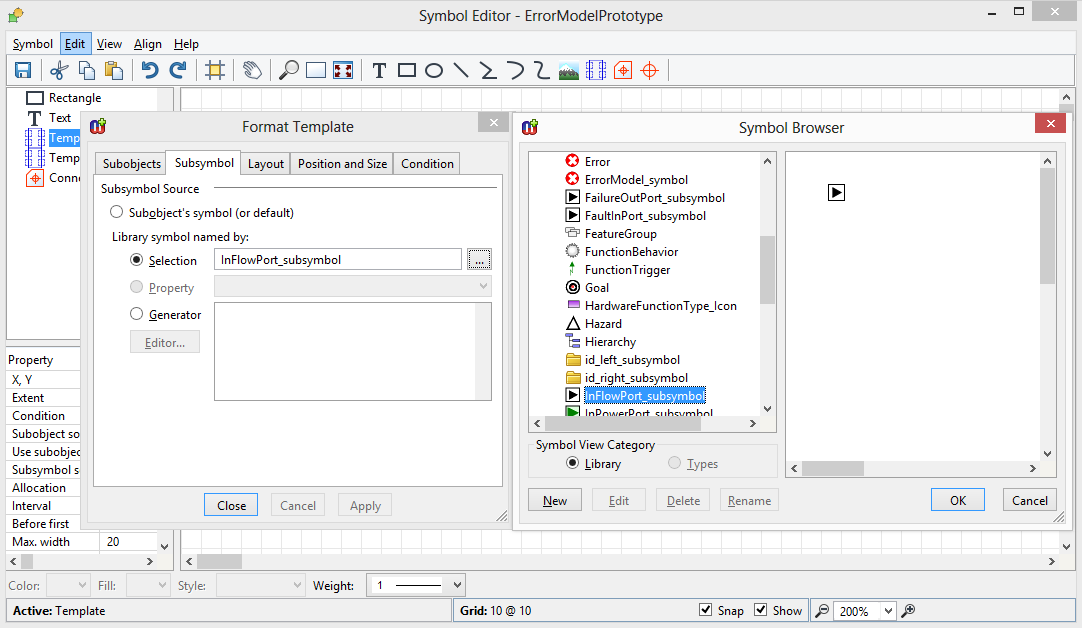 And the next template (for the label) has a similar library symbol definition (in the next screenshot opened in Symbol Editor): 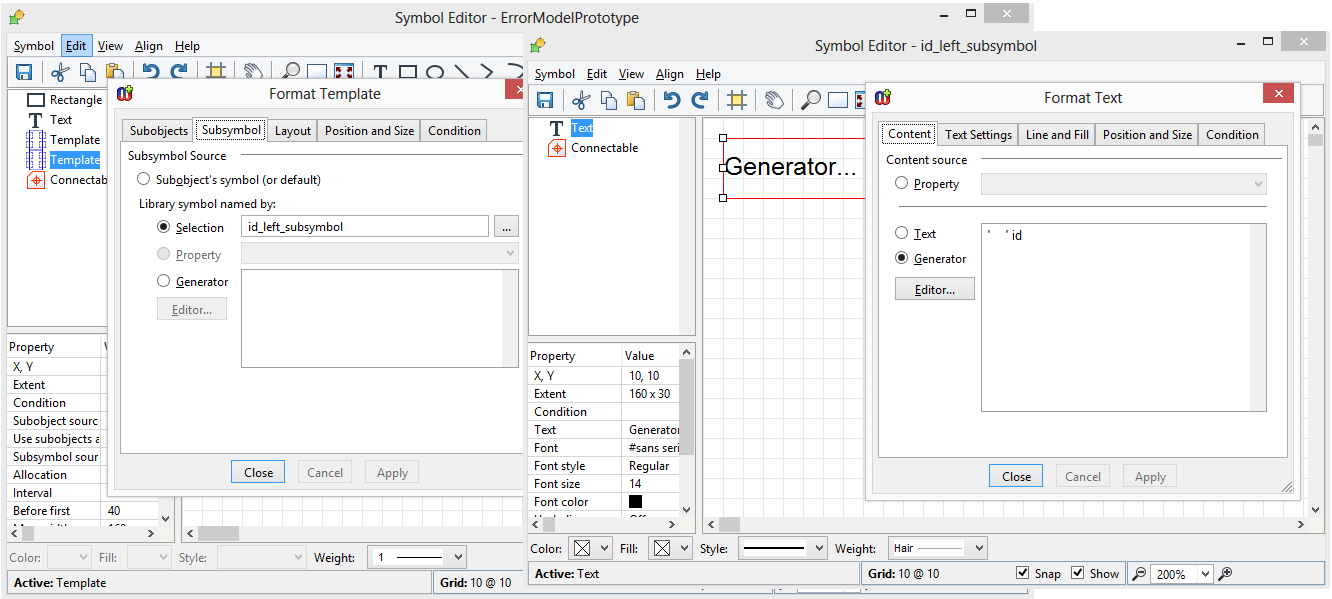 |
|
|
|
|
jkouwer
Major Contributor
Joined: 08.Mar.2010 Points: 22 |
Post Options
Thanks(0)
Quote Reply
Posted: 07.Apr.2014 at 22:24 |
|
Hello Janne,
Thanks for the explanation! I managed to reproduce what you did with my own graphs. (happy, happy!). I first tried to get the ports from a collection property by changing the line do decompositions into do :name of my collection property; But that didn't work. So I moved the port objects into a decomposition (and restored the do decompositions), et voilà! There they were. I also couldn't help but notice that you have a check box in your template definition that I cannot find in my installation of metaedit: "allow moving of ports"... Could you shed any light on that as well, maybe? Did I miss an update (I only could find a patch for Japanese support)? Kind regards, Jeroen Kouwer Edited by jkouwer - 07.Apr.2014 at 22:25 |
|
|
|
|
stevek
MetaCase

Joined: 11.Mar.2008 Points: 643 |
Post Options
Thanks(1)
Quote Reply
Posted: 07.Apr.2014 at 22:37 |
Jeroen: soon... :). |
|
|
|
|
janne
MetaCase
Joined: 25.Mar.2008 Points: 58 |
Post Options
Thanks(0)
Quote Reply
Posted: 08.Jan.2015 at 09:21 |
|
New MetaEdit+ 5.1 provides movable ports along with other new features, see details at: http://www.metacase.com/news/ME51.html
In the evaluation version's demo repository there exists several samples of Port DSMs e.g. in the "Port examples" project.
|
|
|
|
|
Post Reply
|
|
| Tweet |
| Forum Jump | Forum Permissions You cannot post new topics in this forum You cannot reply to topics in this forum You cannot delete your posts in this forum You cannot edit your posts in this forum You cannot create polls in this forum You cannot vote in polls in this forum |


 Topic Options
 jkouwer wrote: